New Trade Zone
Trade Zone is now live
Use the new Trade Zone for auctions and instant-price trades so Pokemon and item offers are easy to find.

Petermmc
Registered User
-
Joined
-
Last visited
Everything posted by Petermmc
-
Hi! Yes, the Clamperl gave me back all my items and I could get out of there now, thank you very much!
-
I was doing the Blaziken Mega Evolution at Cursed Keystone Grotto a year ago, then I qui while I had 2 tries left inside the Spiritomb. A year later, I logged back in, canceled the quest but couldn't get out of Cursed Keystone Grotto. I had 2 pokemons that could use surf, but it said "System: You need to own HM03 - Surf to use this Mount" in the chat box, and the Mantine only said "Mantine!" whenever I intereacted with it, it didn't let me go back like it's supposed to. What do I do now?
-
Nope, did not work. I tried redownload the client on mediafire multiple times but did not work. Is there anything else i can do?
-
I just downloaded PRO on my android phone yesterday and for some reasons, i cant use the backpack or any icon in the bottom left corner except for social. So far, i have tried restart the app, fix the gui, hide the notch (recommended by Bhimoso, a discord moderator) but nothing has worked. He said it's a known bug and i can get my help here. Please help, thanks. P/s: My phone is a Oneplus phone, Android version 9, if those info are necessary
-
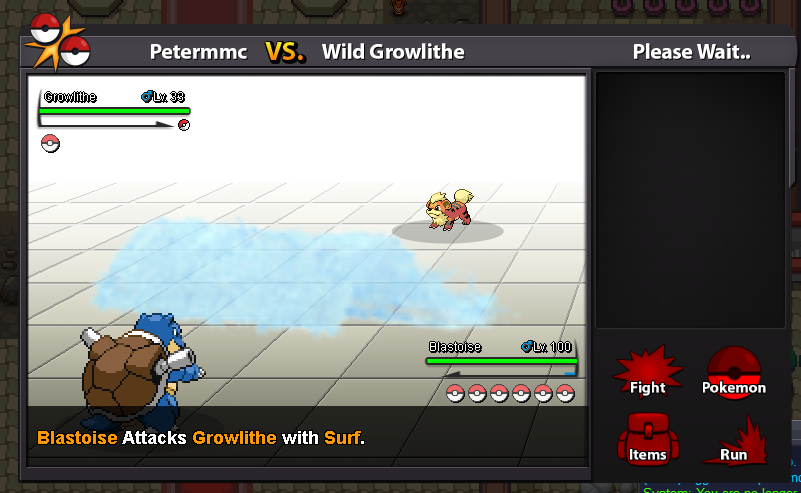
Just encountered this today, don't know if it happens to everyone or not, the animation of surf move becomes blur