




New Trade Zone
Trade Zone is now live
Use the new Trade Zone for auctions and instant-price trades so Pokemon and item offers are easy to find.


Vegetarox
Registered User
-
Joined
-
Last visited
Everything posted by Vegetarox
-
500k
-
1.4
-
-
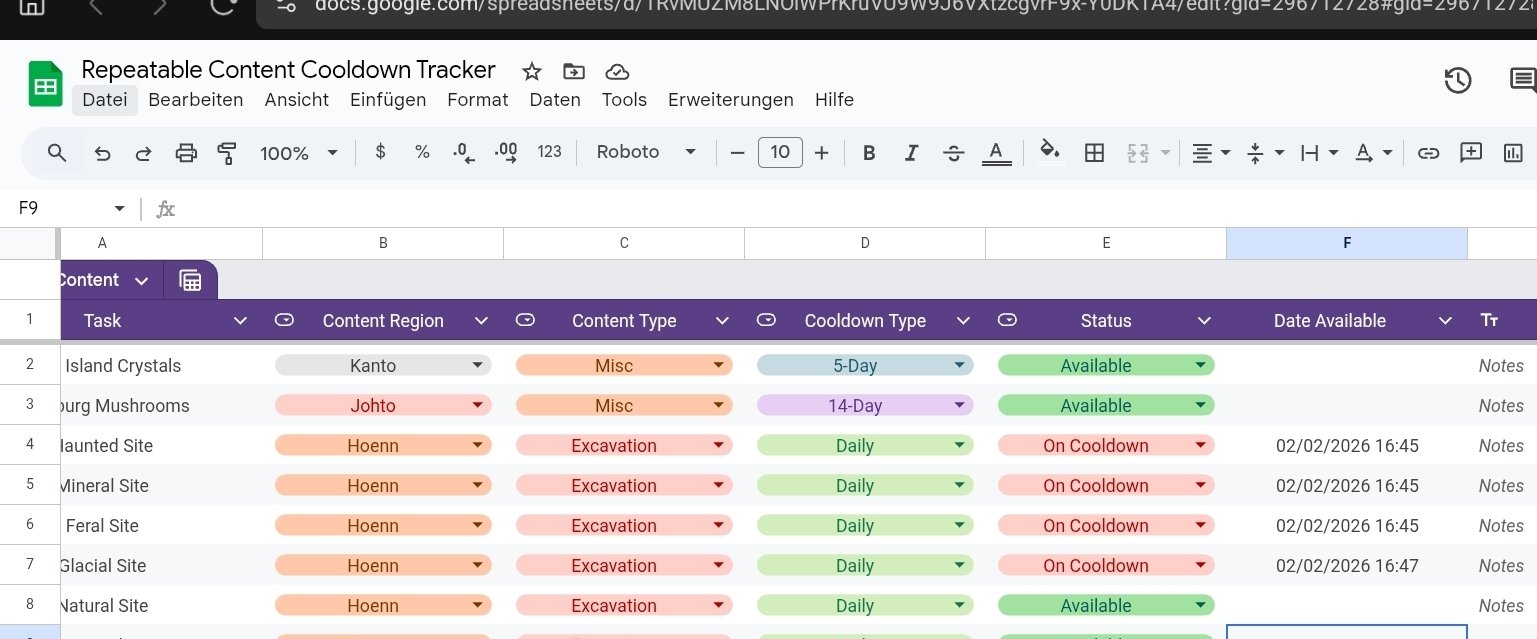
the date available on project is set on Chicago Timezone. im from Germany. Correct Time available on sheet should be 23:45 , 23:47
-
Yes the trigger is not working at the time output should be GMT0 if i saw in code correctly. Maybe we can choose our time zone
-
I don't know what the problem the verification of the Bot is fast, easy and would help us very much.
-
-
-
Hey @Walrosskastanie👋 The bot currently cannot join any additional servers because it has reached Discord’s 100-server limit for unverified bots. As a result, it’s no longer possible to add the bot to new servers, and the ^ commands are not available there. The fix is very simple and quick: 👉 Verify the bot in the Discord Developer Portal Once verified, the bot will: - be able to join unlimited servers - fully support all slash commands again - Have no further restrictions when being added After verification, the bot can be added normally without any issues. It would be great if this could be done when you have a moment 👍 Thanks!
-
still ^inspect and ^memberlist commands dont work on guild discord, just /repel and spawns
-
-
If I encounter a wild Pokémon i run auto ib the direction before. Started with Christmas Update, still not fixed
-
-
Please don’t just name a Pokémon – I’m especially interested in the reasoning behind your choice.
-
Who is the best False Swiper – and why? Hey everyone 👋 I’d like to start a discussion about one of the most important tools for catching Pokémon: Who do you think is the best False Swiper, and why? Please don’t just name a Pokémon – I’m especially interested in the reasoning behind your choice. My current setup At the moment, I’m using Smeagle as my False Swiper with the following moveset: SoakSporeFalse Swipe Why I like this setup: Soak removes type immunities (e.g. Ghost-types) Spore provides reliable sleep False Swipe safely brings Pokémon down to 1 HP Overall, this combo feels very flexible and works well in many situations. Why I’m asking I’m wondering if there are other False Swipers that might be: more consistent bulkier or faster require less setup or perform better in specific scenarios So again: Which Pokémon do you consider the best False Swiper, and what makes it better than others? Looking forward to your experiences and explanations
-
Any update on this @Kvar
-
-
[Auction] Silver Server Starting Bid: 500k Minimum Bid Increment: 100k Accepted Payments: Pokedollars CCs 500k each IV Rerolls 750k each No Insta Price Auction Duration: 48 Hours (after starting bid is met) Rules: This is a Silver Server auction. If you are on Gold, you must transfer to Silver upon winning. Please include the account name you will be using for the transaction if you are not purchasing with your main account. 15 Minute Rule: If a bid is received in the final 15 minutes of the auction, the end point will be delayed by 15 minutes from that bid. This delay will repeat with each new bid until the current offer has stood for a full 15 minutes.

-
Wrote you on Discord, in 30 minutes I online all day
-
add me on discord: Vegetarox187 and i will give you invite for the Discord Server and stuff
-
1M
-
Start
-
-
1,2m
-
need a Serperior Swampert Pelipper Chansey
