Skip to content
View in the app

A better way to browse. Learn more.

Pokemon Revolution Online

A full-screen app on your home screen with push notifications, badges and more.

To install this app on iOS and iPadOS
  1. Tap the Share icon in Safari
  2. Scroll the menu and tap Add to Home Screen.
  3. Tap Add in the top-right corner.
To install this app on Android
  1. Tap the 3-dot menu (⋮) in the top-right corner of the browser.
  2. Tap Add to Home screen or Install app.
  3. Confirm by tapping Install.

Sexygirl

Suspended
  • Joined

  • Last visited

Everything posted by Sexygirl

  1. i wanna know what is that 20 pinky :D im courios, but the servers are sleepin
  2. I thanks the stuff the brand new spooky starters, and the 20 new pinkan pokes. Im happy now, because i love pinkys :D
  3. Where can i read the updates from the spooky server?
  4. What is the halloween event on this game?
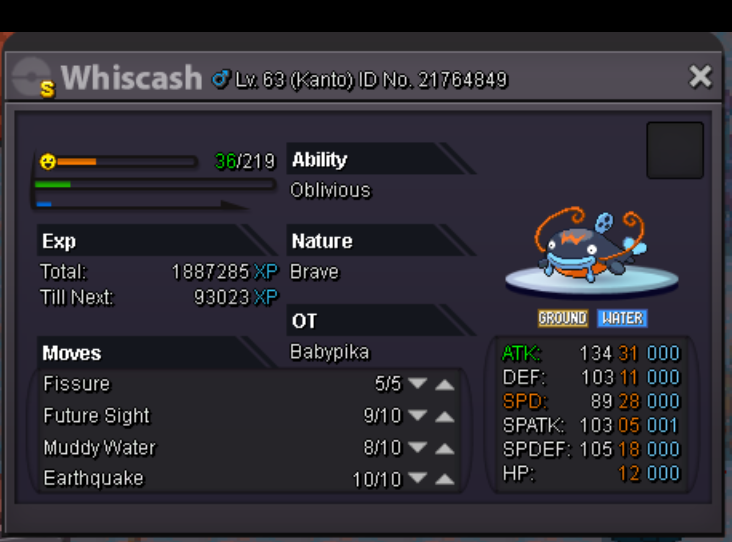
  5. Shiny whiscash (kanto poke) for sale. Auction start, best offer takes it. start from 2,5m $ Just real, serious offers please!
Account

Navigation

Search

Search

Configure browser push notifications

Chrome (Android)
  1. Tap the lock icon next to the address bar.
  2. Tap Permissions → Notifications.
  3. Adjust your preference.
Chrome (Desktop)
  1. Click the padlock icon in the address bar.
  2. Select Site settings.
  3. Find Notifications and adjust your preference.