New Trade Zone
Trade Zone is now live
Use the new Trade Zone for auctions and instant-price trades so Pokemon and item offers are easy to find.

Joltyena
Registered User
-
Joined
-
Last visited
Everything posted by Joltyena
-
Uuuuuh, can someone fix this broken tree that is cutoff in half?
-
Hi there, you first need to teach Parasect Stun Spore again and the option for Spore will pop up.
-
Hi there! Seems you haven't merged you account then. Seems you haven't merged your account yet, so what you need to do is head to your dashboard and merge your Red or Blue account to Silver Server. Here is the link https://pokemonrevolution.net/dashboard/. If you need more info on merging and any possible errors that may come with it, check out these other links: https://tinyurl.com/PROMergeFAQ https://tinyurl.com/PROMergeErrors
-
Seems you haven't done the quest then, what you need to do is catch a Ditto with your OT and give it to Samuel. Once that is done, Samuel will give you a bike voucher to go ahead and buy a bike. You will need 60k in order purchase the bike in Cerulean.
-
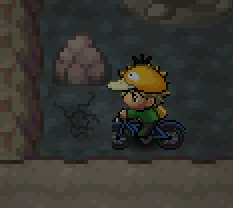
So, as I am going to do my dig spots I notice the tip of the bike going underneath the dig spot. This is when I was going through Rock Tunnel right before Lavender Town. I noticed this with multiple dig spots in the area, though I didn't ss all of them except this one. I can't see if this is just a general issue with dig spots as I have none available at this current time, but it might be. I hope this can be fixed soon.