




New Trade Zone
Trade Zone is now live
Use the new Trade Zone for auctions and instant-price trades so Pokemon and item offers are easy to find.

Woodley
Registered User
-
Joined
-
Last visited
-
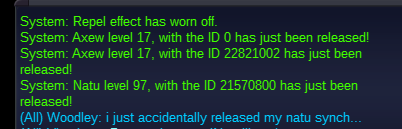
Accidentally released my natu synch. Would be appreciated if it was recovered.. I will be more careful in the future. Sorry for the inconvenience!
-
Hey, I recently battled Oswald (NPC to unlock sinnoh) and tried using a max revive in battle. Can't specifically recall the error message i got, but it was something like "the pokemon is already fainted." Basically i was unable to use max revive, but normal revives worked as usual. Might want to take a look at it :) Cheers!
-
Hey guys, Played PRO for a month and looking for a social guild with preferably mature players (18-20+). - 24 yrs old - Completed Kanto, Johto, and Hoenn - Logged around 280 hrs
-
1. Woodley 2. 112 hrs. Currently in Johto 3. Favorite pokemon would be Marowak. 4. Been enjoying hunting for pokemon with good IV's/nature while getting through the story. Would be open to learning more about the pvp side.
-
#1: Woodley #2: 24 #3: Len33#9762 #4: 5+ hours a day so far. It could vary because... life ;) #5: 63 hours logged. Started recently #6: 7 badges completed #7: Currently been searching for rare tier pokemon with good IV's/nature. Assuming that would be a hunter. #8: Friendly, mature and social person. I like to discuss both pokemon and non-pokemon related topics (big sports fan!)