




New Trade Zone
Trade Zone is now live
Use the new Trade Zone for auctions and instant-price trades so Pokemon and item offers are easy to find.

Zycke
Registered User
-
Joined
-
Last visited
Everything posted by Zycke
-
Hi . Good day. I accidentally released the wrong poke from my party. Can you help me get it back ? Thanks Here's the screenshot with the id number. Thanks. .

-
1. Your IGN : Zycke 2. Your Playtime : 387 hrs. 3. Your previous Guild, why did you leave it (in case you were Kicked, then why?) :\ I was from Phoenix before but i was kicked due to discord inactivity. I thought i just have to be online on both ingame and discord. 4. Why Do You Want To Be Part Of Legacy : I want to be a part of an established guild in hopes of sharing and gaining ideas with fellow players. 5. Have you ever been Banned in PRO, if yes then Why? : Nope. I want to stay clean. 6. Other than having fun playing the game, what are your goals in PRO? : To render ingame services to other players. 7. How old are you and other than English, what languages do you speak? : 25. Filipino. 8. Provide a screenshot of your Trainer Card. :
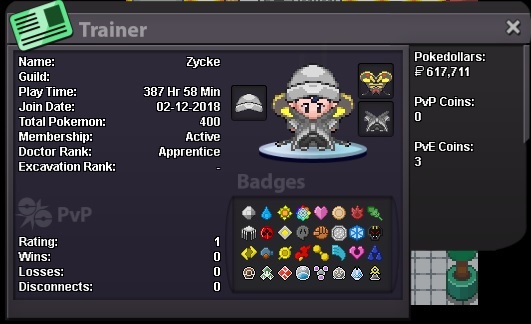
-
Hi , can i apply again ? Message says invite is invalid . Thanks
-
1. What's your Player name (IGN)? - Zycke 2. Number of hours played? - 82 hrs 3. What's your favorite Pokemon? - Magnezone 4. What country are you from? - Philippines 5. How old are you? - 26