




New Trade Zone
Trade Zone is now live
Use the new Trade Zone for auctions and instant-price trades so Pokemon and item offers are easy to find.

Luthwen1
Registered User
-
Joined
-
Last visited
Everything posted by Luthwen1
-
Sold for 3m to Marios. Can close thread.
-
Half an hour left, bump!
-
5 hours left bump!
-
Sync pokemon, as long as it's dead in first spot, will still have the 50% chance to change the nature. The leveled pokemon changes what the repel repels as it only repels pokemon below the leaders level. Read this guide: https://pokemonrevolution.net/forum/topic/95034-url
-
3m approved.
-
The repel pokemon (the same level) has to be alive, you can have your sync dead in the first slot.
-
Changed starting bid and AW. Bump.
-
Revised starting bid, AW, and increments. Bump.
-
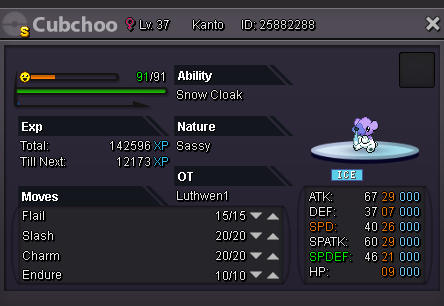
Just caught this cute lil' thing, and looking to sell! Starting Bid will be 3m Current offer: 3m Marios Minimum Bid Increments is 250k Insta Win will be 10m And the auction will go for 1 days from starting bid!
-
-
Posted on wrong thread.
-
What's your IGN? Luthwen1 How many hours do you have in PRO? Had 180hrs on Silver, but just moved to Gold. Do you have discord? (Let us know your name and # so we can contact you.) Luthwen#6132 How far are you in story? Going through Kanto again. How active are you in PRO? (How often do you play?) ~4-6 hours a day. Are you a PvP or PvE player? Or do you enjoy both? PvE for now, hopefully PVP later. Why do you want to join Calamity guild? Sounds like a nice guild.
