




New Trade Zone
Trade Zone is now live
Use the new Trade Zone for auctions and instant-price trades so Pokemon and item offers are easy to find.

Dklexz
Registered User
-
Joined
-
Last visited
-
Thank you very much, I am already solved, and an apology for the inconvenience.
-
Hello Staff... My problem is that i want to change servers, there is a message that says: "You cannot transfer if you still have open lending trades." The problem is that i do not remember who lends Pokémon, so i would like to support to obtain a list of Pokémon and if it is possible to return them to my account or help me in some way to make the server transfer. Please, I need help.
-
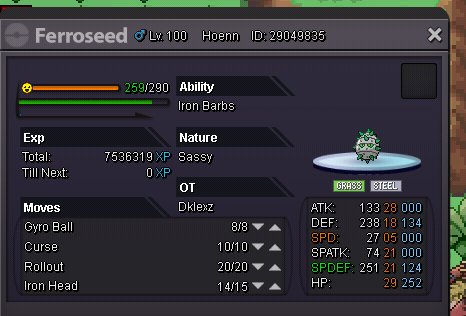
In-game name: DKLexZ Server: Gold Pokemon ID and/or screenshot: I accidentally leveled my Ferroseed to 100 and need it deleveled! Please help me!
-
I was cleaning and mistakenly release some pokemon, they are the following 2 Wingull 1 Azurill Gold Server


-
I lent 2 Pokemon to my friend by lend trade but the Pokemon didn't return to me. I got the message that the Pokemon had been returned but are not in my box and not in his box. I don't have a screenshot because it was just a lend trade and I didn't think it would give an error. Gastrodon (Epic/ Bold / Storm Drain) Rotom-Wash (Epic/ Bold)
-
Me intereza unirme a la Guild, acabo de iniciar 1 cuenta y ya voy en la 3ra medalla de Johto, ¿Cómo podría hacer para estar dentro? (Tengo otra cuenta más avanzada donde ya complete toda la historia y tengo +800 hrs de juego)