New Trade Zone
Trade Zone is now live
Use the new Trade Zone for auctions and instant-price trades so Pokemon and item offers are easy to find.


Jadeash
Contributor
-
Joined
-
Last visited
Everything posted by Jadeash
-
Boost
-
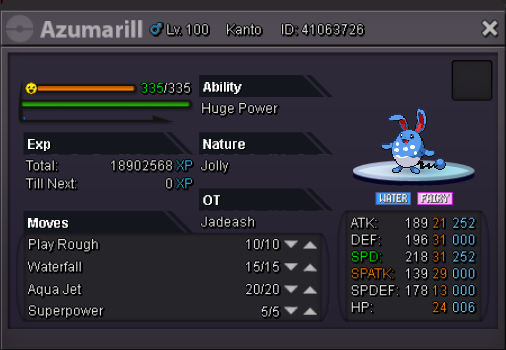
C.O. 1m Time: 72 hours after first bid Payment methods: Pokedollars, CC = 350k Min. Bid 100k

-
1. Jadeash 2. 1069 3. Zoroark and Mawile 4. 23
-
900k
-
S.O. 500k Min. bid 100k Auction time: 24h from first offer Good luck to all
-
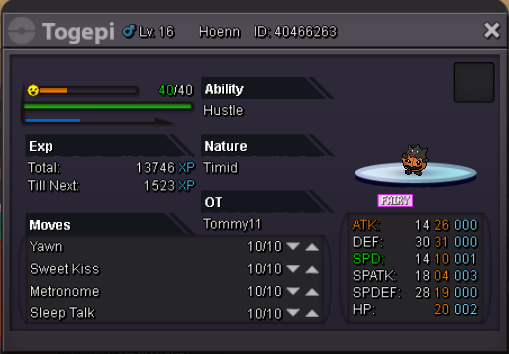
WTB/WTT for Xmas Axew or Buneary Can negotiate price or other trades. Pm in game IGN: Jadeash

-
1m (Negotiable) Accept cc (320k) rc (5k) or trade pm in game IGN: Jadeash

-
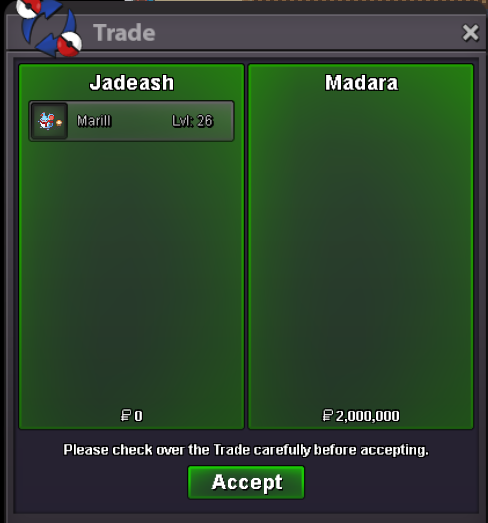
Sold 2m Madara Thank you everybody for particiapting ^^
-
Notes: -Insta price edited -Different payment method added 42 mins left
-
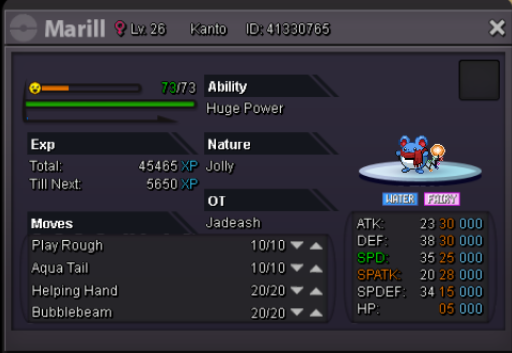
8 hours leftPvpable Xmas Marill Auction B.O. Madara 2m Min bid 200k Insta 4m + free EVs (Accept cc 320k ea) Auction 24 hours Good luck everyone
 I cant move any pokemon from my box or change my party. I have't went to hoenn yet but my hoenn pokemon appear unlocked in the pc. I first encountered this problem in necropolis PC. please help.1. What's your Player name (IGN)? Jadeash 2. Number of hours played? 204 Hours 3. What's your favorite Pokémon? Can't single out 1 Pokemon but I have a dream team ^^ . Mawile, Zoroark, Greninja, Gardevoir, Typhlosion, Mewtwo 4. What country are you from? Egypt 5. How old are you? 22 6. When's your Birthday? (Optional) December 22nd