New Trade Zone
Trade Zone is now live
Use the new Trade Zone for auctions and instant-price trades so Pokemon and item offers are easy to find.

Wj20
Registered User
-
Joined
-
Last visited
-
yes i battle with him, thanks a lot.
-
-
silver
-
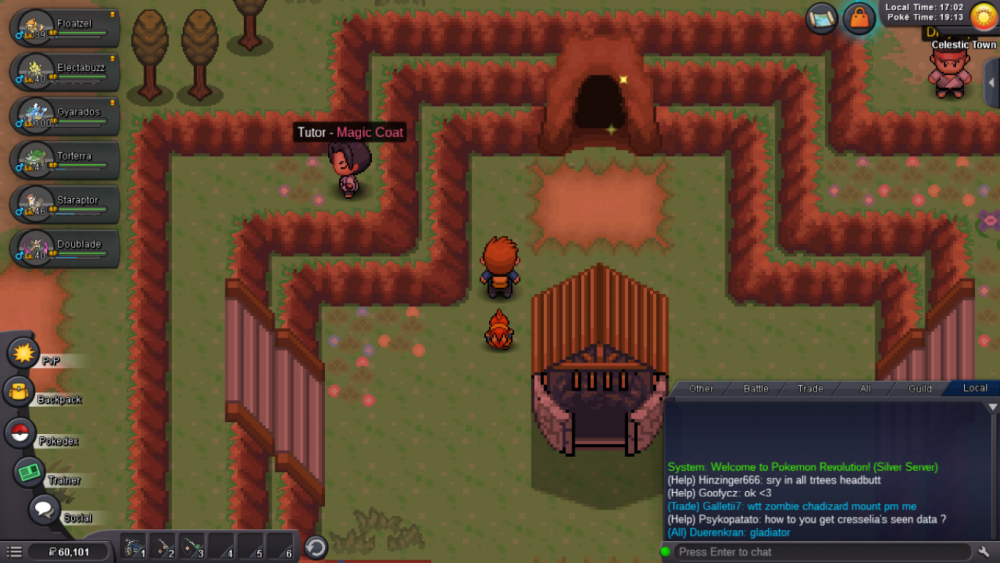
Hi team, Im Wj02, I am at sinnoh region and after i win badge 4 i go and win 7 badge and i went to celestic town first and i think battle with grump galaxy, but after that i did grump quest speak with cinthia open route 210 and went i go to celestic town again cave is open and i cant find cinthia mother, i cant continue the history can someone help me, thanks.
-
Hi, I cant continue the history, i cant find galaxy grump, the cave is open but i never see cinthia gran mother, can you help me.
-
Hi, This is the problem when I came to celestic town there is not galaxy grunt, the acces cave is open i can enter and see fossil, but I dont see cithias grand mother.
-
Hi team, Happy new year, Excuse me for my english. My name is Wilson, I had a problem, I am at Sinnoh Region after win 4 badge, i did team galaxia quest and spoke with cinthis, i went to route 210, i gave position to syduck and open the route, but I cant find cinthia grandmother at celestic town, I think i battle with galaxia team before because i remenber visit that town, i wait for your comment and thanks you so much.