




Skip to content
View in the app

A better way to browse. Learn more.

Pokemon Revolution Online

A full-screen app on your home screen with push notifications, badges and more.

To install this app on iOS and iPadOS
  1. Tap the Share icon in Safari
  2. Scroll the menu and tap Add to Home Screen.
  3. Tap Add in the top-right corner.
To install this app on Android
  1. Tap the 3-dot menu (⋮) in the top-right corner of the browser.
  2. Tap Add to Home screen or Install app.
  3. Confirm by tapping Install.
New Trade Zone
Trade Zone is now live
Use the new Trade Zone for auctions and instant-price trades so Pokemon and item offers are easy to find.
Open Trade Zone

Carlosed

Suspended
  • Joined

  • Last visited

Everything posted by Carlosed

  1. Sold to Nishaa thanks to everyone who bid in this auction and good luck to everyone!
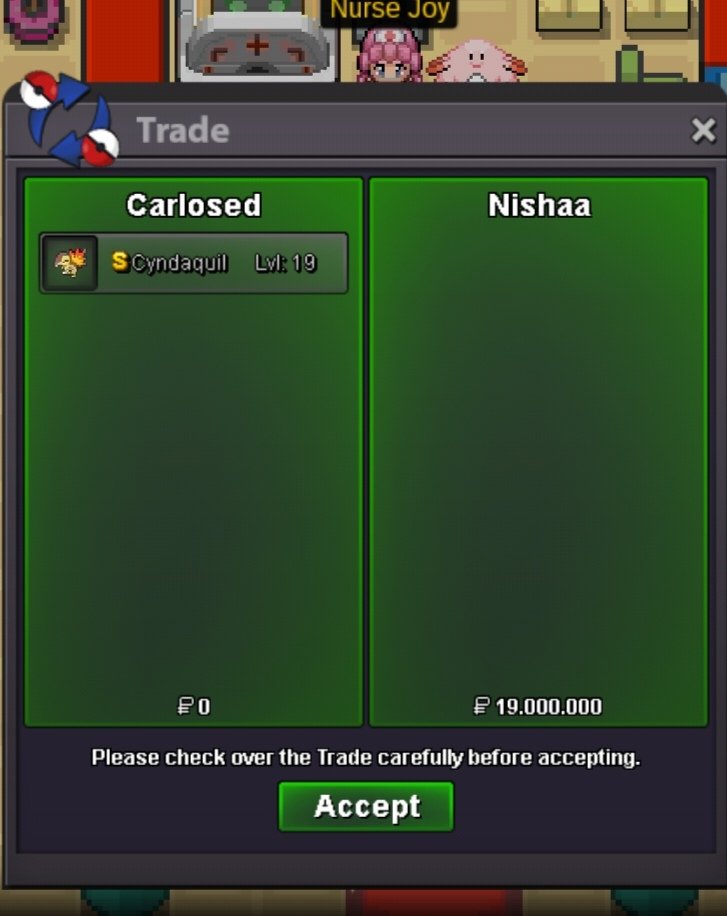
  2. Okay I pm you Ingame!
  3. I guess we have a winner congrats! Would you like to meet in gold server or in silver server?
  4. Noted we are not far away from the instant price 22million!
  5. Noted last 15min!
  6. Noted last 30min!
  7. Noted last 50min!
  8. Noted 6h 34min left
  9. Noted 14h 18min left
  10. thank you auction started good luck!
  11. Carlosed replied to Limit's topic in Suggestions
    those stall promoter banned sableye... 1 mach punch from conkeldur would have killed that dark pokémon
  12. Carlosed replied to Limit's topic in Suggestions
    yes sir I can't use my jolly sableye 1+
  13. Proof of the 45m offer?

Account

Navigation

Search

Search

Configure browser push notifications

Chrome (Android)
  1. Tap the lock icon next to the address bar.
  2. Tap Permissions → Notifications.
  3. Adjust your preference.
Chrome (Desktop)
  1. Click the padlock icon in the address bar.
  2. Select Site settings.
  3. Find Notifications and adjust your preference.