New Trade Zone
Trade Zone is now live
Use the new Trade Zone for auctions and instant-price trades so Pokemon and item offers are easy to find.


Seraphlost
Registered User
-
Joined
-
Last visited
Everything posted by Seraphlost
-
The npc only shows the ivs I got as an option to apply while rerolling, which I didn't
-
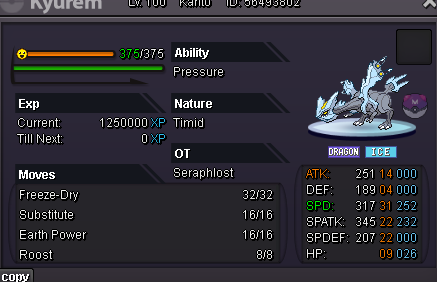
hey, I just used multiple rrs on my kyurem and applied 1 on the rerolled ivs on it. However I wanted to change back to the original ivs which I had before rerolling but in the previous ivs- its showing the ivs i got during reroll instead of the original iv I had before I started rerolling. Is there no way to get the original ivs back?? I only applied this iv on my kyurem and rejected all others
-
+1
-
seraphlost server- gold utc+5:30 darkmatter6204
-
Seraphlost UTC+5:30
-
1m ursa
-
900k ursa
-
800k ursa
-
Service taken: pinkan 1+2 Very fast service, reliable
-
Start cloy
-
150k ferro
-
Hello I have a small question regarding EVs and nature of the Pokemon we face in dungeon. Are they all maxed EVs like boss or normally trained and what nature do they have? PS- in heroic Thank you!
-
Hello mate when are you online today
-
I will do in 1.5hrs
-
start karp
-
+1 great idea
-
4cc
-
No that answers my question thank you for your time. Have a great day
-
Hello I am aware it's not allowed to pvp with same account in both servers. However I am confused wether or not I am allowed pvp in gold with 1 account and on silver with another?
-
-
understood thank you have a great day
-
Few years back I remember doing the cresselia quest. I dont remember if I caught it or not nor can I start the quest right now. I am not sure what I can do?
-
-
600k 1st one
-