




New Trade Zone
Trade Zone is now live
Use the new Trade Zone for auctions and instant-price trades so Pokemon and item offers are easy to find.

Zazelion
Registered User
-
Joined
-
Last visited
Everything posted by Zazelion
-
15 mins more auction time from @Vegeta111 last bid
-
Bump
-
Bump
-
bumpbumpS.o: 700k C.o: 2.5m by Nyex Min Bid: 100k Duration: 48 hours (Countdown Link: https://countingdownto.com/?c=4481443) Insta Price: 3m CONTACT ME: ign: Zazelion Discord: ZazeLioN#0506S.o: 4m C.o: 6m by @Isildurr2x Min Bid: 200k Duration: 48 hours (Countdown Link: https://countingdownto.com/?c=4481494) Insta Price: - CONTACT ME: ign: Zazelion Discord: ZazeLioN#0506yeah i think i do have it. well, idk how but I just checked it, and I can now. Thank you.
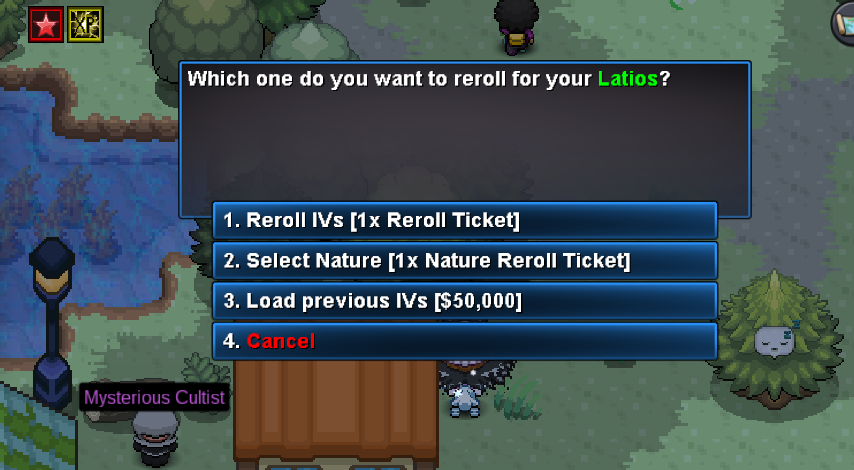 upHello, yesterday I've used Double rrs on my Latios & Tornadus, and got a decent iv for both of them, then i tried to rr again for both and i didnt realise i miss-clicked "yes" to the bad ivs. And now I cant do the reload ivs service from Phychic Marina. Ill include some video & pics from my ss 1. Video I cant do reload ivs (https://drive.google.com/file/d/1PCr3QtwG1JWY-vC2on_GcOI0HaYjItiY/view?usp=sharing) 2. Better IVs of Latios 3. Miss-clicked IVs Latios 4. Better IVs of Tornadus 5. Miss-clicked IVs TornadusStart slowbro


Account
Navigation
Search
Configure browser push notifications
Chrome (Android)
- Tap the lock icon next to the address bar.
- Tap Permissions → Notifications.
- Adjust your preference.
Chrome (Desktop)
- Click the padlock icon in the address bar.
- Select Site settings.
- Find Notifications and adjust your preference.
Safari (iOS 16.4+)
- Ensure the site is installed via Add to Home Screen.
- Open Settings App → Notifications.
- Find your app name and adjust your preference.
Safari (macOS)
- Go to Safari → Preferences.
- Click the Websites tab.
- Select Notifications in the sidebar.
- Find this website and adjust your preference.
Edge (Android)
- Tap the lock icon next to the address bar.
- Tap Permissions.
- Find Notifications and adjust your preference.
Edge (Desktop)
- Click the padlock icon in the address bar.
- Click Permissions for this site.
- Find Notifications and adjust your preference.
Firefox (Android)
- Go to Settings → Site permissions.
- Tap Notifications.
- Find this site in the list and adjust your preference.
Firefox (Desktop)
- Open Firefox Settings.
- Search for Notifications.
- Find this site in the list and adjust your preference.