




New Trade Zone
Trade Zone is now live
Use the new Trade Zone for auctions and instant-price trades so Pokemon and item offers are easy to find.


Cynthia
Registered User
-
Joined
-
Last visited
-
Cynthia changed their profile photo
-
Hi Dev, as a feedback, the reconnect timer is still at 45 seconds in both client updates this October. Thank you very much and have a great day! 👋😁
-
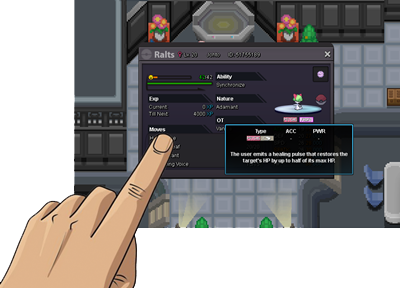
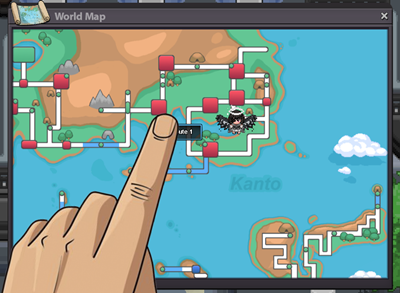
World Map Text Adjustment (Android) - Checking the name of the location in World Map is kinda covered by the finger when pressed in Android so its a bit hard to view the location name. Maybe adjust the text a little to the right similar to checking Pokemon Move details and Inventory Item Details? Thank you very much! Additional Reconnect Time I think the current reconnect timer (like 30 seconds) is a bit short. Is it possible to adjust to at least a minute, to give the players enough time to switch internet connection? Thank you very much~! Enjoy the upcoming Halloween Event everyone! 👻 PvE Tradeable Drifloon mount please. 😆

-
