




New Trade Zone
Trade Zone is now live
Use the new Trade Zone for auctions and instant-price trades so Pokemon and item offers are easy to find.


Lacomus
Registered User
-
Joined
-
Last visited
Everything posted by Lacomus
-
@Financebro Took a little time preparing screenshot. User above took 25k
-
Snow warning, timid, high speed, high special attack. Other stats decent too (max special defence). I'm going to say high 6 figures, to low millions. Nice poke @InpStart: 1 Min bid: 1 Duration: 1 hour (after the first bid) Payment: Pokedollars Note: HP Ghost. No cancellations, no insta Closed: @Itzronin 150k
 Enjoy! @Luxiao
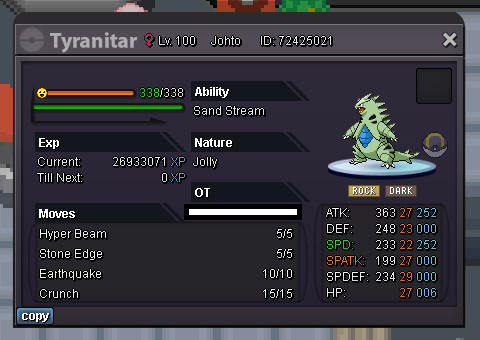
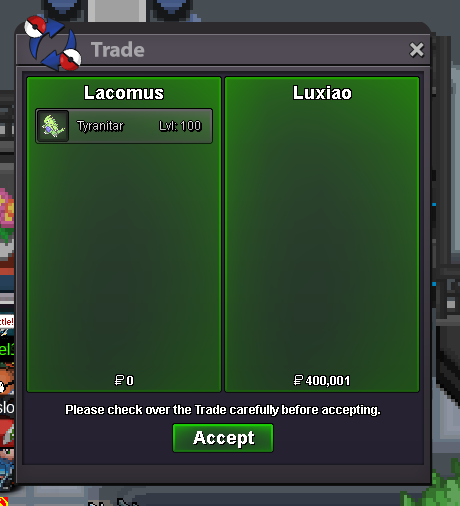 Think you've won @LuxiaoStart (12,345)170,001Enjoy! @Dragonplayers
 109,38215 minute rule applies - Forum: If a bid is received in the final 15 minutes of the auction, the end point will be delayed by 15 minutes from that bid, and will be delayed by 15 minutes for each new bid thereafter, until the current offer has been held for a full 15 minutes. Must be accurate to the minute that the auction is set to end. › e.g. If the auction ends at 15:00, it will end at 15:00:00. If a late bid is received in the final 15 minutes, at 14:46, the auction will end at 15:01. If another user bids at 15:00, the auction will be extended again, and will end at 15:15, this will be repeated until the current offer has been held for a full 15 minutes.I'll start off your first auction at 66,666. Best of luck!Start: 1 Min bid: 1 Duration: 1 hour (after the first bid) Payment: Pokedollars Note: HP Ice. No cancellations, no insta Closed: @Luxiao 400,001
 @Luckytea https://pokemonrevolution.net/forum/forum/46-playground@Barze97 If that's the case, then it probably doesn't fit into the auction category anyway, if a master is to dictate it, in this fashion@Luckytea Hmm. I don't know man "the price will start from the high specific price then go down until 1 pokedollar, I will edit every hours following the auction rule I set up right in the auction post" So if it starts at whatever number, it'll of course come down to 1 pokedollar eventually (being a reverse auction), and you say the fastest person wins. Is it really that challenging? Not sure I see the excitement, or thrill of this...unless I'm not getting it. May also require adjusting auction rules (introducing a new auction variant), maybe more work for trade moderators. Not only that, you're also wanting to dictate how much people are aloud to bid probably, so 1k goes to 999, then 998, and not going straight to 1. Maybe more appropriate for some off-topic fun, than auction. I'll admit my 1 dollar auctions are dumb, but this has the potential to be dumber (and maybe even creating more of a mockery out of the process), in my opinion PS But on a positive note, good thinking of ideas!










Account
Navigation
Search
Configure browser push notifications
Chrome (Android)
- Tap the lock icon next to the address bar.
- Tap Permissions → Notifications.
- Adjust your preference.
Chrome (Desktop)
- Click the padlock icon in the address bar.
- Select Site settings.
- Find Notifications and adjust your preference.
Safari (iOS 16.4+)
- Ensure the site is installed via Add to Home Screen.
- Open Settings App → Notifications.
- Find your app name and adjust your preference.
Safari (macOS)
- Go to Safari → Preferences.
- Click the Websites tab.
- Select Notifications in the sidebar.
- Find this website and adjust your preference.
Edge (Android)
- Tap the lock icon next to the address bar.
- Tap Permissions.
- Find Notifications and adjust your preference.
Edge (Desktop)
- Click the padlock icon in the address bar.
- Click Permissions for this site.
- Find Notifications and adjust your preference.
Firefox (Android)
- Go to Settings → Site permissions.
- Tap Notifications.
- Find this site in the list and adjust your preference.
Firefox (Desktop)
- Open Firefox Settings.
- Search for Notifications.
- Find this site in the list and adjust your preference.