




New Trade Zone
Trade Zone is now live
Use the new Trade Zone for auctions and instant-price trades so Pokemon and item offers are easy to find.


Hiimjanosch
Registered User
-
Joined
-
Last visited
Everything posted by Hiimjanosch
-
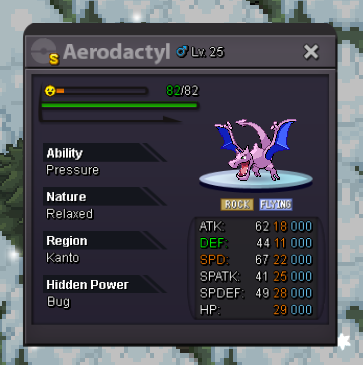
Hi guys im selling this shiny aerodactyl add me ingame or send me offers in this post 😉
-
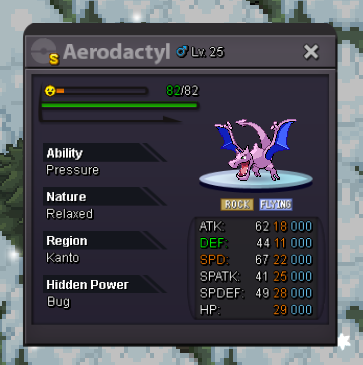
Hi guys im selling this shiny Aerodactyl send me ure offers or add me ingame
-
Start auction for all 🙂
-
Hi guys i Love the game and i Love to Collect Pokémon (Event/Shiny) and i think Many Player Enjoy To collect . In the old Games u could put Any Poke at a specific Place in You’re pc and get Them Special backgrounds i would really Enjoy this in this game aswell. It would be cool to be able to sort Them how u like it and Not just from lvl and Always Need to get a Full Box especially for all the different Event pokes maybe u Agree on this one ive Seen it already that this is on the to do List but i dont Know if a Rework with More Filters and Split boxes is the Same like My request have a Good day guys!
-
How much for Banette? 800k?
-
Hi man i would buy 2 are u online now?
-
I Need a False swiper Pref with sleep Powder (Breloom) Show me what uve got. with prices to Hunt for Pokémon
-
Currently im at work i could be online in 7 hrs 😅
-
Hi man i buy ferro
-
.
-
U online? i Wang to Buy Breloom Maybe we can Talk about Price Nice Shop man!
-
Hi i would buy venosaur 350k ahh already sold i didnt See but cool Shop anyways
-
Are u online Today?😃
-
Hi i Would buy Milotic and Breloom 🙂 are they still available ?
-
Hi man i buy Milotic
-
I would buy chinchou
-
.
-
+40k
-
Start
-
100k arcanine
-
+10 arcanine & mightyena
-
+10 haunter & Gastly
-
+10 haunter & Gastly
-
+10 haunter & Gastly
-
+ 10 magnemite

