Skip to content
View in the app

A better way to browse. Learn more.

Pokemon Revolution Online

A full-screen app on your home screen with push notifications, badges and more.

To install this app on iOS and iPadOS
  1. Tap the Share icon in Safari
  2. Scroll the menu and tap Add to Home Screen.
  3. Tap Add in the top-right corner.
To install this app on Android
  1. Tap the 3-dot menu (⋮) in the top-right corner of the browser.
  2. Tap Add to Home screen or Install app.
  3. Confirm by tapping Install.

Infamousro

Registered User
  • Joined

  • Last visited

  1. thankyou @Benvirisbackfor purchasing from the shop SOLD
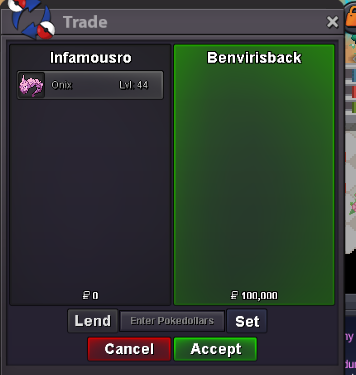
  2. @Benvirisbacksorry i didnt get the ping... yeah sure message me the price u r thinking of will see if i can come down to that
  3. 500k
  4. the trade has been done and therefore this post can be closed now....
  5. The Auction has Officially ended... Congratulations to @Hohlyeraser for winning the Jolly pink 28 31 magikarp... @HohlyeraserKindly transfer to gold if u r from silver and message us.... Kindly contact @Asakouraaa ingame or in discord for the trade... My Id is mentioned undersigned if needed! good luck to all the participants... Happy Bidding! Thankyou, InfamousRo IGN: Asakouraaa Discord: kartsonakis
  6. @Hohlyerasermin bid is 200k and last bid was 7.2m therefore ur bis is invalid....
  7. Dedenne Hp ice sold Thankyou @Gaabofor purchasing from the shop!
  8. @Gaabomsg me on dc or ingame

Account

Navigation

Search

Search

Configure browser push notifications

Chrome (Android)
  1. Tap the lock icon next to the address bar.
  2. Tap Permissions → Notifications.
  3. Adjust your preference.
Chrome (Desktop)
  1. Click the padlock icon in the address bar.
  2. Select Site settings.
  3. Find Notifications and adjust your preference.