




New Trade Zone
Trade Zone is now live
Use the new Trade Zone for auctions and instant-price trades so Pokemon and item offers are easy to find.

Lamola
Suspended
-
Joined
-
Last visited
Everything posted by Lamola
-
Bump
-
I make a mistake because i thought my ac is 32h and when i see @Six06 bid 1.6 I was surprised because yayozama bid 1.6 for ea and when we trade I'm working so I'm in a bit of a hurry so I couldn't take a picture so I'll try to contact @Six06 to apologize and compensate
-
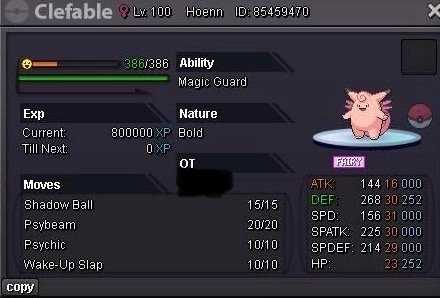
Action: 48h after first bid Start offer: 1m Min Bid: 200k Insta: 4m Accepted payments Coin Capsule = 450k Reroll Ticket = 700k Ingame: lamola Discord: lamola3824
-
@Yayozama you win
-
15min left
-
Up
-
@Minhtri111 you won
-
8h left
-
2h left for ursaluna
-
5h left
-
Up
-
Up
-
15h left
-
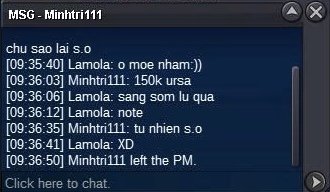
Koraidon mount 28h left
-
Ursa 16h left
-
You start both or which mount
-
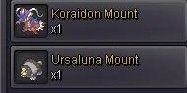
Action: 36h after first bid Start offer: 1m (for ea) Min Bid: 200k Insta: 5m for ea Accepted payments Coin Capsule = 500k Reroll Ticket = 700k Ingame: lamola Discord: lamola3824 2 form ursaluna normal and ursaluna blood moon


-
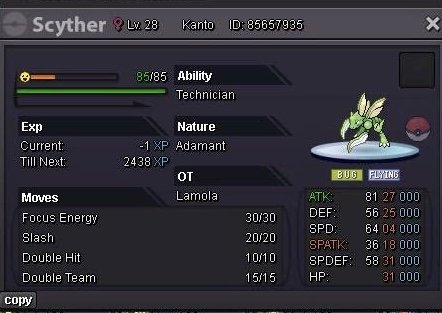
Action: 24h after first bid Start offer: 50k Min Bid: 50k Insta: N/A Accepted payments Coin Capsule = 500k Reroll Ticket = 700k Ingame: lamola Discord: lamola3824 Action: 24h after first bid Start offer: 100k Min Bid: 50k Insta: N/A Accepted payments Coin Capsule = 500k Reroll Ticket = 700k Ingame: lamola Discord: lamola3824 Action: 24h after first bid Start offer: 50k Min Bid: 50k Insta: N/A Accepted payments Coin Capsule = 500k Reroll Ticket = 700k Ingame: lamola Discord: lamola3824
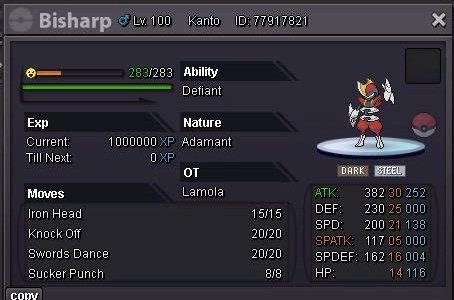
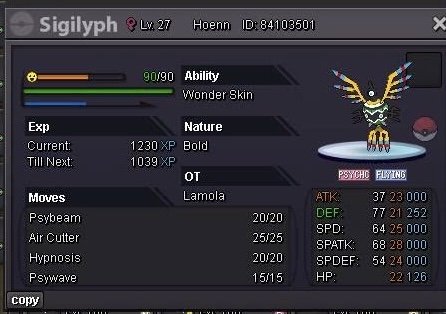
-
Start
-
3m
-
1m2
-
It will take quite a long time 1m1
-
1m
-
800k
-
700k

