




New Trade Zone
Trade Zone is now live
Use the new Trade Zone for auctions and instant-price trades so Pokemon and item offers are easy to find.


Rhulk
Registered User
-
Joined
-
Last visited
Everything posted by Rhulk
-
-
Congrats. ninja still has 3~4 hour left!
-
-
200k not 100k raises sorry
-
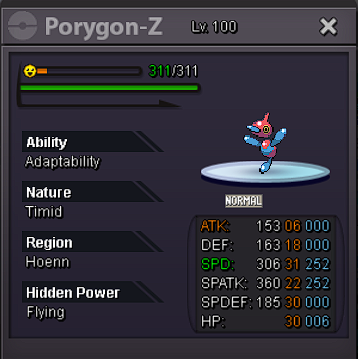
Auction 1: Epic Pory-z (Conversion-Z sweeper) Start price: 2m Min raise: 200k Insta: 10m Auction 2: 31 Spd Greninja (life orb-gunk shot build) Start price: 1.4m Min. Raise: 200k Insta: 5m Separate Auctions, each ends 48hr after started. (unless insta, and 15 min rule applies as well) accepted payments: Pokedollars or RR tickets (550k value per IV RR)

-
-
-
I’m at the gym I’ll be back online in like 1hour give or take.
-
7
-
6m
-
4m
-
3.1
-
3
-
2.2
-
-
2m
-
Gold chests are a “rich get richer” they won’t change that. It’s for the people who can afford the absolute best IV meta pokes. Very few low hour or not so wealthy can make it
-
Start
-
I would like to suggest a slight update/rework to the Re-Roll tickets you get from PvP chest. I think they should be tradable, or at least exchangeable for something. If you don’t need RR or get a Pokemon specific reroll you already have epic, we should be able to at least trade them to an npc for PvP tokens or maybe trade 2 soul-bound for 1 tradable RR.
-
-
-
-
-
-

