




New Trade Zone
Trade Zone is now live
Use the new Trade Zone for auctions and instant-price trades so Pokemon and item offers are easy to find.

Ebyang
Registered User
-
Joined
-
Last visited
Everything posted by Ebyang
-
10m
-
9.2m
-
9m
-
2.9m
-
2.6m
-
2.2m
-
2m
-
1.5m
-
1.1m
-
That's great! Thank you, Sir Hazegeek!
-
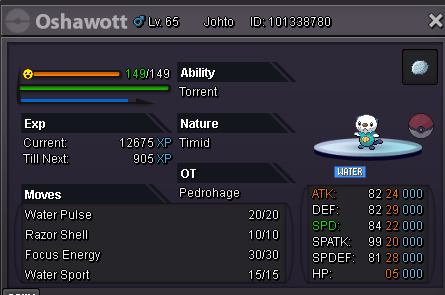
Hi, I'm asking for assistance to check the trade history or to find the owner of the Pokémon (screenshot attached). We added each other as friends, but it didn't appear on the friends list. Apologies in advance if I also missed taking a screenshot of the transaction since we added each other. The player avail the level-up service in-game. Thank you!
-
5.2m
-
-
-
-
-
im online please message me ingame
-
12.7m
-
12.2m
-
3.2 l set

