New Trade Zone
Trade Zone is now live
Use the new Trade Zone for auctions and instant-price trades so Pokemon and item offers are easy to find.


Rayziell
Moderator
-
Joined
-
Last visited
-
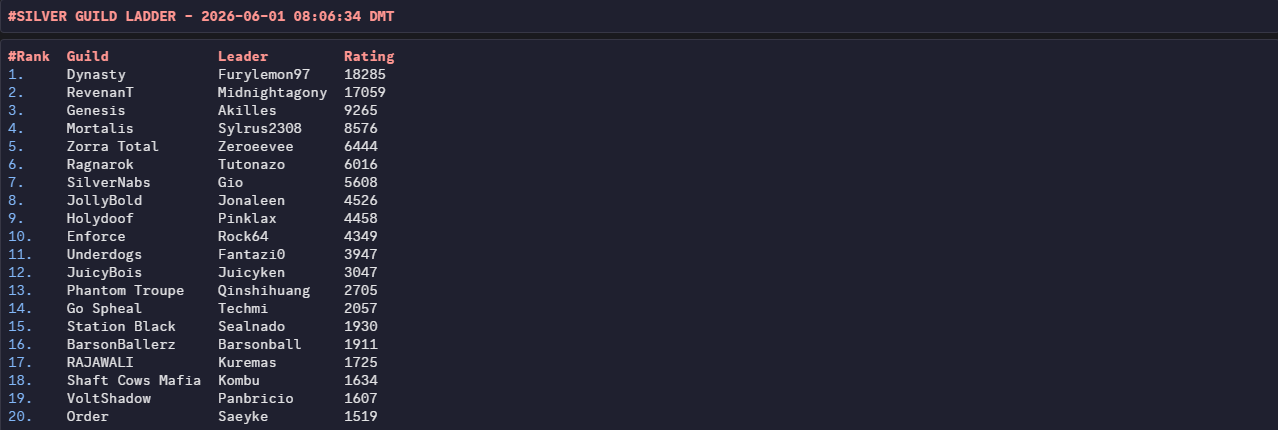
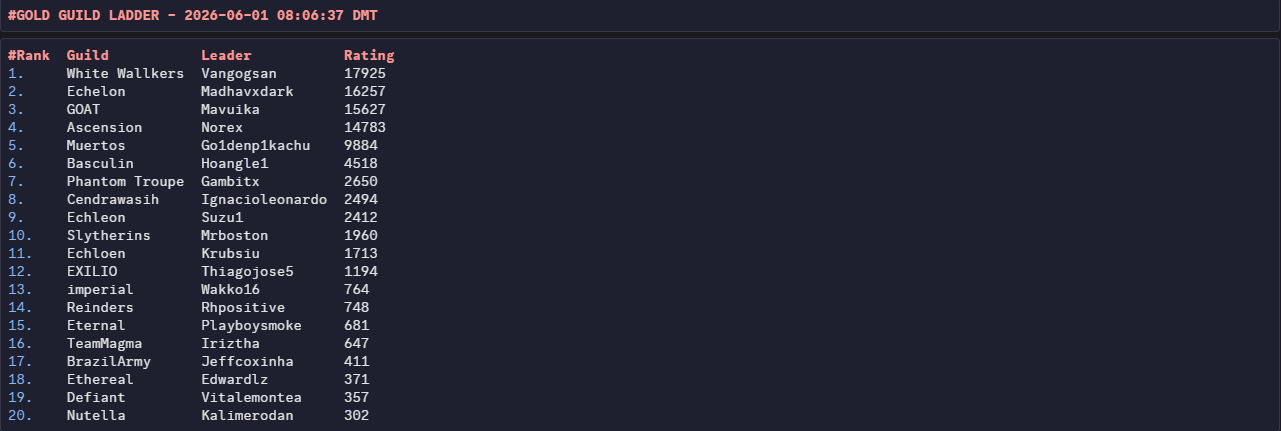
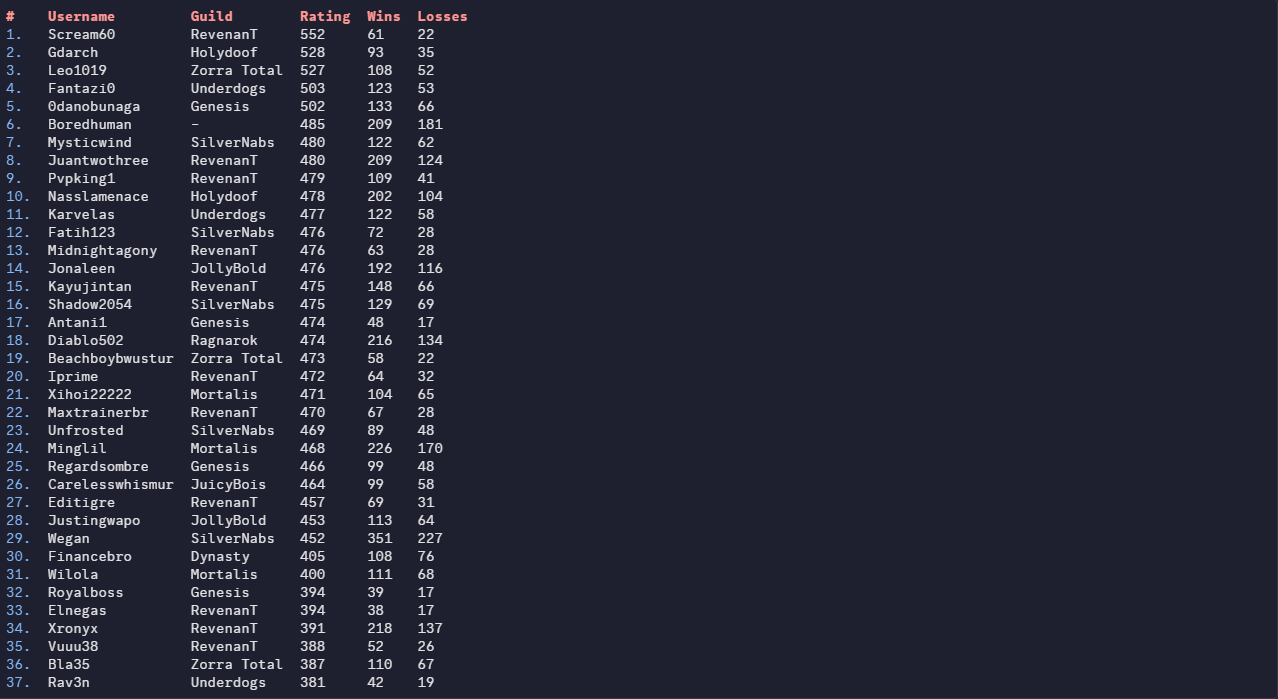
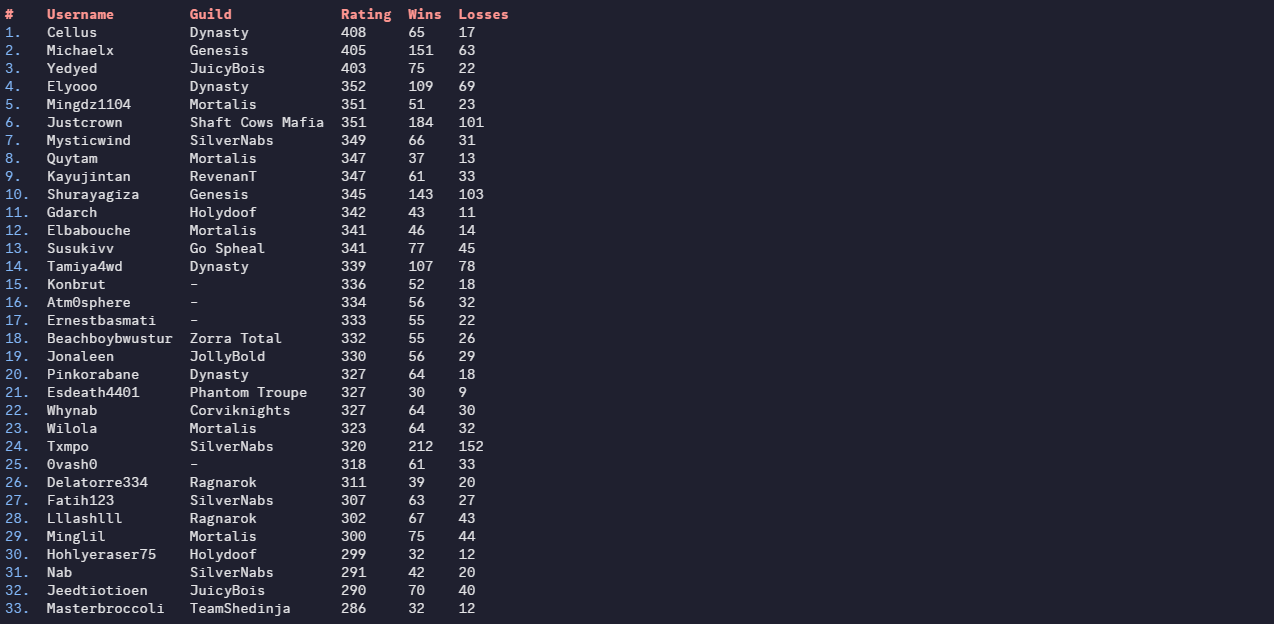
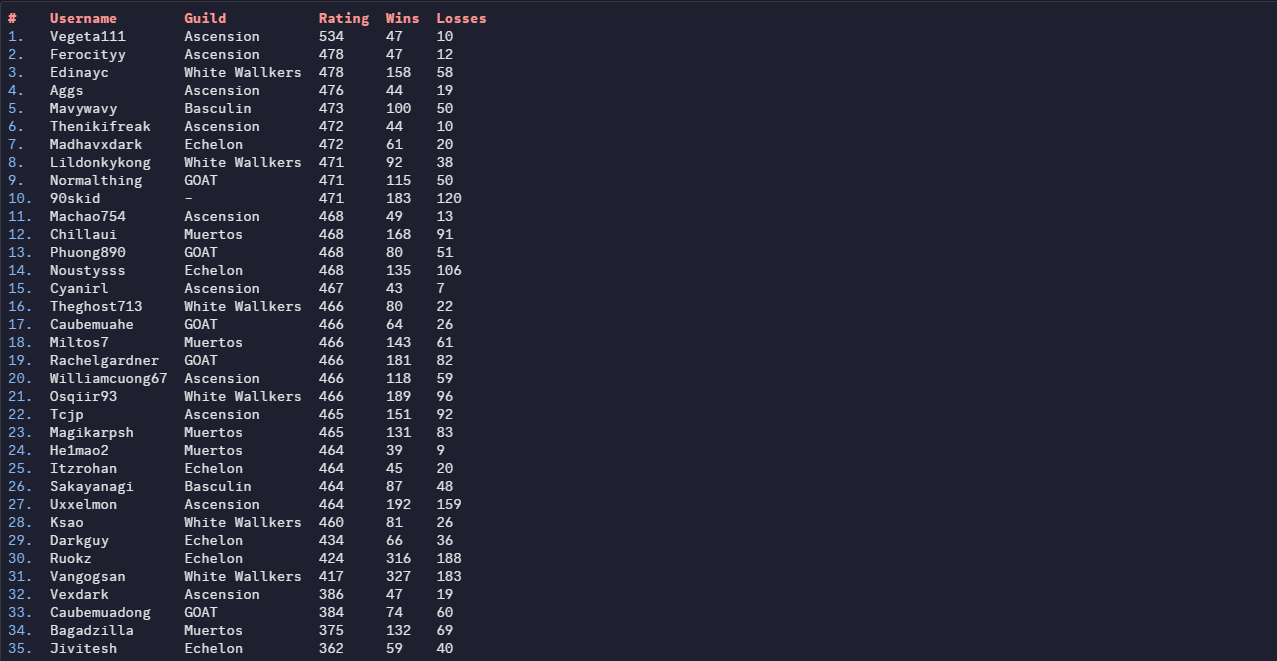
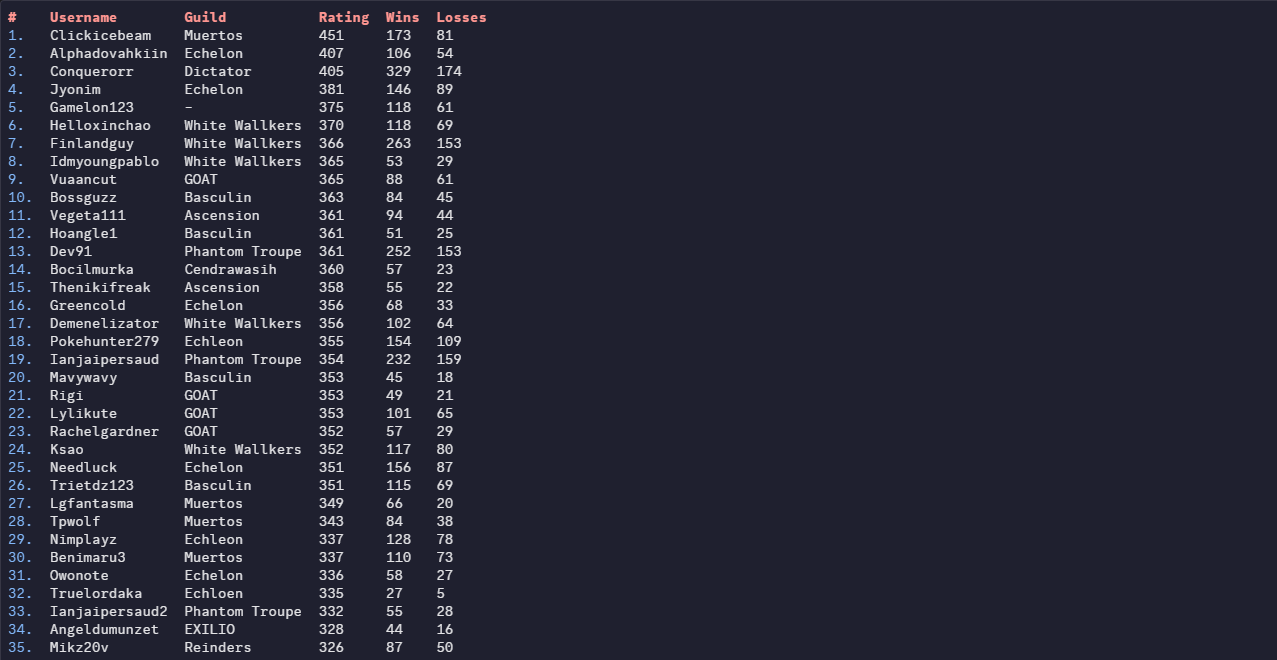
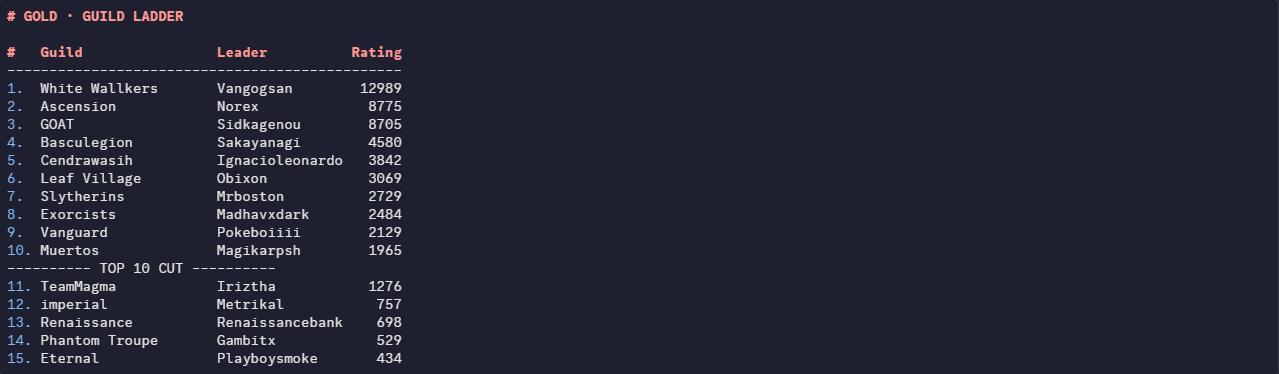
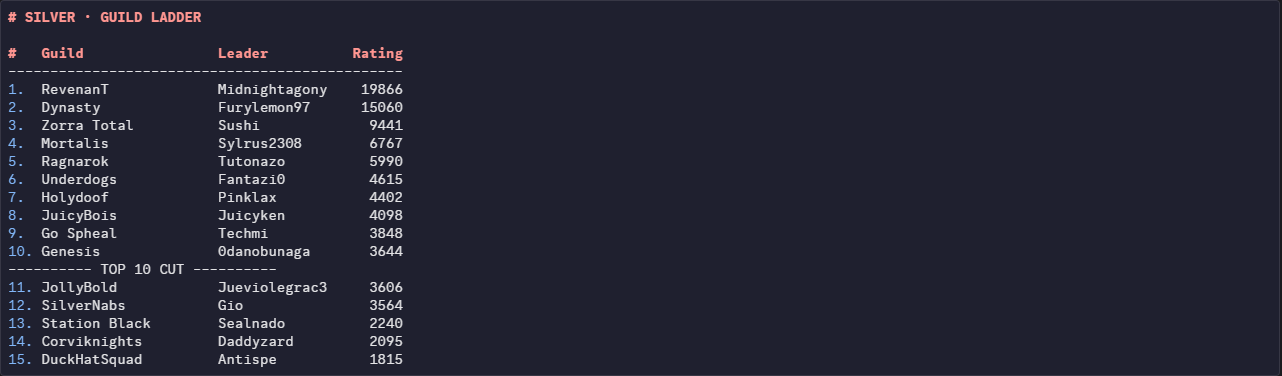
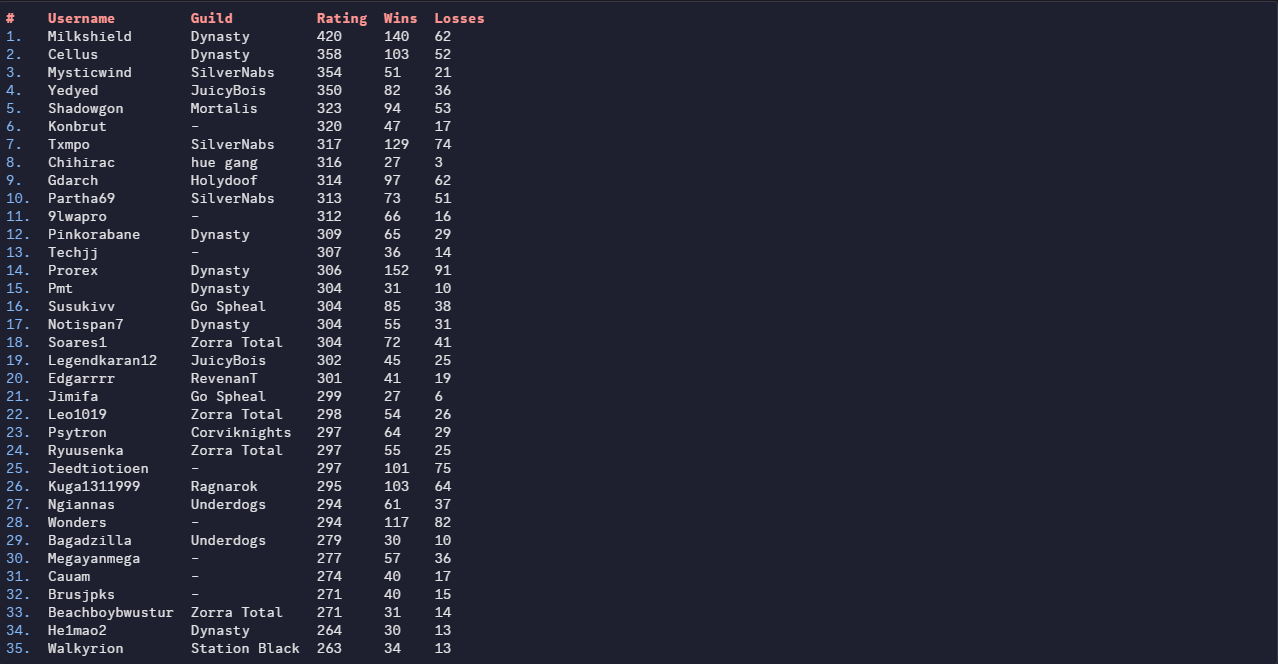
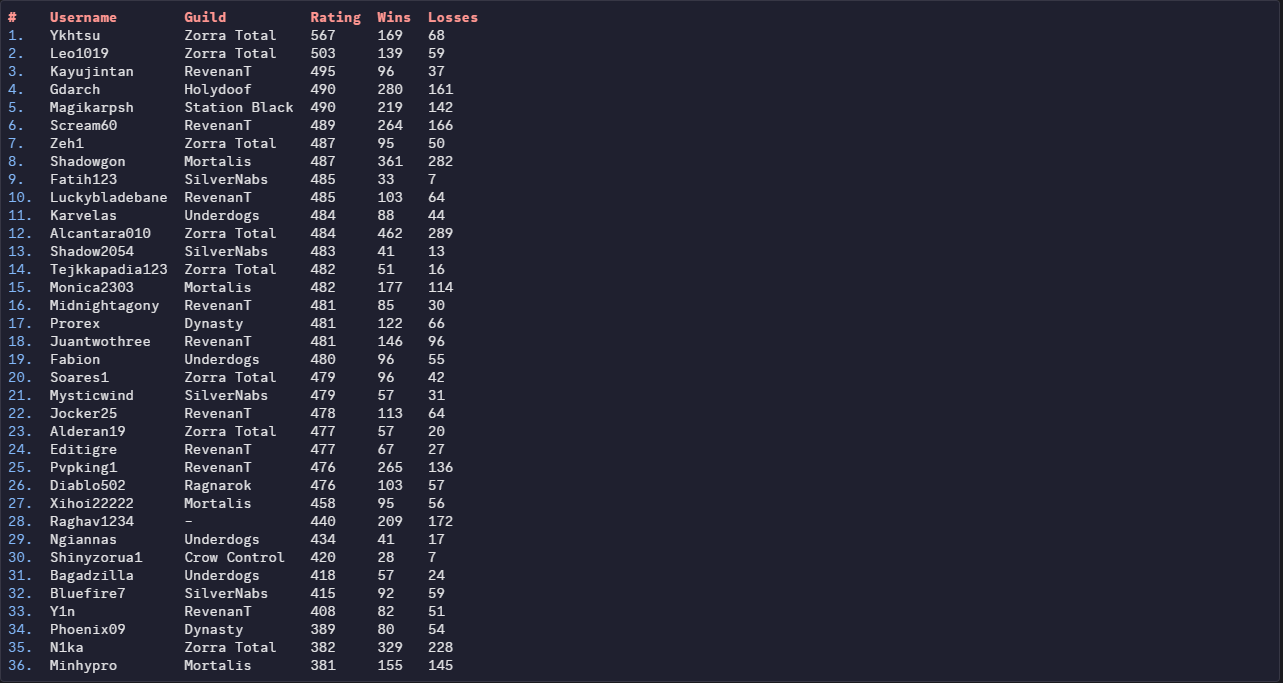
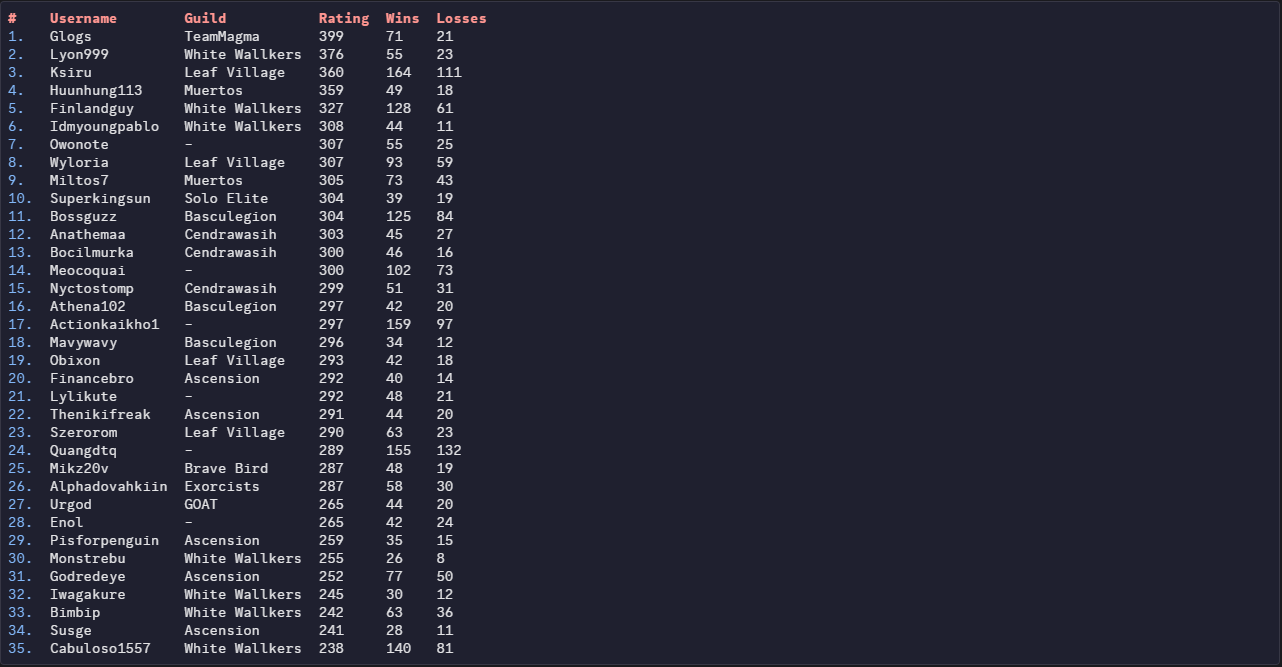
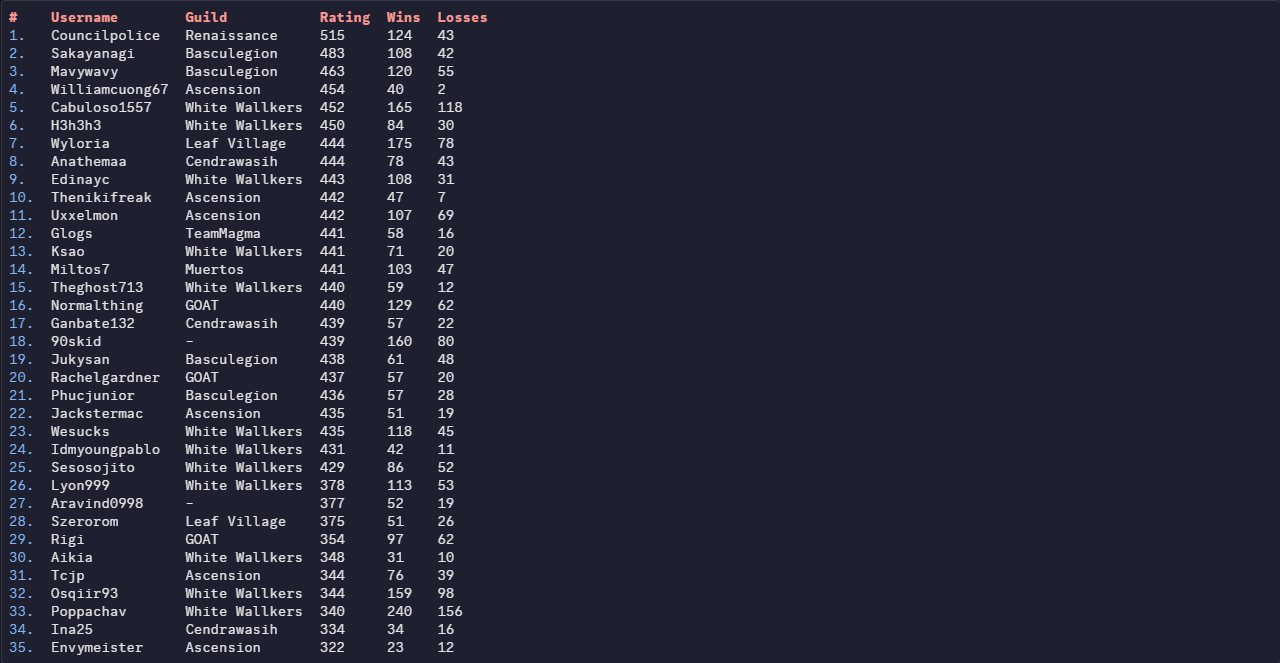
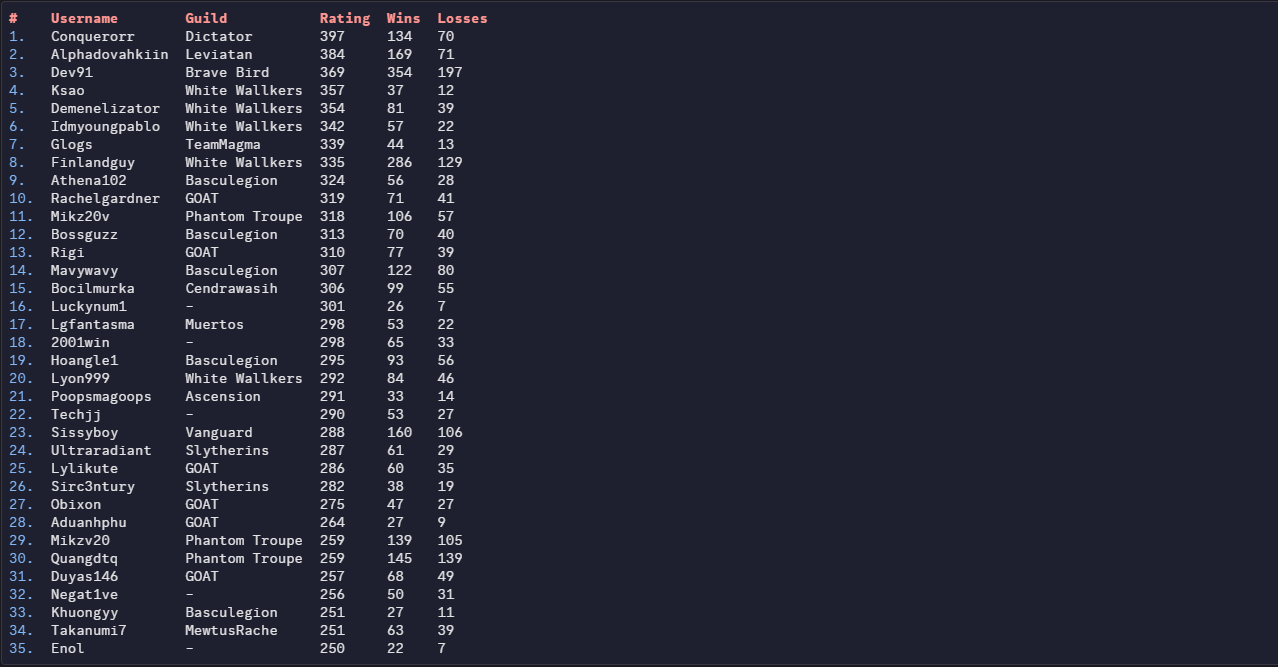
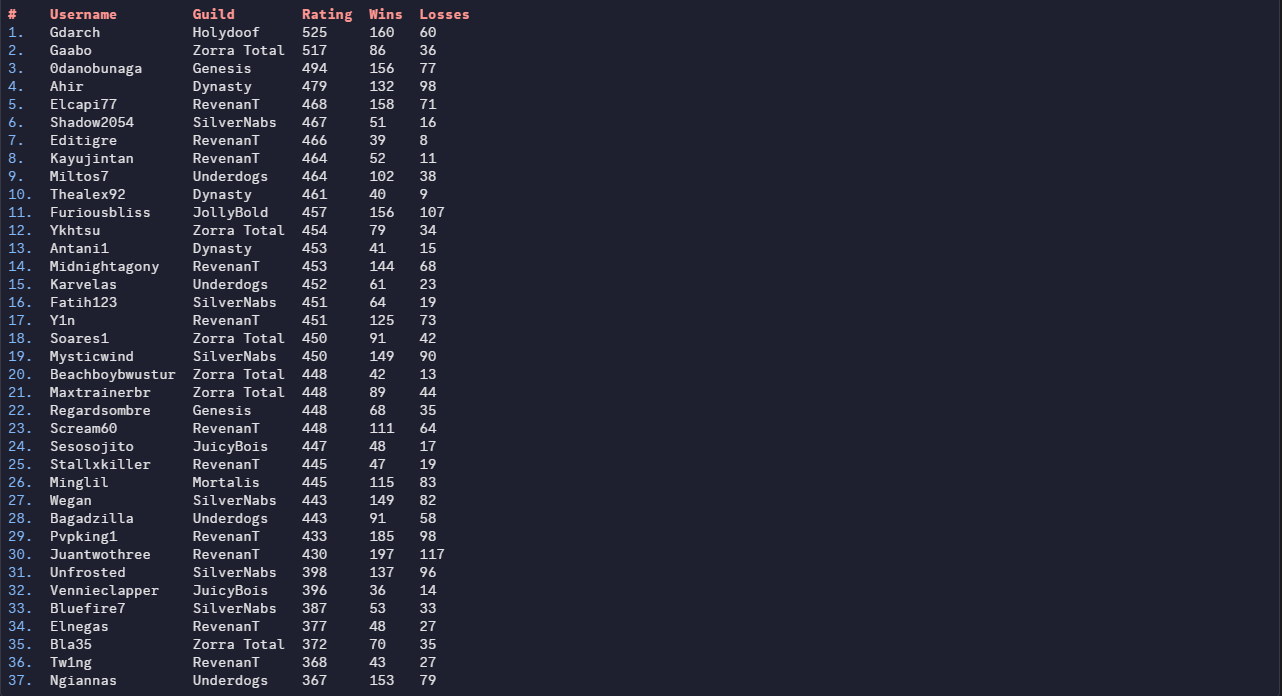
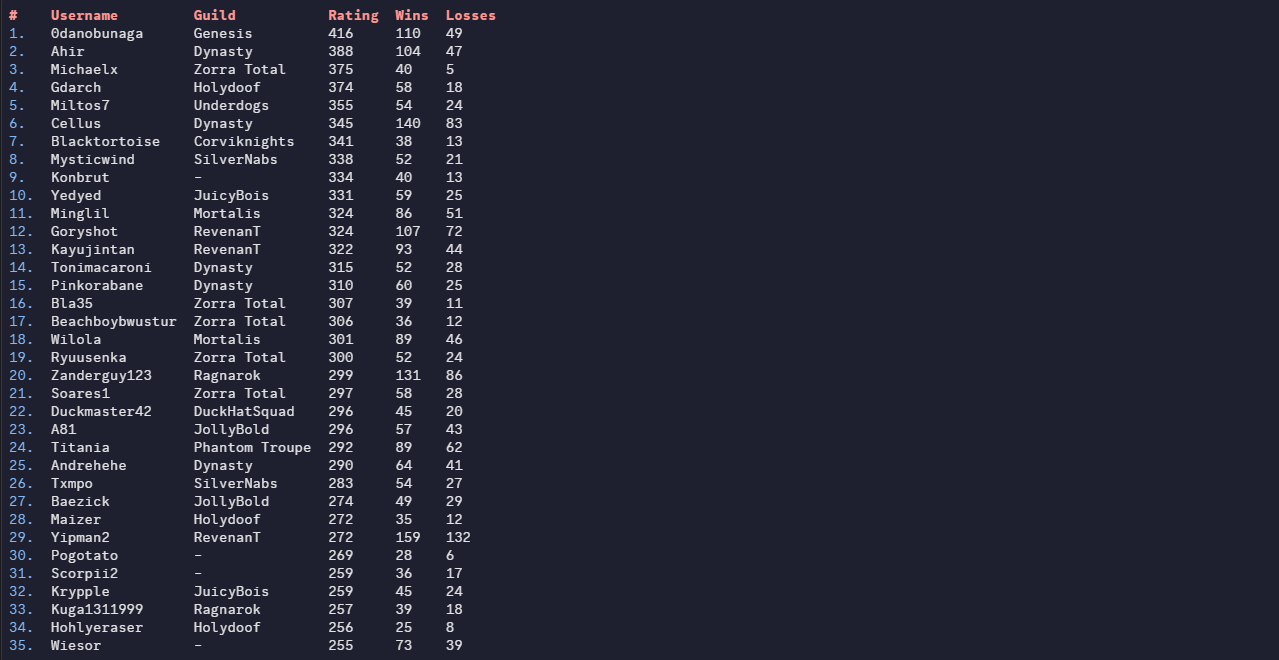
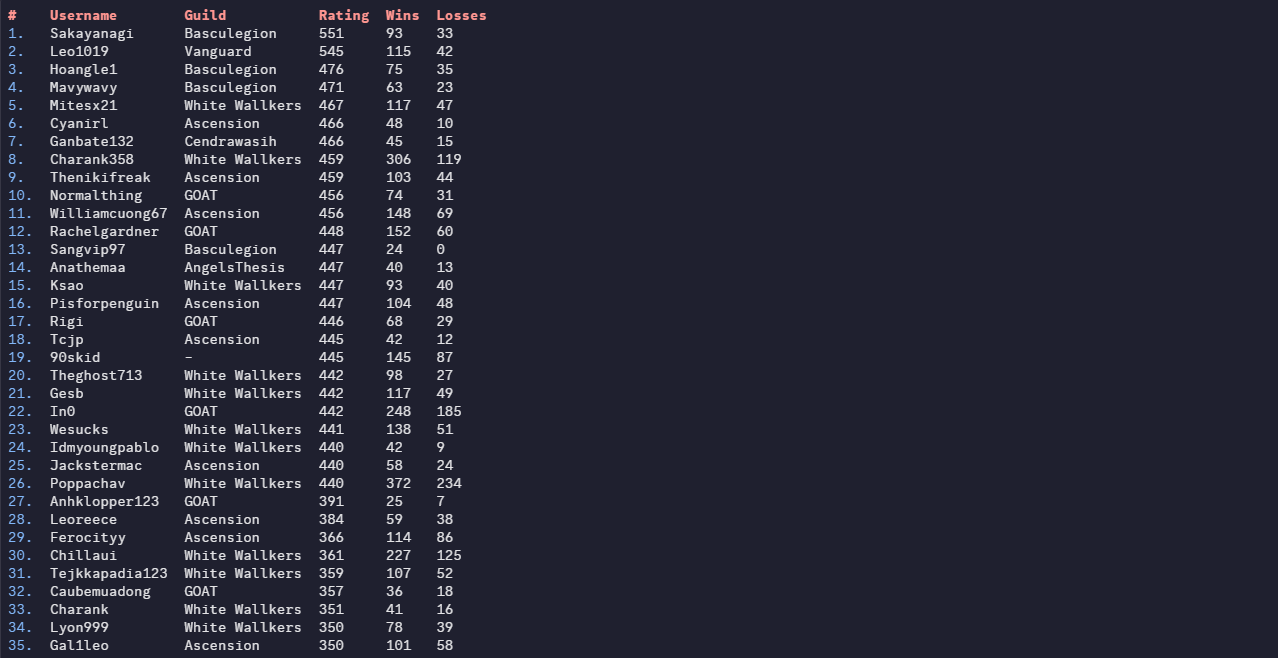
Greetings Trainers, here are the PvP Season results of the month September 2026! Like always, we would like to thank everyone for giving PRO a competitive environment for another season. We would also like to congratulate each player and guild who made it to the top of the ladder, it's not an easy feat reaching the top. We all wish you the best in the next season. Thanks for participating! REWARDS: Normally, 1st Place will receive 600 PvP coins, 2nd place 595, and so on. Top ladder guilds shall receive 25% EXP Boost for the entirety of the next season! Additionally, Top 25 players from each server will receive: Access to Tutor Heaven! An exclusive Victorious Chroma! Special rewards will be distributed every 12 hours to those who reach the top 25 during this PvP Season, the distribution is as follows: 1st Place: 5× PvP Chests 2nd–3rd Place: 4×PvP Chests 4th–10th Place: 3× PvP Chests 11th–19th Place: 2× PvP Chests 20th–25th Place: 1× PvP Chests * Golden PvP Chests have better odds to give exclusive cosmetics! RANKED LADDER RESULTS: Top 25 Silver Ranked Rating (No Tier Ladder) Top 25 Gold Ranked Rating (No Tier Ladder) RANDOM RANKED LADDER RESULTS: Top 25 Silver Random Ranked Rating (No Tier Ladder) Top 25 Gold Random Ranked Rating (No Tier Ladder) RANKED GUILD LADDER RESULTS: Silver Guild Rating Gold Guild Rating Disclaimer: Results may have a marginal difference to ones recorded by other players. The results taken were taken seconds before the ladder was reset, whilst the servers were offline. If you used a Discord bot, or gathered your own screenshots earlier than us, your results may be inaccurate. If you are or aren't on the ladder when you think you should/n't be, please contact Rayziell via Forum Threads. Please note that users with the exact same rating may switched positions during the reward process, we have no influence over that.

-
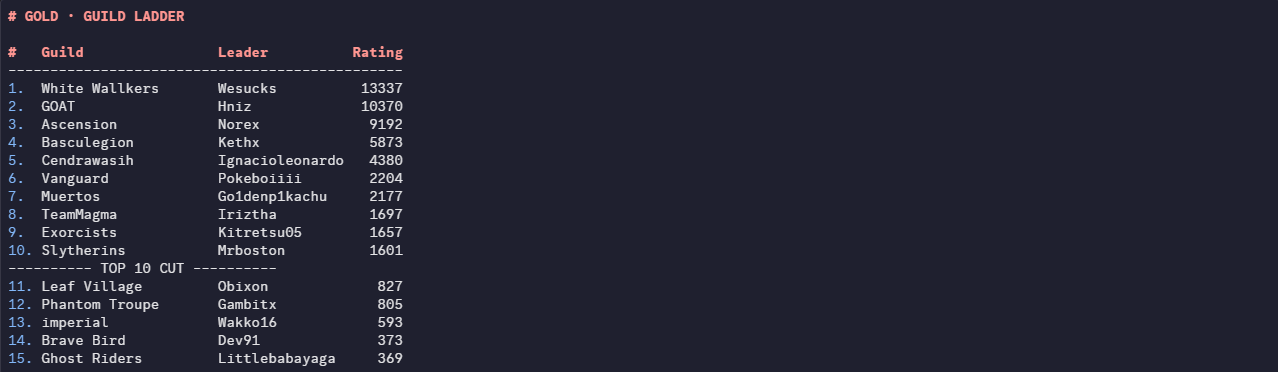
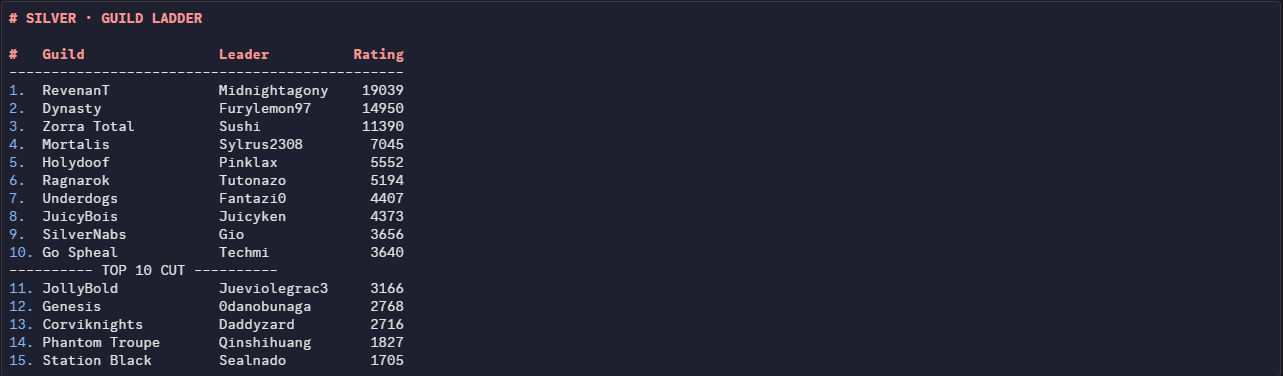
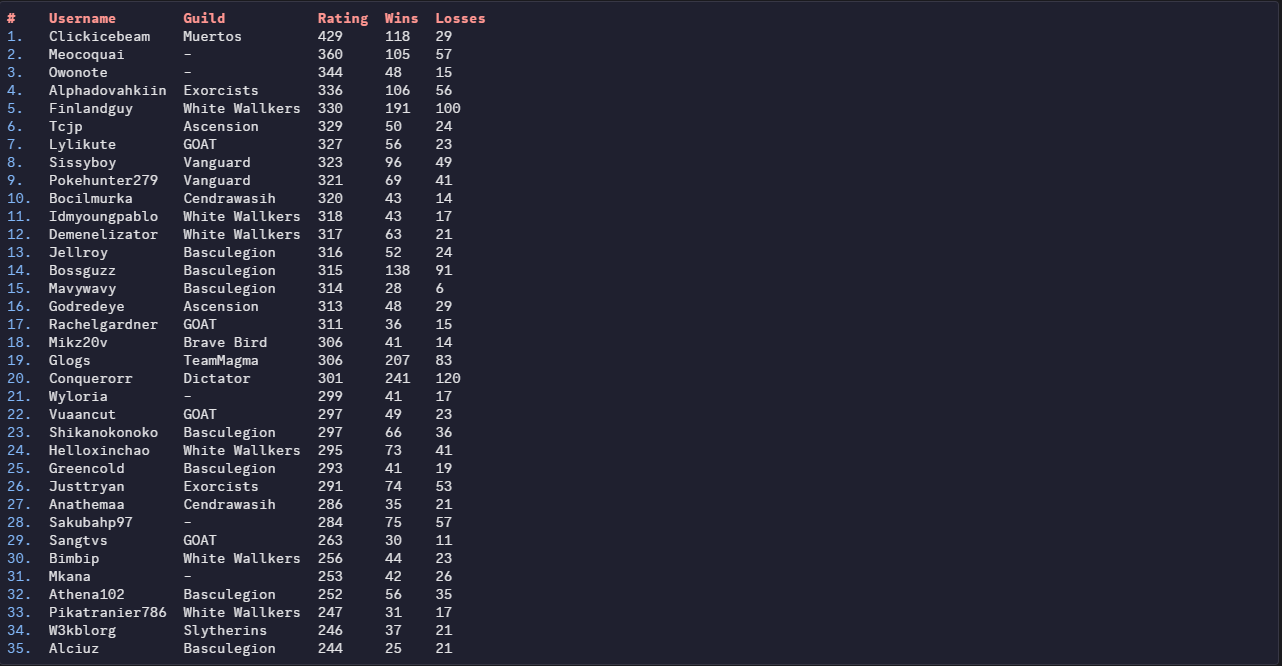
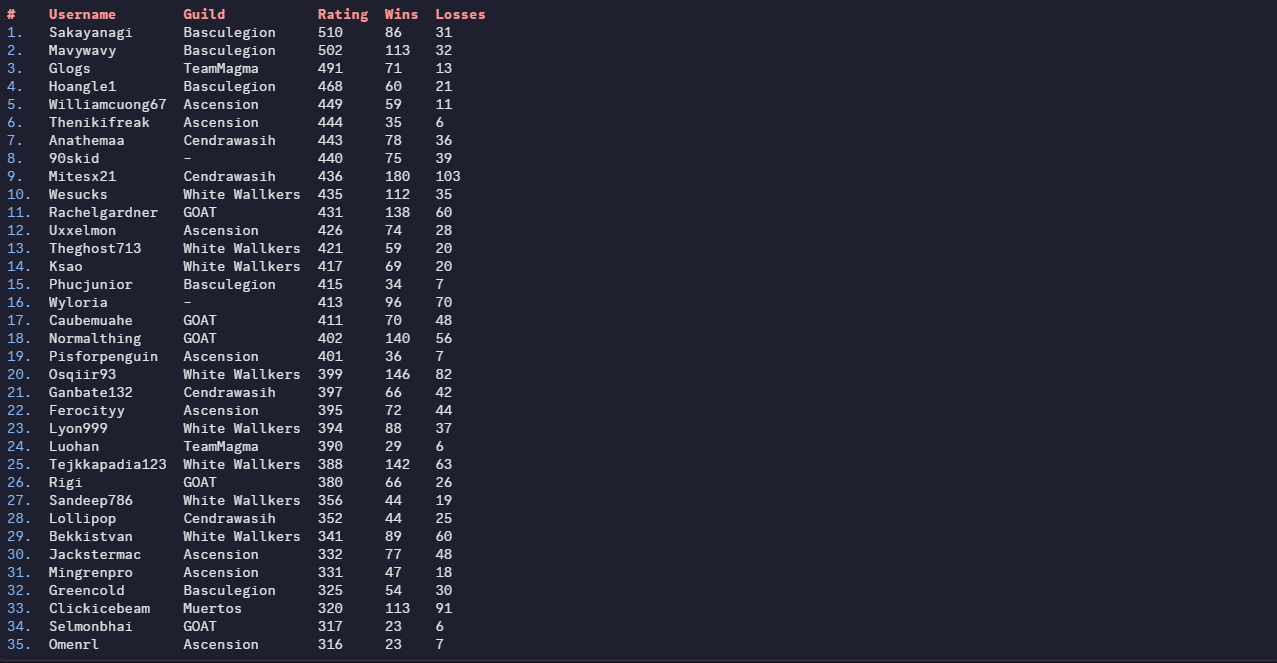
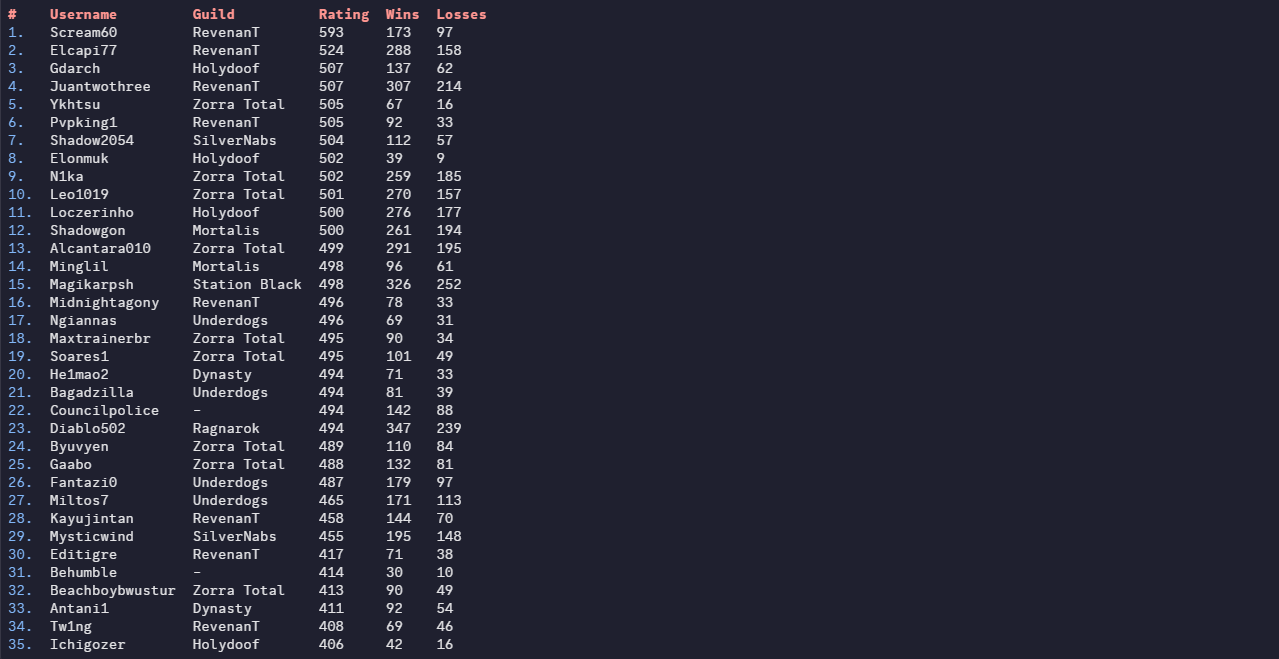
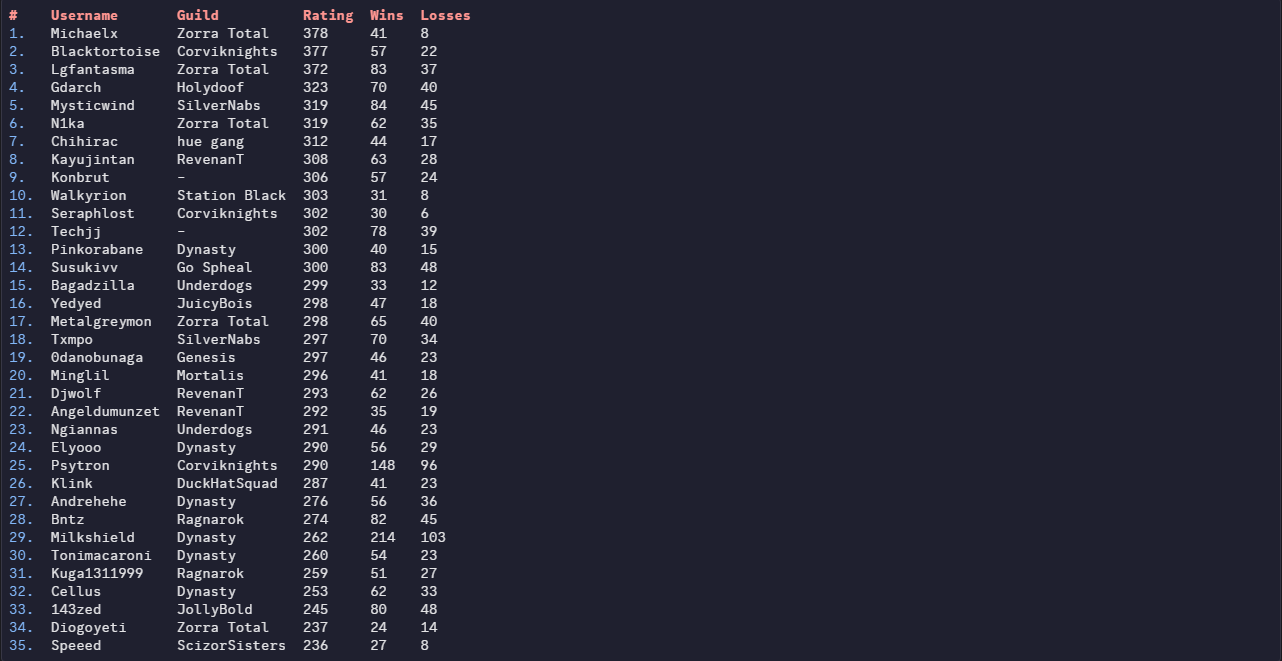
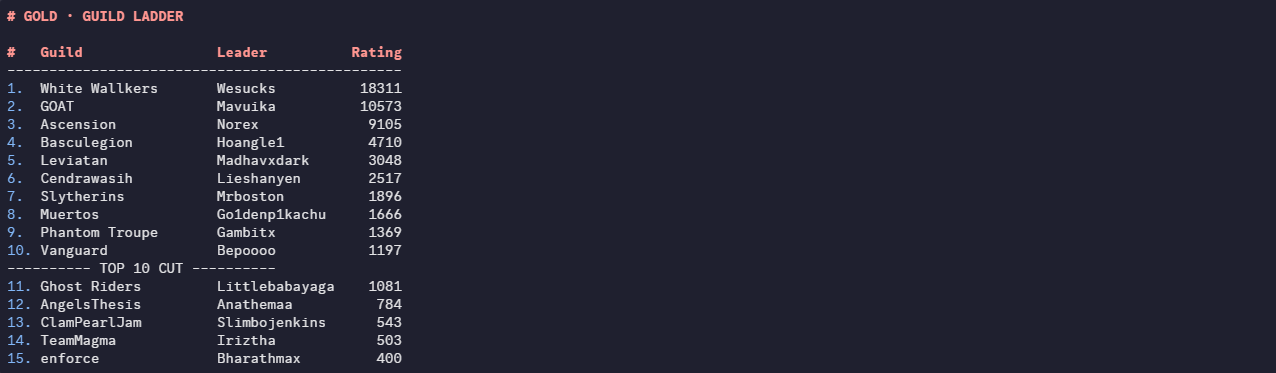
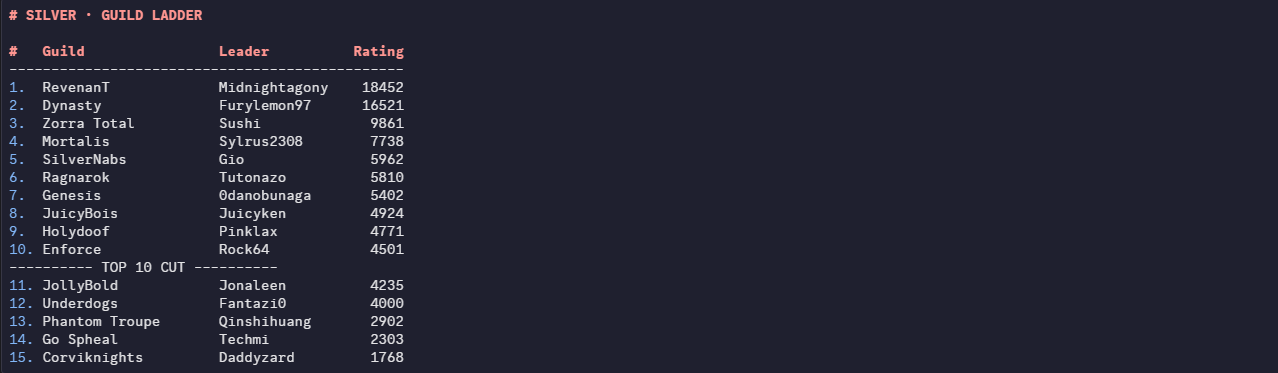
Greetings Trainers, apologies for the delay. Without further ado, here are PvP Season results! Like always, we would like to thank everyone for giving PRO a competitive environment for another season. We would also like to congratulate each player and guild who made it to the top of the ladder, it's not an easy feat reaching the top. We all wish you the best in the next season. Thanks for participating! REWARDS: Normally, 1st Place will receive 600 PvP coins, 2nd place 595, and so on. Top ladder guilds shall receive 25% EXP Boost for the entirety of the next season! Additionally, Top 25 players from each server will receive: Access to Tutor Heaven! An exclusive Victorious Chroma! Special rewards will be distributed every 12 hours to those who reach the top 25 during this PvP Season, the distribution is as follows: 1st Place: 5× PvP Chests 2nd–3rd Place: 4×PvP Chests 4th–10th Place: 3× PvP Chests 11th–19th Place: 2× PvP Chests 20th–25th Place: 1× PvP Chests * Golden PvP Chests have better odds to give exclusive cosmetics! RANKED LADDER RESULTS: Top 25 Silver Ranked Rating (No Tier Ladder) Top 25 Gold Ranked Rating (No Tier Ladder) RANDOM RANKED LADDER RESULTS: Top 25 Silver Random Ranked Rating (No Tier Ladder) Top 25 Gold Random Ranked Rating (No Tier Ladder) RANKED GUILD LADDER RESULTS: Silver Guild Rating Gold Guild Rating Disclaimer: Results may have a marginal difference to ones recorded by other players. The results taken were taken seconds before the ladder was reset, whilst the servers were offline. If you used a Discord bot, or gathered your own screenshots earlier than us, your results may be inaccurate. If you are or aren't on the ladder when you think you should/n't be, please contact Rayziell via Forum Threads. Please note that users with the exact same rating may switched positions during the reward process, we have no influence over that.
-
Greetings Trainers, apologies for the delay. Without further ado, here are PvP Season results! Like always, we would like to thank everyone for giving PRO a competitive environment for another season. We would also like to congratulate each player and guild who made it to the top of the ladder, it's not an easy feat reaching the top. We all wish you the best in the next season. Thanks for participating! REWARDS: Normally, 1st Place will receive 600 PvP coins, 2nd place 595, and so on. Top ladder guilds shall receive 25% EXP Boost for the entirety of the next season! Additionally, Top 25 players from each server will receive: Access to Tutor Heaven! An exclusive Victorious Chroma! Special rewards will be distributed every 12 hours to those who reach the top 25 during this PvP Season, the distribution is as follows: 1st Place: 5× PvP Chests 2nd–3rd Place: 4×PvP Chests 4th–10th Place: 3× PvP Chests 11th–19th Place: 2× PvP Chests 20th–25th Place: 1× PvP Chests * Golden PvP Chests have better odds to give exclusive cosmetics! RANKED LADDER RESULTS: Top 25 Silver Ranked Rating (No Tier Ladder) Top 25 Gold Ranked Rating (No Tier Ladder) RANDOM RANKED LADDER RESULTS: Top 25 Silver Random Ranked Rating (No Tier Ladder) Top 25 Gold Random Ranked Rating (No Tier Ladder) RANKED GUILD LADDER RESULTS: Silver Guild Rating Gold Guild Rating Disclaimer: Results may have a marginal difference to ones recorded by other players. The results taken were taken seconds before the ladder was reset, whilst the servers were offline. If you used a Discord bot, or gathered your own screenshots earlier than us, your results may be inaccurate. If you are or aren't on the ladder when you think you should/n't be, please contact Rayziell via Forum Threads. Please note that users with the exact same rating may switched positions during the reward process, we have no influence over that.
-
Hello, thank you for informing us in advance. After reviewing the situation, I believe that this was indeed a case of two different individuals, so there will be no further action regarding this matter. However, please avoid playing Ranked PvP from the same household or network in the future. Doing so can easily lead to confusion or potential issues, such as accidentally matching against each other, which could result in Rule #4 violations if not handled correctly. To prevent any misunderstandings, please make sure this does not happen again. However, if the exact same situation occurs again, significantly more severe action may be taken, and the case will be reviewed much more strictly. As this has already happened once, I would no longer be able to confidently assume that you and Axoltboiz are in fact two different individuals. As you are aware from your previous Illegitimate Rank Boosting infraction, playing on an account that you do not rightfully own is a bannable offense. Since you already have a first infraction and even a second one on record, any further violation would likely result in considerably more severe punishment. Without a chance to appeal even. For that reason, please make sure this situation does not happen again. Kind Regards, Rayziell
-
Greetings Trainers, apologies for the delay. Without further ado, here are PvP Season results! Like always, we would like to thank everyone for giving PRO a competitive environment for another season. We would also like to congratulate each player and guild who made it to the top of the ladder, it's not an easy feat reaching the top. We all wish you the best in the next season. Thanks for participating! REWARDS: Normally, 1st Place will receive 600 PvP coins, 2nd place 595, and so on. Top ladder guilds shall receive 25% EXP Boost for the entirety of the next season! Additionally, Top 25 players from each server will receive: Access to Tutor Heaven! An exclusive Victorious Chroma! Special rewards will be distributed every 12 hours to those who reach the top 25 during this PvP Season, the distribution is as follows: 1st Place: 5× PvP Chests 2nd–3rd Place: 4×PvP Chests 4th–10th Place: 3× PvP Chests 11th–19th Place: 2× PvP Chests 20th–25th Place: 1× PvP Chests * Golden PvP Chests have better odds to give exclusive cosmetics! RANKED LADDER RESULTS: Top 25 Silver Ranked Rating (No Tier Ladder) Top 25 Gold Ranked Rating (No Tier Ladder) RANDOM RANKED LADDER RESULTS: Top 25 Silver Random Ranked Rating (No Tier Ladder) Top 25 Gold Random Ranked Rating (No Tier Ladder) RANKED GUILD LADDER RESULTS: Silver Guild Rating Gold Guild Rating Disclaimer: Results may have a marginal difference to ones recorded by other players. The results taken were taken seconds before the ladder was reset, whilst the servers were offline. If you used a Discord bot, or gathered your own screenshots earlier than us, your results may be inaccurate. If you are or aren't on the ladder when you think you should/n't be, please contact Rayziell via Forum Threads. Please note that users with the exact same rating may switched positions during the reward process, we have no influence over that.