New Trade Zone
Trade Zone is now live
Use the new Trade Zone for auctions and instant-price trades so Pokemon and item offers are easy to find.


Ignaz1989
Suspended
-
Joined
-
Last visited
-
WTB: Shiny Calm Drowzee and Shiny Modest/Bold Jigglypuff (must have competitive abilities.
-
SHINY PRIMEAPE LVL 60 VITAL SPIRIT Insta: 550k Payments: Pokedollers, IV Reroll 500k, CC 370k

-
congrats @Raf07 on winning the auction whenever you're ready to trade.
-
Bump
-
Ignaz1989 started following Reintroduce PayPal
-
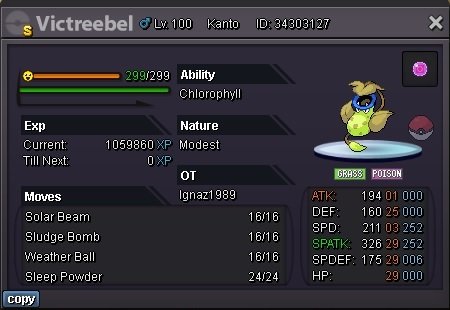
START OFFER 500k MIN BID 50k INSTA BUY 5 M THE AUCTION ENDS 30H NEXT FIRST BID PAYMENTS : Cc = 370k Rr = 500k POKEDOLLAR
-
i didn´t meet him just go there why should i lie ? just came cave didn´t see anything there
-
i just go to summit and climbed up waterfall clicked the rock but no rotom appeared is that normal?! seems to be a bug pls help staff team!
-
can you make a list of the Abandoned Pokémon here in the forum where you can find them exactly? not all pokemon are listed per wiki either, only some of the sevii island and other hidden islands are missing the Abandoned Pokémon !
-
Admin Can't you reintroduce paypal because I will donate over 800€ immediately and I don't have a credit card?! :D
-
-
wtb very epic ivs rattata Adamant/Guts Pay 45k (non-Shiny) and 175k for (Shiny) / 140k for (Pink) pm me here or discord EmperorKaido#4077
-
1.7m
-
1.5m offer
-
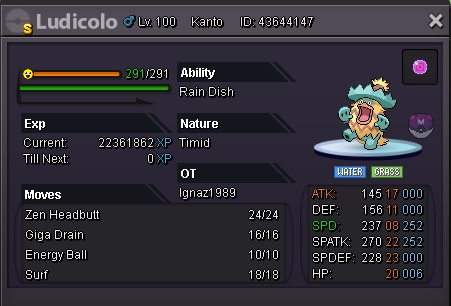
Insta: 2m Note: Without Lifeorb Accepting Cc = 380k Rr = 700k MB = 40K Pokedollars
-
bump