




New Trade Zone
Trade Zone is now live
Use the new Trade Zone for auctions and instant-price trades so Pokemon and item offers are easy to find.

Adamlxwis
Registered User
-
Joined
-
Last visited
Everything posted by Adamlxwis
-
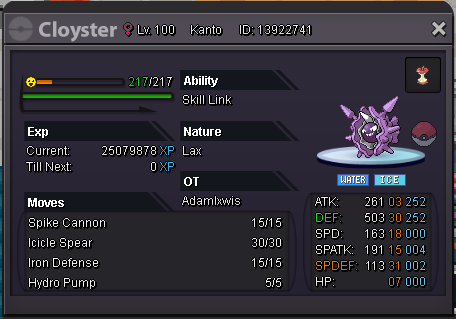
IGN: Adamlxwis Server: Silver Hi, my IGN is Adamlxwis and several months months ago I traded two of my Pokémon to my brother (IGN: Ryanlewis - silver server) to complete the Johto E4, of which he did, however he then proceeded to the next region accidentally, without sending the Pokémon back to me - screenshots of Pokémon detailed below. There wasn't any chats involved as he asked me in person, so I appreciate this may be a stumbling block, if so I can provide much more detail. He no longer plays PRO so I have his account details, but prefer not have to complete his current region in order to trade them back to me. I've only recently returned to PRO myself, so it would be super helpful if I could have these Pokémon back to help me to beat Horon. I'm struggling! Lol.

-
Re: What shinies u have?? <t>I own a shiny Muk :)</t>
-
Welcome to PRO :)
-
Thanks for all the great replies. I appreciate it!
-
Hello :) My in-game name is called AdamLxwis I thought I'd make a small introduction even though I've been playing PRO since May now! I'm currently in the Hoenn region so if you see me, feel free to chat! :) I intend to be apart of this community for a very long time as I haven't got bored since the day I started! Keep up the great work. Adam