




New Trade Zone
Trade Zone is now live
Use the new Trade Zone for auctions and instant-price trades so Pokemon and item offers are easy to find.

Alitiz
Registered User
-
Joined
-
Last visited
Everything posted by Alitiz
-
Player name: alitiz Showdown name: ifidontkillhim Server: silver Rank on ladder: 15
-
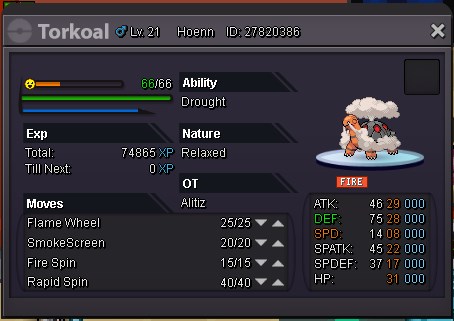
Hi. Starting offer is 250k and insta 400k. The auction ends in 24 hours.
-
Ok so the winner is Fadoka. Thank you all. The thread can be locked.
-
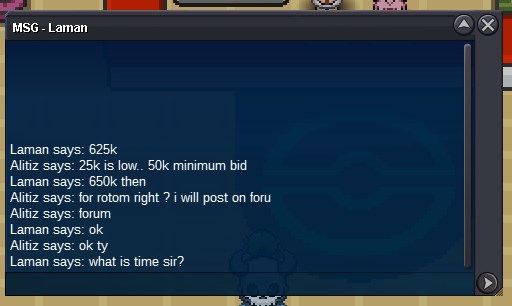
b.o. 650k from laman
-
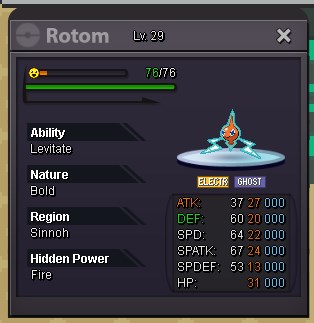
Wts this hp fire rotom. Starting offer is 600k and insta 1.2m. The auctions will end in 48 hours from now or whenever i decide that one offer is good. Thank you.
-
Count me in. GL.
-
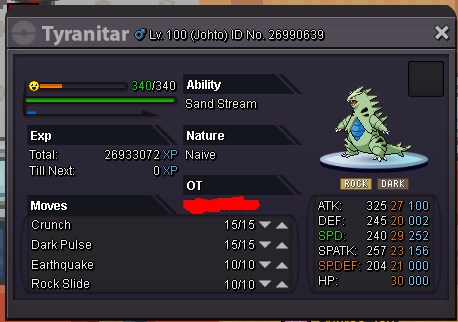
Hi. Starting price for tyranitar is 600k. Insta price 1.2m. The auction will end in 2 days from now. If i dont like the best offer i can keep the pokemon and stop the auction.
-
sold in game
-
-
2.7 for akalazam
-
Hi. Starting price is 2.7m. Insta 3.2m. You can message me in-game too.

-
NICE!! Amazing shinies count me in gl!
-
PRO Username: alitiz Have you looked at the FAQ to solve your issue?: Yes On which server issue happened: RED What have you done before the problem was there? What have you already tried to solve the problem? i have tried every thing restart,re download 32 and 64 bit everything the same mesage apears "user already logged in" what sould i do? Description and Message