New Trade Zone
Trade Zone is now live
Use the new Trade Zone for auctions and instant-price trades so Pokemon and item offers are easy to find.

Chaunky
Registered User
-
Joined
-
Last visited
-
1. My name online is Chaunkykong 2. 150 hours played 3. Cubone 4. 31 How would I contact you to join the guild?
-
Logan, We are both offline at this time. Thank you for your help
-
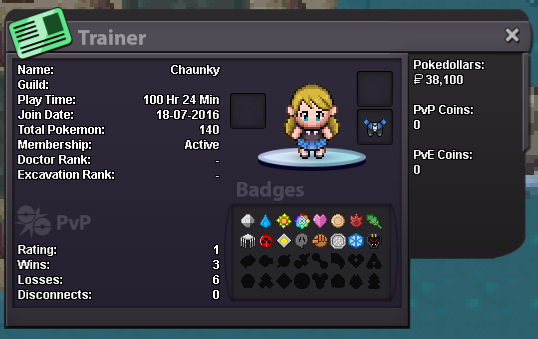
Greeting and salutations to everyone in Eternity! Thank you for the chance to join your guild! I wanted to take some time to tell you about myself, and I hope that I would be able to join your ranks! I am looking to join Eternity because I have been playing PRO for a while now, and I really want to be part of a community within this game. I have had a ton of fun so far on my own, but I really think with MMO's the interaction with others is what makes them special. My real name is Rodney but in game I go by Chaunky I can speak English and French. My dicord account is: Chaunky#4340; and I have a second monitor so I am always on discord when I am online. My goal is to continue on the within the game, I am currently in the second round of the elite 4. As more long term goals, I would like to get involved with the PVP scene once I have a full team of 100 pokemon. Then also to help new trainers and guildies through the game with tips, tricks or any other ways I can assist them. As I have seen this community be extremely generous to me, and I would like to give back. You will find my trainer card attached below. Thank you for taking the time to read this. Feel free to contact me in game, or via discord. I look forward to joining the community of Eternity. ~Chaunky