New Trade Zone
Trade Zone is now live
Use the new Trade Zone for auctions and instant-price trades so Pokemon and item offers are easy to find.

Nayasky
Registered User
-
Joined
-
Last visited
Everything posted by Nayasky
-
I can't add you bro, add me Nayaski#2497. Looking forward hearing from you!
-
Auction canceled.
-
Insta lowered to 1.2m.
-
Thanks ❤
-
Haha, sorry forgot to mention it. Auction ends 3days after first bid
-
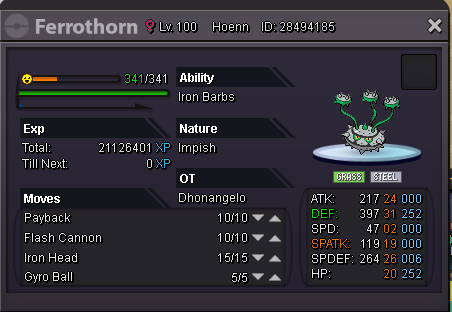
Buyer will get the ferro with pvp moveset. ❤
-
C.o 850k by Lokigodofchaos (Retracted) insta 1.2m Min bid 100k cc as 250k - Iv reroll as 550k Fake offers will be reported. Offers ingame will be screenshotted and posted here.
-
I got a 20+ I think with hp rock :D (Relaxed)
-
550k goodra
-
-
Hi! So I did my digspots like 2 days ago, And I see they've been reset already. I'm sure I checked that spot when I was doing my digs. Yesterday another guy said that his digs were reset after one day. (Can I do my digspots?) Kind regards Booty
-
Bump, nice conk
-
Bump, Nice shiny bro
-
bumpie bump, Nice snor!
-
Auction canceled.
-
-
Give me your discord tag.
-
Regarding your entries to join the guild, Add me on discord ( Nayaski#2497) Sorry for the late response. Hope to see you!
-
-
Dope Shop bro
-
What is the hidden power?
-
-
I think that quest doesnt count, afaik they changed the poke which means you do not receive a ticket.
-
-
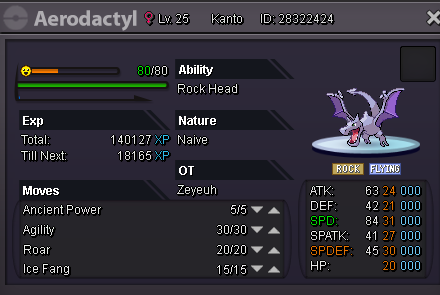
Starting offer: 2.5m Min raise: 100k Insta: 4m Coin capsules count as 250k. auction ends 2days after first bid.