




New Trade Zone
Trade Zone is now live
Use the new Trade Zone for auctions and instant-price trades so Pokemon and item offers are easy to find.

Adiiiiiit
Registered User
-
Joined
-
Last visited
Everything posted by Adiiiiiit
-
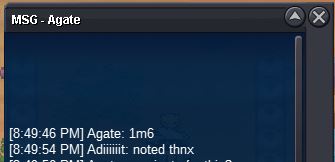
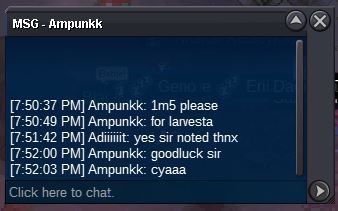
Sold both zorua and larvesta to @Agate Forgot to take screenshot Will try to trade again for screenshot Ty!
-
Bump!
-
Zorua start noted https://www.tickcounter.com/countdown/3539533/zoruaLarvesta Started https://www.tickcounter.com/countdown/3538974/larvesta
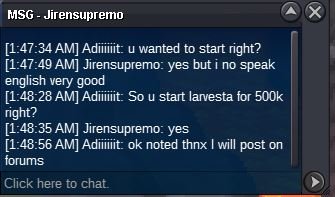 Starting Bid: 500k (Larvesta) c.o 1m6 Min bid: 100k No Insta Duration: 36 hours from start bid https://www.tickcounter.com/countdown/3538974/larvesta Starting Bid: 300k (Zorua) c.o 300k Min bid: 100k No Insta Duration: 36 hours from start bid https://www.tickcounter.com/countdown/3539533/zorua Payment Methods: Pokedollars IV Reroll Ticket = 660K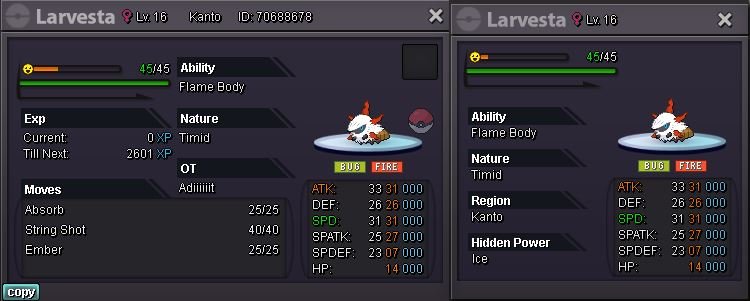
 GG guys!!
.png.fd4fb502fbe1e8f66279dbe37b85ff77.png) Final Bump 3hrs left^^noted n updatedBumpnoted n updatedBumpnoted n updatedBump around 4 days leftBump around 5 days leftBump 6 days left^^noted and updatednoted!noted bro https://www.tickcounter.com/countdown/3508126/my-countdownStart bid: 1m Min raise: 1m No insta 7 days after start bid c.o 85m5k Accepted Payments: -Pokedollars -CC (360k/ea) - Iv reroll (660k/ea) Countdown-->https://www.tickcounter.com/countdown/3508126/my-countdown
Final Bump 3hrs left^^noted n updatedBumpnoted n updatedBumpnoted n updatedBump around 4 days leftBump around 5 days leftBump 6 days left^^noted and updatednoted!noted bro https://www.tickcounter.com/countdown/3508126/my-countdownStart bid: 1m Min raise: 1m No insta 7 days after start bid c.o 85m5k Accepted Payments: -Pokedollars -CC (360k/ea) - Iv reroll (660k/ea) Countdown-->https://www.tickcounter.com/countdown/3508126/my-countdown.png.8bcf11d1699a1ddd5d22024bcb9361a0.png) Hi I'm online now where to come?100kGible Scyther Charmander
Hi I'm online now where to come?100kGible Scyther Charmander


Account
Navigation
Search
Configure browser push notifications
Chrome (Android)
- Tap the lock icon next to the address bar.
- Tap Permissions → Notifications.
- Adjust your preference.
Chrome (Desktop)
- Click the padlock icon in the address bar.
- Select Site settings.
- Find Notifications and adjust your preference.
Safari (iOS 16.4+)
- Ensure the site is installed via Add to Home Screen.
- Open Settings App → Notifications.
- Find your app name and adjust your preference.
Safari (macOS)
- Go to Safari → Preferences.
- Click the Websites tab.
- Select Notifications in the sidebar.
- Find this website and adjust your preference.
Edge (Android)
- Tap the lock icon next to the address bar.
- Tap Permissions.
- Find Notifications and adjust your preference.
Edge (Desktop)
- Click the padlock icon in the address bar.
- Click Permissions for this site.
- Find Notifications and adjust your preference.
Firefox (Android)
- Go to Settings → Site permissions.
- Tap Notifications.
- Find this site in the list and adjust your preference.
Firefox (Desktop)
- Open Firefox Settings.
- Search for Notifications.
- Find this site in the list and adjust your preference.