




New Trade Zone
Trade Zone is now live
Use the new Trade Zone for auctions and instant-price trades so Pokemon and item offers are easy to find.

Siryukii
Registered User
-
Joined
-
Last visited
Everything posted by Siryukii
-
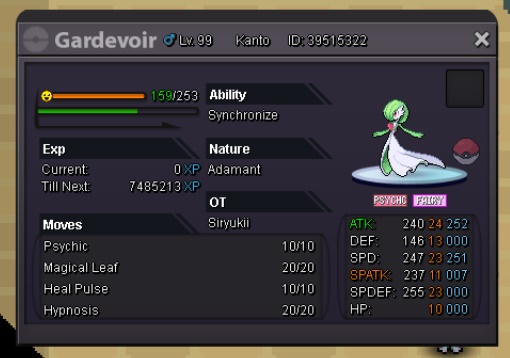
Good night, good morning or good afternoon ... I don't know. Anyway. I need help with a mistake made by me. I accidentally clicked to evolve my pokemon into Gardevoir, but it was actually meant to be Gallad. How can you make him go back to being Kirlia?
-
NAME CHANGE Username: Pvittar New Username: Frosch or Siryukii if can't put ''Frosch'' Server to charge the money from: Silver
-
1. What's your Player name (IGN)? Pvittar 2. Number of hours played? 678 Hr 3. What's your favorite Pokemon? Ambipom 4. What country are you from? Brazil 5. How old are you? 21
-
oh right oh righ thank u very much for this information :) I dont know about it.... lets go to this quest again.... bah. I'm sorry for ur time.
-
Today before to enter in CC i spoke with the Pokestops in front of CC and he give me 2 candies ok, I finished to lv up my Flabebe and I opened my bag and my rare candies gone. What??? That's a bug from breezy twon or something like that? 'cause I bought every in there. Around 90 candies I think. Your guys can do something or see whats going on? I really need my candies back or I'll stop to play your game. My nick is: Pvittar Server: Silver
-
In-game name: Pvittar Server: Silver Pokemon ID and/or screenshot: 34711760 I have one magnemite lv 98 and I used one RC and I forget hes holding everstone.... :/
