New Trade Zone
Trade Zone is now live
Use the new Trade Zone for auctions and instant-price trades so Pokemon and item offers are easy to find.

Vratz
Registered User
-
Joined
-
Last visited
-
Ingame name:Vratz Server:Blue Timezone: GMT+2 Would need help with a trade evolution, thank you already! :)
-
Nice gliscor! It's in the same league as the one I caught myself a while ago :Grin: . I couldn't add you on discord though. Can you double check your name? Thanks! Hey, for some reason it changed. Its Vratz #9762 now This one right? https://imgur.com/gallery/pnITo
-
Hey, have been playing for almost half a year and gathered bunch of quite epic pokemons,trademark being my epic h.a careful gliscor: https://i.imgur.com/LuWxq6e.jpg I am active and friendly player and currently have 370 ingame hours, growing each day. I think i would enjoy being your member and you would also benefit from me. Also have discord: vratz#1754 My trainer card: https://i.imgur.com/AnoDCVE.jpg
-
I accidentially tapped run too, wish they would give a second chance, would even pay for it :/ Not really the best christmas present :(
-
Uhh still a total noob on this game and this is my first sale post, what you mean by that? I dont really know the value of it so i put 6m to start since got that offered already ingame
-
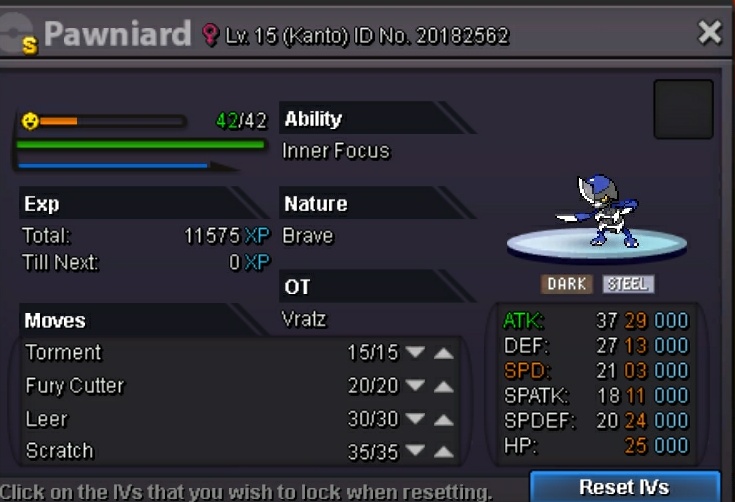
Looking to sell this shiny pawniard, got a decent attack. Current bid 10m by pizzaiolo Insta 20m Auction time untill 26.11.2017 8:00 pm gmt+2