




New Trade Zone
Trade Zone is now live
Use the new Trade Zone for auctions and instant-price trades so Pokemon and item offers are easy to find.

Lasthope4
Registered User
-
Joined
-
Last visited
-
Lasthope4 changed their profile photo
-
Lasthope4 Gold 4th GMT +6
-
Text me in game or dm me in discord when you are online Discord => lasthope4
-
What about Darumaka? Didn't I win that one as well
-
Lasthope4 Gold +6 5th
-
80k for Larvesta
-
60k for Larvesta and Darumaka
-
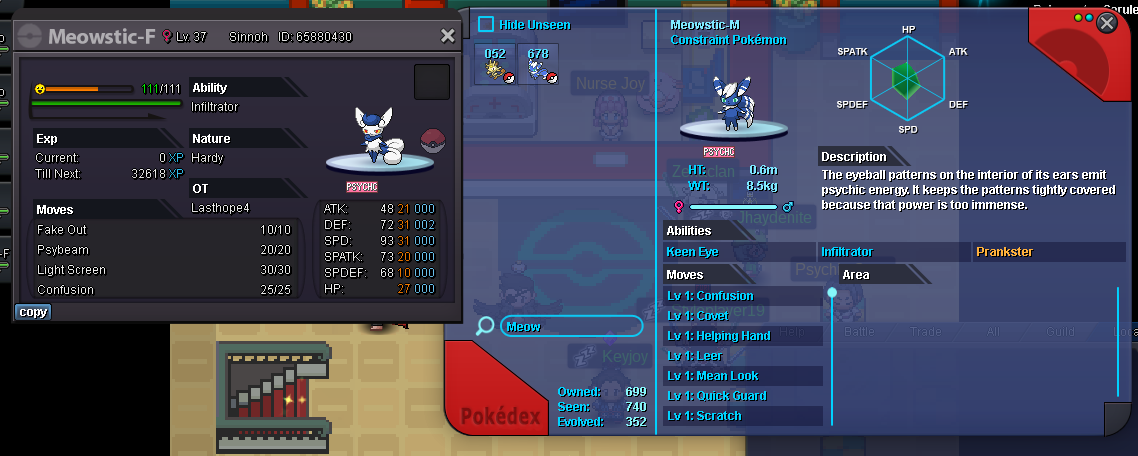
I found this doing evolutions. Meowstic-M has a pokedex entry where on the other hand Meowstic-F simply does not exist in the Pokedex. I evolved a female Espurr into Meowstic-F and did not get any evolution data for it, the number stayed the same. So either we are missing the entry of Meowstic-F in the Pokedex or it should be only "Meowstic" in the Pokedex regardless of gender (That's how it is in the original nintendo pokedex).
-
Username: Lasthope4 Server: Gold Country/Timezone: +6
-
Adamant Tyranitar Sold
-
Bump
-
You should be able to now, that's my bad
-
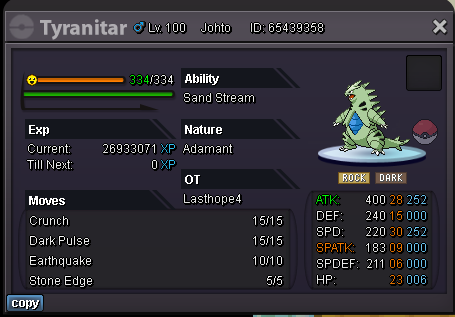
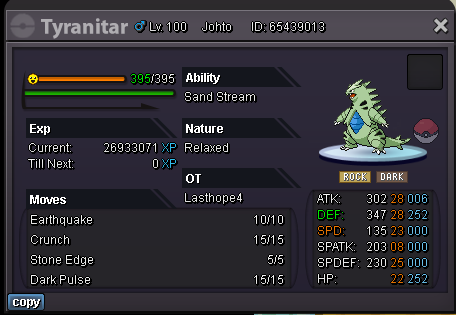
Adamant Epic Tyranitar - 1.2M Relaxed Epic Tyranitar - 800K The price is negotiable, reply here or hit me up on my discord Lasthope4#7216 to have a conversation. Have a good day.
-
Player name: Lasthope4 Showdown name: HerLasthope4 Server: Silver. Rank on ladder: 3rd.
-
YES
-
Player Name: Lasthope4 Showdown Name: HerLasthope4 Server: Silver. Rank on Ladder: 21. Good luck to all the players

