




New Trade Zone
Trade Zone is now live
Use the new Trade Zone for auctions and instant-price trades so Pokemon and item offers are easy to find.

Smokeer
Registered User
-
Joined
-
Last visited
Everything posted by Smokeer
-
I created a topic about email recovery on 04/07, and so far I have not had a response.
-
Thank you for your help
-
Why the paras is not learning spore?
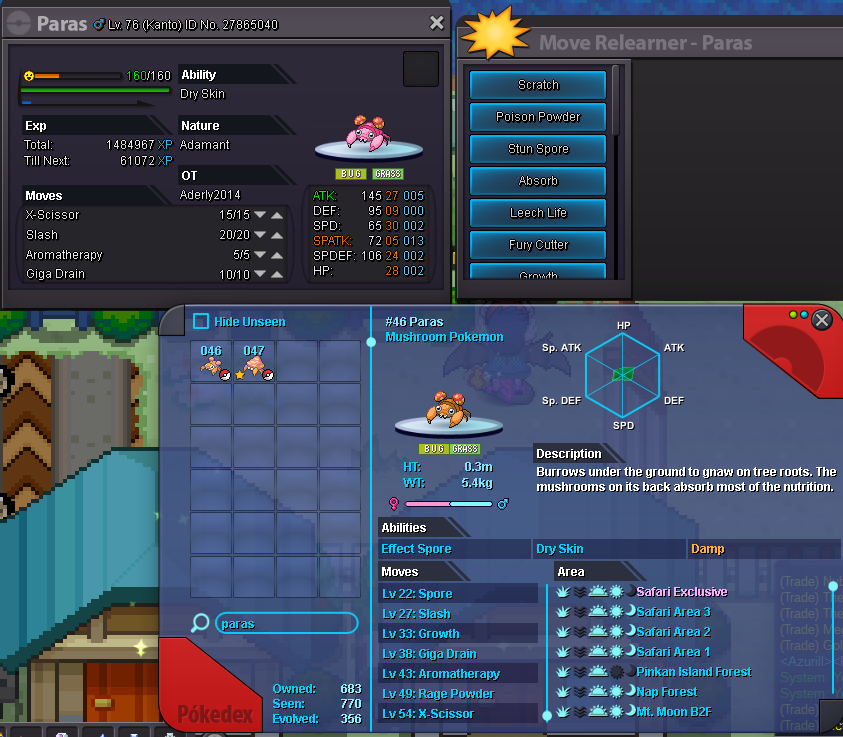
-
Re: wts ha ada dratini <t>i start</t>
-
You must have lost some battle for npc.
-
Re: Chandelure epic <t>bump.</t>
-
Re: Chandelure epic <t>bump.</t>
-
Re: Chandelure epic <r><QUOTE author="BrianYang" post_id="484594" time="1514015559" user_id="1745325"><s> </e></QUOTE> auction ends<br/> <br/> 24, 2017 7:52 am</r>
-
-
pm in-game
-
i buy salamence.
-
auction begins after first offer It was made in " Thu Dec 14, 2017 4:00 pm " you offered Sat Dec 16, 2017 4:24 pm The auction time is over
-
Re: Chansey and Hawlucha <r><QUOTE author="herrieisbeest" post_id="480868" time="1513441445" user_id="1044028"><s> </e></QUOTE> chansey sold sry</r>Re: Chansey and Hawlucha <t>Bump.</t>Re: Chansey and Hawlucha <r><QUOTE author="WHatdesu" post_id="480134" time="1513296868" user_id="1039365"><s> </e></QUOTE> yea</r>Re: Chansey and Hawlucha <t>bump.</t>Re: Chansey and Hawlucha <t>Bump..</t>bids ends 48 hours after 1st bid SOLD SOLDRe: GODLY TYRUNT ( 3 Days Left ) <t>fake sell</t>Re: ❆⛄✨WTS PVP Eelektross✨⛄❆ <t>i pay 250k</t>i offer 250k550k kabuto450k kabutoi start kabuto