




New Trade Zone
Trade Zone is now live
Use the new Trade Zone for auctions and instant-price trades so Pokemon and item offers are easy to find.
All Activity
Past hour
-
Maextpm joined the community
-
Blackfrost003 joined the community
-
Akongani joined the community
Today
-
Dummbeith joined the community
-
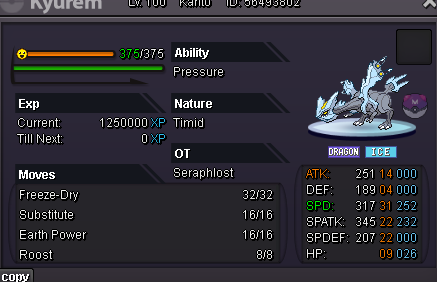
Heathlife joined the communityhey, I just used multiple rrs on my kyurem and applied 1 on the rerolled ivs on it. However I wanted to change back to the original ivs which I had before rerolling but in the previous ivs- its showing the ivs i got during reroll instead of the original iv I had before I started rerolling. Is there no way to get the original ivs back?? I only applied this iv on my kyurem and rejected all others
 Bitsabittarded joined the communityMt24 joined the communityKlein922 joined the communityGaligou joined the communityVaryflood joined the communitythanks for shopping! <3
.png.b0a023b581fc25714a4ed745789767e6.png) sure! i’m online nowHi @Bitterblade I am still having trouble with that quest. I have tried to talk with all 5 black cap thief and the condition still the same. I am still getting same response from npc. Any help with be much appriciated Thank youHi wtb darkrai egg mount 700kI think i know the problem now thank you so much for helping.. thread can be closethanks for shopping! <3
sure! i’m online nowHi @Bitterblade I am still having trouble with that quest. I have tried to talk with all 5 black cap thief and the condition still the same. I am still getting same response from npc. Any help with be much appriciated Thank youHi wtb darkrai egg mount 700kI think i know the problem now thank you so much for helping.. thread can be closethanks for shopping! <3.png.301cfe0788a5e461615b6120f0e22d67.png)
Yesterday
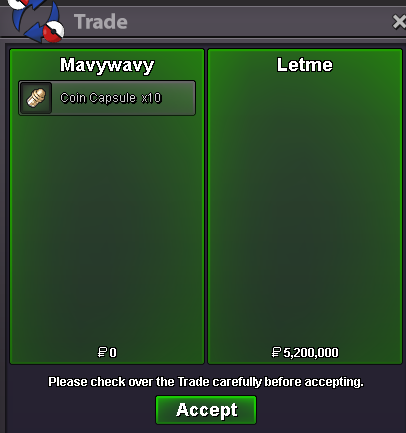
Good day @Vicrow Apologies for the delay in response. I am glad to hear that you were able to get this resolved! As stated, this issue usually occurs with your anti-virus is blocking files. With that being said, I will be closing this thread now. If you have any further questions or concerns, do not hesitate to reach out. Regards, BitterbladeGood day @Kingbilly I apologize for the delay in response. As stated, guild renaming is unavailable. This update was announced in May 2025 and can be found here. I apologize for any inconvenience this may have caused. That aside, I see you have created a new guild. With that being said, this thread is now resolved and will be closed. If you have any further questions or concerns, do not hesitate to reach out. Good luck with your new guild! Regards, BitterbladeGood day @Hhtoaya I apologize for the issue you were experiencing. There is currently no known issue with the information presented in the Pokedex not aligning with the in-game encounters. Overall, the encounters come down to RNG and, at times, that RNG is not in our favor. On a route with many different spawns, that pool of possibilities increases. I hope this information finds you well and look forward to hearing from you. Regards, BitterbladeGood day @Bntz Are you still experiencing issues with the Victini Quest? I look forward to hearing from you. Regards, BitterbladeGood day @Ramzi2525 Are you still experiencing these issues? I look forward to hearing from you. Regards, BitterbladeGood day @Upsun Are you still experiencing these issues? I look forward to hearing from you. Regards, BitterbladeGood day @Kairu I see that you have been successfully able to log in. This is fantastic news! With that being said, I will be closing this thread now. If you have any further questions or concerns, do not hesitate to reach out. Regards, BitterbladeGood day @Lgxt As this thread has not received a response in some time, I will be closing it. If you continue to have these issues, please feel free to make a new thread. Regards, BitterbladeGood day @Rxce I apologize for the delay in response. Are you looking to have a trade evolution assisted with? If not, could you elaborate further on what you are need assistance with? I look forward to hearing from you. Regards, BitterbladeProblem Solved Thank youGood day @Bronzywinter179 I see that you were able to move freely in the game, this is great news! With that being said, I will be closing this thread. If you have any further questions or concerns, do not hesitate to reach out. Regards, BitterbladeGood day @Gangstersus It appears that you were able to access the Trade Zone. That is fantastic news. With that being said, I will be closing this thread now. If you have any further questions or concerns, do not hesitate to reach out. Regards, BitterbladeI defeated the two summer event guardians, but they didn't give me the mount as a reward. Can someone help me, please?Good day @Juliebee I apologize for the issues you are experiencing. After speaking with the Team Aqua Grunt that is outside of Kalijodo Cave, you will need to head to Mt. Summer and do the following things: Fight and defeat the Magma Grunt Leader Use the Mystical Core to stop the eruption (done through using the interacting with the blue rocks in each cave past the rock smashable rocks). If you have done both of these things, can you please provide me a screenshot of the dialogue given to you by the Magma Grunt Leader (if present) as well as any dialogue that may appear after interacting with the blue rocks in each cave. Furthermore, if you would like a guide to double check your steps while we sort this issue out, feel free to read through the Vulcan Island Quest Part 1 guide. I look forward to hearing from you. Regards, BitterbladeBump











Account
Navigation
Search
Configure browser push notifications
Chrome (Android)
- Tap the lock icon next to the address bar.
- Tap Permissions → Notifications.
- Adjust your preference.
Chrome (Desktop)
- Click the padlock icon in the address bar.
- Select Site settings.
- Find Notifications and adjust your preference.
Safari (iOS 16.4+)
- Ensure the site is installed via Add to Home Screen.
- Open Settings App → Notifications.
- Find your app name and adjust your preference.
Safari (macOS)
- Go to Safari → Preferences.
- Click the Websites tab.
- Select Notifications in the sidebar.
- Find this website and adjust your preference.
Edge (Android)
- Tap the lock icon next to the address bar.
- Tap Permissions.
- Find Notifications and adjust your preference.
Edge (Desktop)
- Click the padlock icon in the address bar.
- Click Permissions for this site.
- Find Notifications and adjust your preference.
Firefox (Android)
- Go to Settings → Site permissions.
- Tap Notifications.
- Find this site in the list and adjust your preference.
Firefox (Desktop)
- Open Firefox Settings.
- Search for Notifications.
- Find this site in the list and adjust your preference.