New Trade Zone
Trade Zone is now live
Use the new Trade Zone for auctions and instant-price trades so Pokemon and item offers are easy to find.
All Activity
Past hour
-
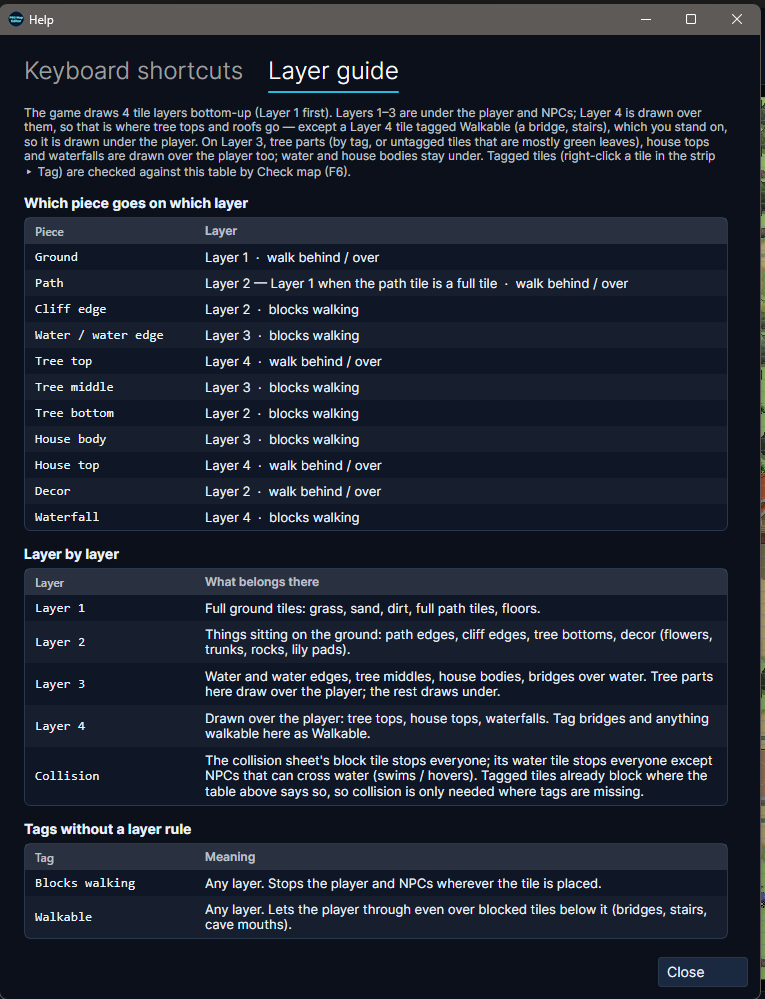
11/10/2026When applying a sprite, it is now no longer stuck, causing you to use the select tool, and another spot on the map to deselect it. Added a checkbox below Pokémon sprites to give them the option to hover over water. (Ghosts) Sprites will now follow a complete loop of their path when finishing points. When points do not complete a full loop, the Pokémon will then turn around and head back. Added in a check for water tile while running test. You should no longer drop in on the water, and be able to walk around. Removed the option, layers are above player. Reworked this entire system for test. Removed the "Mark Blocking" feature and replace with tags. Right clicking a tile/set of tiles will allow you to mark it. It will also advise which layer this should be on. (If you began a map with this, go to Edit and hit "Clear old blocking tags") Updated help. Keyboard shortcuts are now cleaner to read. Added in what each layer should contain. Converted it back to 4 layers. Original thought was to add trees in front of buildings on layer 4. However, the shadow does not look natural. While the shadow could always be removed from the tree, its just extra unnecessary work. Middle clicking on the tile to bring you to it on the sheet is now more responsive. Exporting a PNG image should now show the NPC's and Sprites. Muted reachability on checking map. Muted collision on checking map. Muted link on checking map. Check the map now will list how many tiles do not contain a tag. Double clicking this will open a new window with all the used tiles allowing you to tag them, so your not scrolling up and down, middle clicking to go to that sheet. This also saves for future use. Check the map now lists errors first, warnings second, and notes last. This will force NPC has no name to be at the bottom, and not based on alphabetical order.
-
n978260 sever: silver
-
Username: Godredeye Server: Gold
-
11/10/2026Fixed a crash when editing the last 10 encounters. Fixed a crash when reloading the tracker when the game is minimized, and then unminimized. Stats would begin to show, and then crash before sprites loaded. Added a new check for each battle window to carry the pro-logo (red/white pokeball) for it to count as an encounter. This should eliminate any random encounters while roaming as well. This happened very, very rarely still. Added a "New Look" under Appearances. This will bring you to a newly designed tracker, that can be reverted to the original. (Still working on this however, so expect some differences as updates go along)
-
Ingame Name: Divinegold Server: Silver Goodluck to all players who participate!
-
Ign:tgbnamish Server:silver
-
Shoot3rhmong Silver
-
Jay020 joined the community
-
Pokehunter279 - Gold
-
Username: Kradden87 Server: Silver
-
Moeshop420 joined the community
Today
-
Username: Myx411 Server: Silver
-
Lcfsmpmu joined the community
-
Username :Apexmonarch Server : Silver
-
Pretty sure, you didnt check all the Pumpkin, check the spots in this guide and try again.
-
You need to be regular form, not Unbound. Use Prison Bottle and try again. @Musa24
-
Bnesrqld joined the community
-
Jackstermac, Gold
-
IGN: Sylrus2308 Server: Silver
-
IGN: Myzduyen Server: Silver
-
Username: Demon47 Server: gold
-
Demon47 joined the community
-
Pnhskhhv joined the community
-
Username: Ezel10 Server: Silver
-
Username: Elijope Server: Gold
-
Username: Zailion Server : Silver
-
IGN - Shadow2054 Server - Silver
-
Username: Hjp22 Server: silver server
-
Codyful server: silver
-
Username: Swgmacro Server: Silver
-
Hjp22 joined the community
-
Godchu18 - user name Gold - server