New Trade Zone
Trade Zone is now live
Use the new Trade Zone for auctions and instant-price trades so Pokemon and item offers are easy to find.
All Activity
Past hour
-
bump
-
bump
-
bump
-
-
bump
-
-
bump
-
bump
-
bump
-
bump
-
bump
-
-
bump
-
bump
-
bump
-
bump
-
Today
-
Fdfdsfsdd joined the community
-
Obamnasoda joined the community
-
Tanito joined the community
-
Shadow025 joined the community
-
Zza joined the community
-
Maturon9 joined the community
-
Hello :) Could you please help me swap the names between my 2 accounts? Or do I have to buy 2 name changes? And first change the name of the one and then on the other? Thank you!
-
-
Jimmorrison2 joined the community
-
Mimimikyu joined the community
-
no puedo recibir notificaciones ni entrar a mi gmail que esta sociado a la cuenta debido a que no llegan notificaciones y este fue borrado sin embargo tengo mi usuario y contraseña del pokemon revolution, quisiera saber si me pudieran dar alguna solucion para cambiar el correo conectado a la cuenta y asi poder entrar a jugar en los servidores
-
Inakyrqc23 joined the community
-
bump!
-
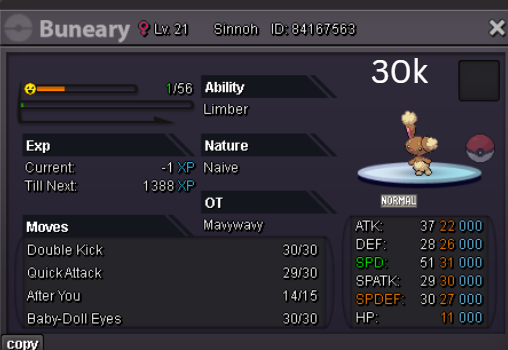
Wtb IGN : Vanthexor Server : Gold
-
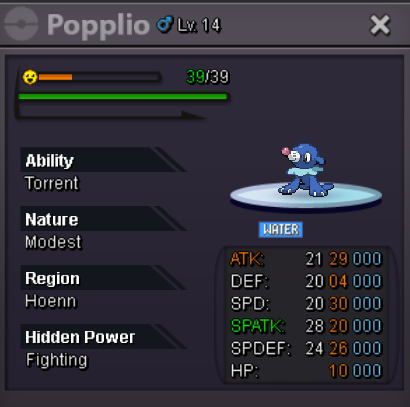
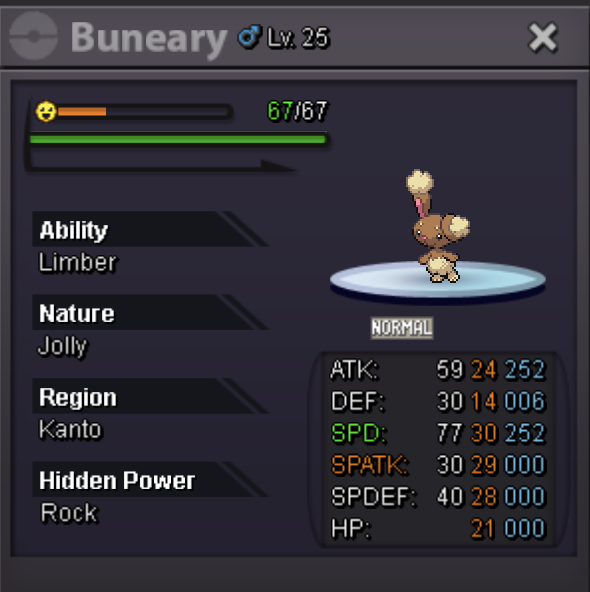
Wtb IGN : Vanthexor Server: Gold
-
Jempestcloud joined the community
-
Hello! I'm really sorry to hear that! Don't worry, you can still return to the Dark Realm. To do so, you'll need to defeat Horon, Thief of Souls, who is located in Dark Valley, north of Necropolis, without losing any Pokémon. Make sure to bring a full party of 6 Pokémon and that all of them have at least 1 HP left when the battle ends. If any of them faints, you'll have to wait 3 days before you can challenge Horon again. Once you've defeated him, go back and talk to Alucard, Master of Deception. He'll battle you again and send you back to the Dark Realm. However, I can't guarantee you'll be able to obtain the Clone Pokémon this time, as you didn't get it on your first attempt. I hope this helps! Kind regards. Hallowglow.
Yesterday
-
[Tool] Shiny Tracker Overlay - Windows, Linux, Mac and Android (PC v3.14 / Android v2.2) Shiny Tracker Overlay is a free screen-reading helper for encounter and shiny hunting. It counts your encounters, shows your real spawn rates, alerts you when a target or shiny appears, keeps a list of your catches, and makes a picture of your hunt to share. It only reads the screen. It does not change the game, click anything, or play for you. Beta warning: reading the screen is never perfect. Always check the game yourself before you run from a valuable encounter. === DOWNLOAD === These links never change and always give you the newest version, so you can bookmark them or pass them on. WINDOWS 10/11 (64-bit) - v3.14 https://github.com/KaizenMMO/shinytracker-builds/releases/latest/download/ShinyTrackerOverlay-Windows.zip LINUX (64-bit, X11 or Wayland) - v3.14 https://github.com/KaizenMMO/shinytracker-builds/releases/latest/download/ShinyTrackerOverlay-Linux-x86_64.tar.gz MAC (M1 or newer, macOS 13 or later) - v3.14 https://github.com/KaizenMMO/shinytracker-builds/releases/latest/download/ShinyTrackerOverlay-Mac-AppleSilicon.dmg ANDROID (64-bit phones and tablets, Android 10 or newer) - v2.2 https://github.com/KaizenMMO/shinytracker-builds/releases/download/android/ShinyTracker-Android.apk All releases and notes: https://github.com/KaizenMMO/shinytracker-builds/releases Already have it? You don't need to download again. The app tells you when an update is out. === WHAT'S NEW === PC v3.14 - Fixed: the app could refuse to start after you had taught it both the normal and a special form of the same Pokemon. If it wouldn't open for you, this version fixes it, and your hunts are still there. - Settings > UPDATES has a "Copy link" button for Windows, Linux and Mac, so you can send a friend the right download. Android v2.2 - No more setup. Go into a wild battle and the app finds the battle on screen by itself, and follows it if it moves. - Updates now download and install from inside the app. The NEWS tab in the app lists every change. === GETTING STARTED === WINDOWS Unzip the download into a normal folder (for example a new folder in Downloads) and run ShinyTrackerOverlay.exe. Keep the _internal folder next to it. If Windows shows a blue SmartScreen warning, choose More info > Run anyway. After this the app updates itself. LINUX Unzip the download and run ShinyTrackerOverlay from the new folder. It needs Tesseract (the text reader). If it's missing, the app shows the exact install command for your system with a Copy button. MAC Open the DMG and drag the app into Applications. The first time, macOS blocks it because it isn't registered with Apple: go to System Settings > Privacy & Security and press Open Anyway (only once). The app helps you install Tesseract and asks for Screen Recording permission, which it needs to see the game. Intel Macs are not supported. PC SETUP (all computers) 1. Open the game in a window (or borderless) and go into a wild battle. 2. In the tracker, open Settings, name a client and press Calibrate zones. 3. Select at least Name + level. The other zones make it more accurate. 4. Turn on Track now for that client, then go to Hunt and press Start hunting. The tour in Settings walks you through the rest. ANDROID 1. Copy the Android link into Chrome on your phone. Paste it into the address bar rather than tapping it inside Discord, whose built-in browser often drops the download. 2. If Chrome says the file might be harmful, tap Download anyway (the message disappears after a few seconds). 3. Open the file when it finishes. Android asks you to let Chrome install apps: turn that on and go back. 4. Tap Install. If Play Protect says it doesn't recognise the app, tap More details > Install anyway. This happens with any app that isn't from the Play Store. 5. Open Shiny Tracker and press start on the Hunt tab. When Android asks to share your screen, choose "Share one app" and pick the game. 6. Allow "Display over other apps" so the floating counter can appear. 7. Go into a wild battle. The app finds it by itself and starts counting. Older 32-bit phones can't run the app. === PRIVACY === - Your hunts, settings and setup stay on your computer or phone. - No account, no subscription, no ads, and nothing is uploaded. === FEEDBACK === Reports help a lot. The easiest way is the Send to developer button (Settings on PC, Tools on Android). It sends me what I need to fix things. Add a short note if you can. Or reply here with: the app version, your device (Windows / Linux / Mac / phone model), what you expected, and what happened. Please don't post private chat or account names.