




New Trade Zone
Trade Zone is now live
Use the new Trade Zone for auctions and instant-price trades so Pokemon and item offers are easy to find.


Forcefull
Suspended
-
Joined
-
Last visited
-
i want to make the denied suggestions anonymized (its owner will be anonymous)
-
how could we know & read all denied suggestion (+5000 denied sugg) before making another one ! 😁
-
i recommand to delete all denied suggestions ofc after giving staff arguments ...

-
i don't see any suggestion here just complaining & jealousy i think you don't even have a boss team
-
updated 14 ideas for Happy Hour integration to pro
.gif.4d2629f423c3a5914dc8d7bae3909779.gif)
-
you can make this happy hour (full party EXP gain): 1- happy hour full part exp gain 2- happy hour first 3rd mones slot only share exp gain 3- happy hour first forth mones slots only share exp gain 4- happy hour the first fourth mones slot share exp gain 5- happy hour the first fofth slots mones share exp gain
-
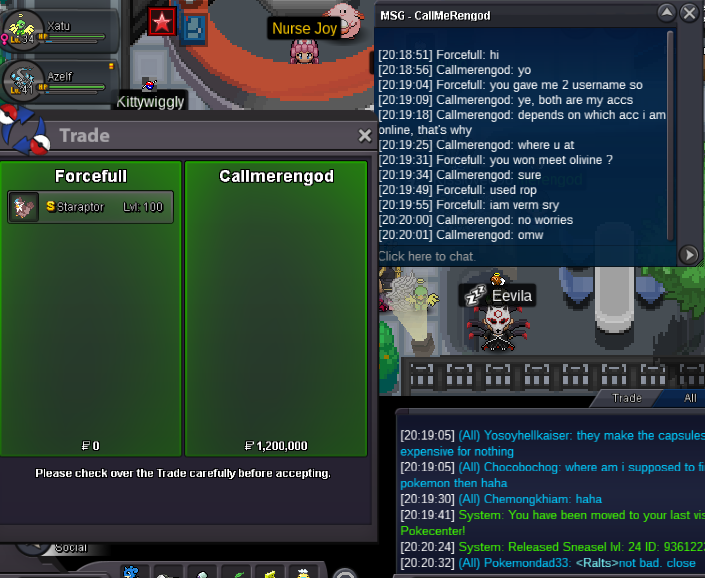
auction end @Callmerengod won 1.2m as auction were not off gmt time
-
???????
-
ah yes was wrong with gmt time so you won what's ur ingame name btw ?
-
c.o 1.1m
-
contact me ingame = forcefull or discord = forcefall
-
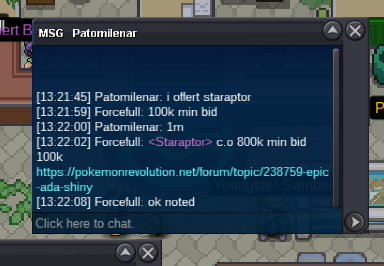
c.o 1m approx 6 hours left
-
approx 28 hours left c.o 800k by joezzy
-
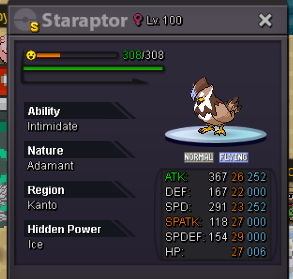
Start: 500k Min raise: 100K Accept CC 400K & Reroll IV 500K insta 5M End in: 48 hours after first bid
-
can you send me screenshoot of what you see 😒