




New Trade Zone
Trade Zone is now live
Use the new Trade Zone for auctions and instant-price trades so Pokemon and item offers are easy to find.


Madtrainer
Registered User
-
Joined
-
Last visited
Everything posted by Madtrainer
-
Hi, I have some old trade threads wich are still not closed. I would like them to be closed if possible. Here's the links to the threads. A few Pokemon for sale Garchomp 31 Speed Some Pokemon to sale Thanks a lot for your time, have a nice day. =D
-
Hi and welcome to my auction. As you can see, the Pokemon auctionned today is a 31 Speed trained Lopunny. It is of course not perfect, but still going to be a good PVP Mega Pokemon. Take note that it still can Mega evolve even with Klutz ability. ;) RULES 1. I only accept Pokedollars, Coin Capsules and Reroll Tickets. Coin Capsule = 400K Reroll Nature = 350K Reroll Ticket = 700K 2. No fake offer. 3. You cannot cancel your offer. 4. The auction will last 48 hours after the first bid (Starting price). Starting price: 1M Minimum bid: 100K Insta price: 3M


.png.ac207f390a116f16167d451d24a57c10.png)
-
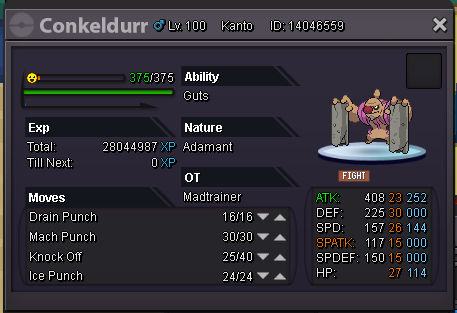
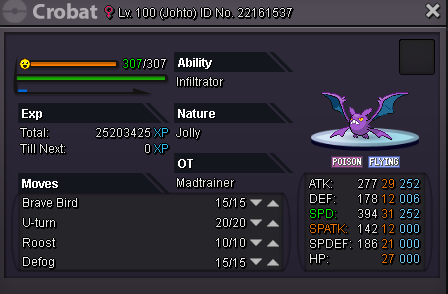
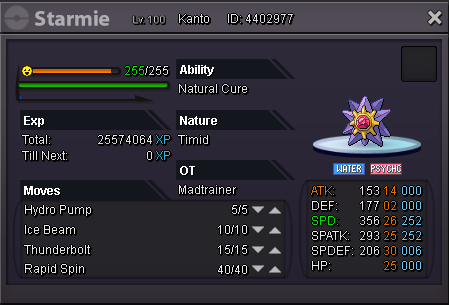
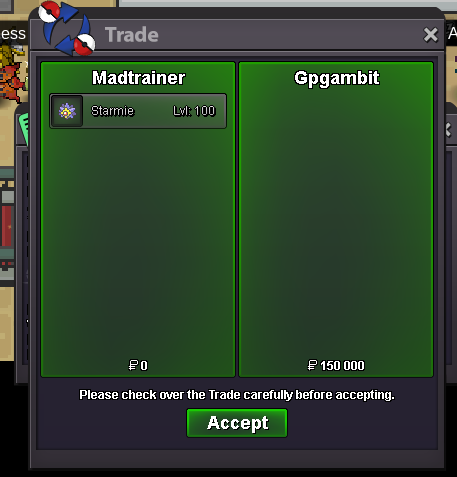
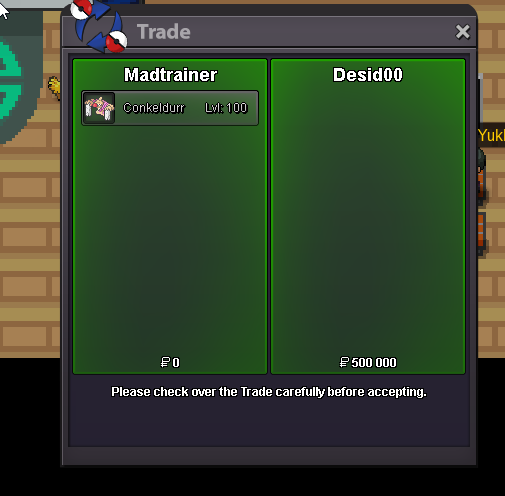
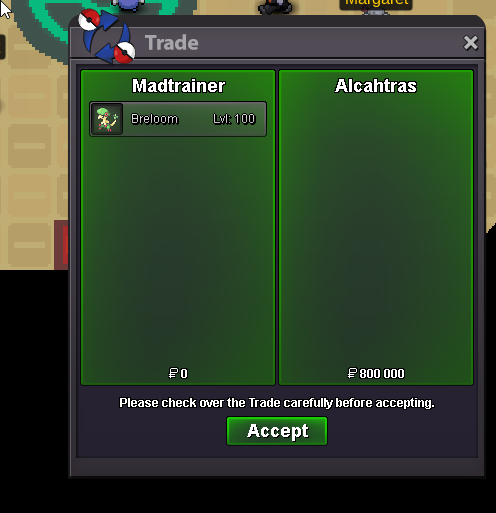
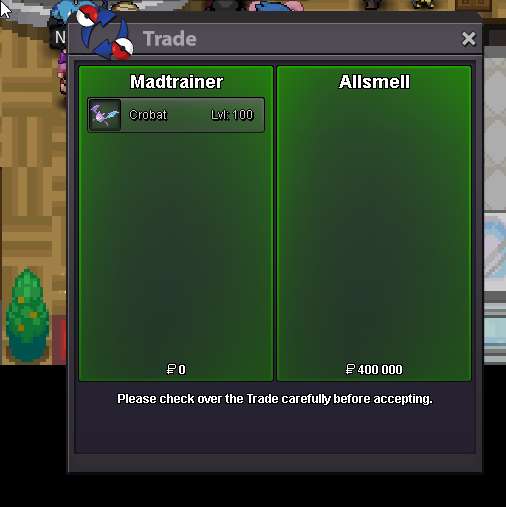
[Poke5]200k[Poke6]500kConkeldurr and Starmie prices have been lowered.BUUUMMP!A guy in Silver Server found a similar Charmander, but jolly. All I know is that he got offered 6M. Not sure if this help since I am on SIlver Server.Hello people! Today I want to sell these Pokemon. This is not an auction house, all prices are insta. Respect PRO trading rules. Here's my Discord: Madtrainer#8526 [TABLE] [TR] [TD] Breloom: SOLD [/TD] [TD] Conkeldurr: SOLD [/TD] [/TR] [TR] [TD] Crobat: SOLD [/TD] [TD] Starmie: SOLD [/TD] [/TR] [/TABLE]

 Ye I also just tested what you are talking about. My dead sync got revived after logging out from a fight and then logging in.Hello! In the game, I'm mostly a hunter and a trader. I often use repel trick. In some of these hunts, I use a dead Syncronize Pokemon lead. It happened often to me to leave the hunt to go for a little trade in another region. I managed, with time, to see that my dead leading Pokemon was revived for some reason while using fast travel. I made some tests today and finaly found wich Pokecenter was reviving my dead lead. I fast traveled from Hearthome to Canalave. No revive I used boat from Canalave to Vermillon. No revive I did go to Celurean, and then came back to vermillon using subway. No revive I did the same with Olivine, Goldenrod, Then Olivine again. No revive Then I did go to Lilycove. All good I entered the teleporter room of Lilycove. Then entered back in the Pokecenter. My dead Natu got revived. I know this is not a huge problem. I am probly one of the few who noticed that, I would be very happy if it was fixed. Even if it is a small problem, it can be annoying when you repel hunt and travel alot. Thanks for reading and sorry for your time. =3You dont need a Pokemon to old Rare Candies anymore Just put in trade chat something like: Wts Rare Candy 6k or Wts Rare Candy 7k. You then wait for someone to pm you. You then both agreed on a ammount, a price and a location to do the trade. At this point, you both meet in the same Pokemcenter to do the trade. You then right click on the dude, click trade and open your bag and search for rare candies. Yen drag and drop Rare Candy on your side of the trade box and select the ammount. Hope it was helpfull, good game and enjoy! =3I think that they are actually working on it. Not long ago, bigger Gengar, Tyranitar, Chancey and others have been added to the game. Same with the Landorus legends trio. Hopefully more are to comes, but we of course wont have all the ''700'' bigger sprites all in the same update. =3I am unable to see the picture. =cStaraptor mount =3Welcome!Trade have been done. Here's a screenshot of the trade. This thread can now be closed.
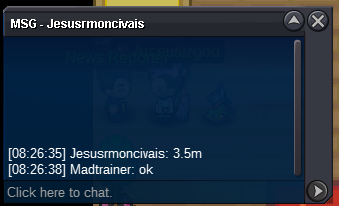
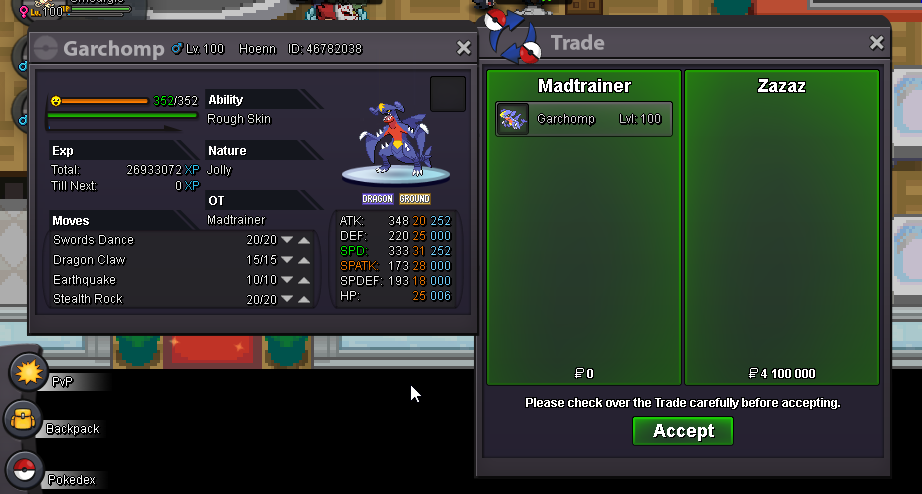 The auction is now over. Zazaz is the winner. I will pm you so we can meet in game.BUMPPPP! One hour left! =DInsta lowered from 6M to 5M.Bump! 25 hours left!Buuuump!! Starting and Insta prices lowered. Same with minimum bid. Good luck!

Account
Navigation
Search
Configure browser push notifications
Chrome (Android)
- Tap the lock icon next to the address bar.
- Tap Permissions → Notifications.
- Adjust your preference.
Chrome (Desktop)
- Click the padlock icon in the address bar.
- Select Site settings.
- Find Notifications and adjust your preference.
Safari (iOS 16.4+)
- Ensure the site is installed via Add to Home Screen.
- Open Settings App → Notifications.
- Find your app name and adjust your preference.
Safari (macOS)
- Go to Safari → Preferences.
- Click the Websites tab.
- Select Notifications in the sidebar.
- Find this website and adjust your preference.
Edge (Android)
- Tap the lock icon next to the address bar.
- Tap Permissions.
- Find Notifications and adjust your preference.
Edge (Desktop)
- Click the padlock icon in the address bar.
- Click Permissions for this site.
- Find Notifications and adjust your preference.
Firefox (Android)
- Go to Settings → Site permissions.
- Tap Notifications.
- Find this site in the list and adjust your preference.
Firefox (Desktop)
- Open Firefox Settings.
- Search for Notifications.
- Find this site in the list and adjust your preference.