




New Trade Zone
Trade Zone is now live
Use the new Trade Zone for auctions and instant-price trades so Pokemon and item offers are easy to find.

Chmchagas
Registered User
-
Joined
-
Last visited
-
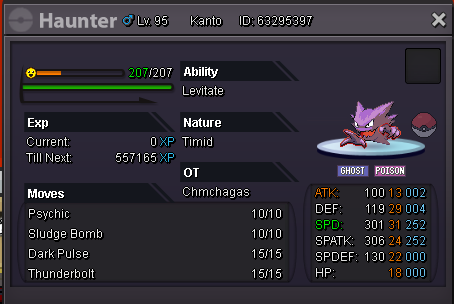
Hello! I have 2 accounts, one I rushed to play pve bosses and the other im playing slowly to enjoy the story, with my first account I wanted to trade evolve a haunter so I logged in into both accounts so I wouldnt get robbed by anyone but I made the mistake and forgot about region lock so I wanted to give it back to my main account so I can use it without needing to rush again through story, here is the pokemon that is on my secondary account. My nickname: Chmchagas My other nickname: Chmchagas1 Both are on silver The ID is 63295397
-
In-game name: Chmchagas Server: Silver Pokemon ID and/or screenshot: Shelgon ID 41488627 Please downgrade to level 99
-
You want a secure, fast and cheap daycare? Come see how our daycare works ~Leveling ~EV Training ~Pokemon Wishlist ~Egg Moves ~Lending ~Delivery ~Sync Get your pokemon ready for you to PVP or PVE in a few hours. Discord: https://discord.gg/dCtmcQ
-
I lost the game to Jackson on Viridian's school, so the girl tell me to move on the road. However when I try to leave Viridian a old man tell me to go check it out the school so I'm kinda stuck, what do I do?