




New Trade Zone
Trade Zone is now live
Use the new Trade Zone for auctions and instant-price trades so Pokemon and item offers are easy to find.

Frefa
Registered User
-
Joined
-
Last visited
Everything posted by Frefa
-
3.4M
-
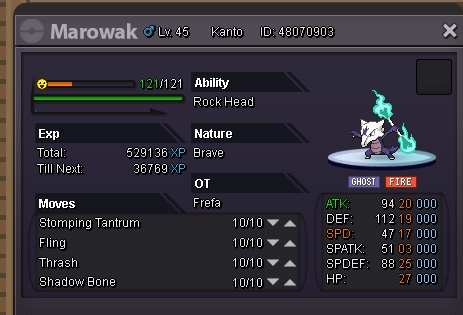
S.o. 1m / insta 3m Min raise 100k Ends in 3 days after 1st bid
-
-
-
-
-
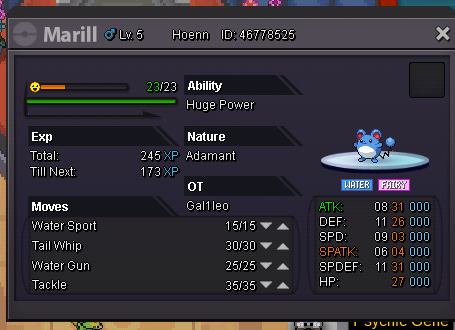
S.o. 700k Min raise 100k Ends in 3 days after 1st bid
-
Kerenloh won, pm me for the trade when you re ready
-
Bump Ends in around 3 hours (Look 1st bid)
-
S.o. 800k Min raise 100k Insta 2.2m Ends in 3 days after 1st bid

-
Bump
-
S.o. 500k Min raise 100k Ends in 3 days after 1st bid

-
SOLD IN GAME CAN BE CLOSED
-
-
Start
-
-
S.o. 600k /min raise 50k Accept reroll (700k) and coin capsule (400k) End in 3 days after 1st bid

-
Update: Sold in game can be closed
-
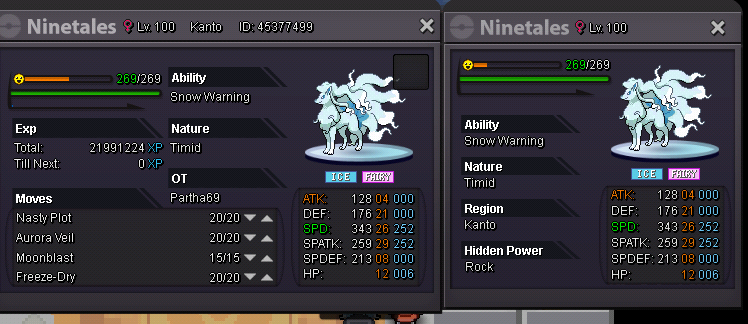
This is not an auction Only insta buy Price:600k
-
-
-
Ty all is risolved!
-
https://pokemonrevolution.net/forum/index.php?threads/wts-chandelure-31-spd-timid-hp-ice.153295/page-2
-
Hi sincerely i prefer to repeat the auction instead. If i must force the trade i will do that but i prefer to repeat the auction. Waiting for your answer and sorry my bad english
-
It's been passed some days and he didn t pm me and is not online since 22/05, when i can repeat the auction? (Don t know if the section is correctly)