




New Trade Zone
Trade Zone is now live
Use the new Trade Zone for auctions and instant-price trades so Pokemon and item offers are easy to find.

Kakura
Registered User
-
Joined
-
Last visited
Everything posted by Kakura
-
As of the end of this auction, congratulations to EdwinOrign for winning the auction and thank you for your participation.
-
Oh the first one 2.5m by EdwinOrign

-
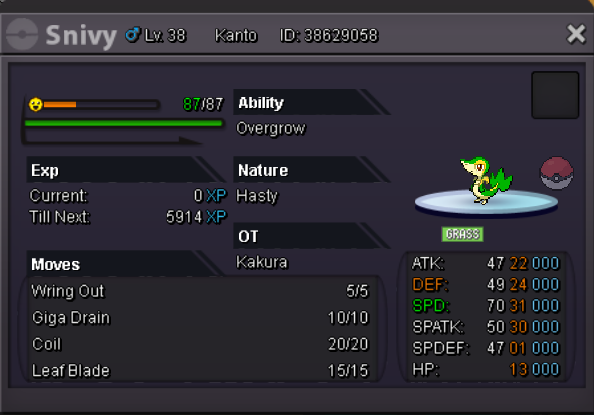
Hi this max speed Snivy is on sale 70k start bid unrelated comment wil be deleted. Ends 24h after first bid
-
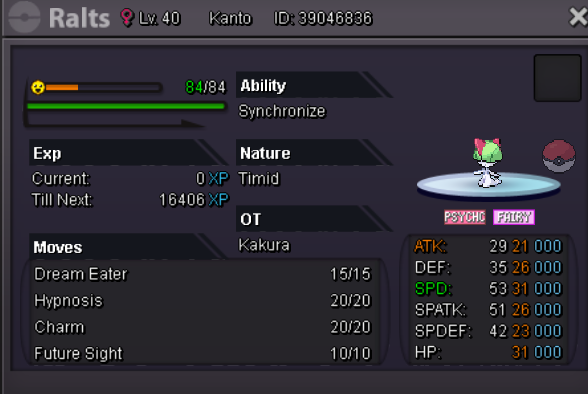
Hi this max speed Ralts is on sale 0.5m start bid unrelated comment wil be deleted. ends 24h after first bid
-
Where are you from?: China How old are you?: 17 How much playtime do you have on PRO (including alternate accounts if any)?: 300hours Has the game improved since you first joined? If yes, how?: Yes Many new prokemon are join and map look better Is there a staff member or player who you feel is underrated?: Many but i can't remember very thanks them i am Kakura lol If you could change one thing about PRO, what would it be (no restrictions, be creative)?: 1.I want can join Chinese many Chinese because don't learn English are fgive up this game 2.Many system like /.… many people don't know how to do 3.E-mail can't use to trade i dugest you can set a system that youmust pay enough game moey to open and the money welill give the e-mail owner 4.Why must have two silver and goild?Only one like pko is better … this is only myself openion but i really want to join Chinese Thanks