




New Trade Zone
Trade Zone is now live
Use the new Trade Zone for auctions and instant-price trades so Pokemon and item offers are easy to find.
.jpeg.dce22977450d77b967e27ef806a21749.jpeg)

Itzronin
Registered User
-
Joined
-
Last visited
Everything posted by Itzronin
-
Too many similar suggestions like this already and I'm tired yk .... Pros - You can travel to anywhere from anywhere, anytime using fly hm for free . Cons - There's already plenty of travelling ways like subway, teleport, ports, etc - Creates imbalance in economy of the game. - Already present travelling ways will be useless. - I'm not too dumb to remember anything else, but it's still not a good idea. -100
-
I can be rn
-
11k Idk why but relicanth sprite🤣🤣 ( And yes I'm body shaming )
-
350k I won't transfer If I win.... ( Cuz I'm already in silver)
-
70 0_o
-
-
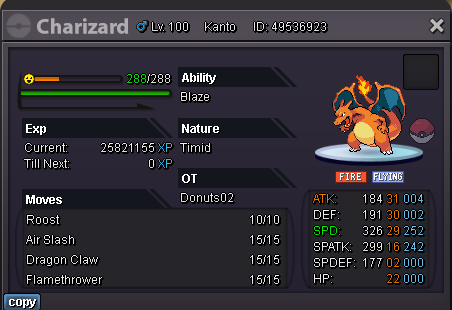
Giveaway ended!!!!. Winner - @Luckytea Trade Completed + Heyyyaaaa everyone, I'm giving away this Lil usable Charizard and a Master Ball. How To Join:- - Just Simple, Like this post and mention one of your friends in the comments to continue..... -I'll decide the winner after reading everything after Week from now on. Remember I'm a very biased person :0 Will be doing some interesting Giveaways and events in the future too, hoping for a good response. Thank you: |😐

-
Time left?
-
220 oran 200 leppa
-
You don't have to trouble yourself 😉 211 Oran + 111 Leppa
-
Sry bout that 200 oran + 100 leppa
-
100 oran
-
10 oran
-
-
-
-
115k
-
107k
-
heck sry... i didnt refreshed 105k
-
1007
-
:"( Good luck
-
291 Leppa + 160 Sitrus
-
290 Leppa + 120 Sitrus
-
280 leppa + 80 Sitrus
-
260 leppa + 50 Sitrus

