




New Trade Zone
Trade Zone is now live
Use the new Trade Zone for auctions and instant-price trades so Pokemon and item offers are easy to find.


Bytrippy
Suspended
-
Joined
-
Last visited
Everything posted by Bytrippy
-
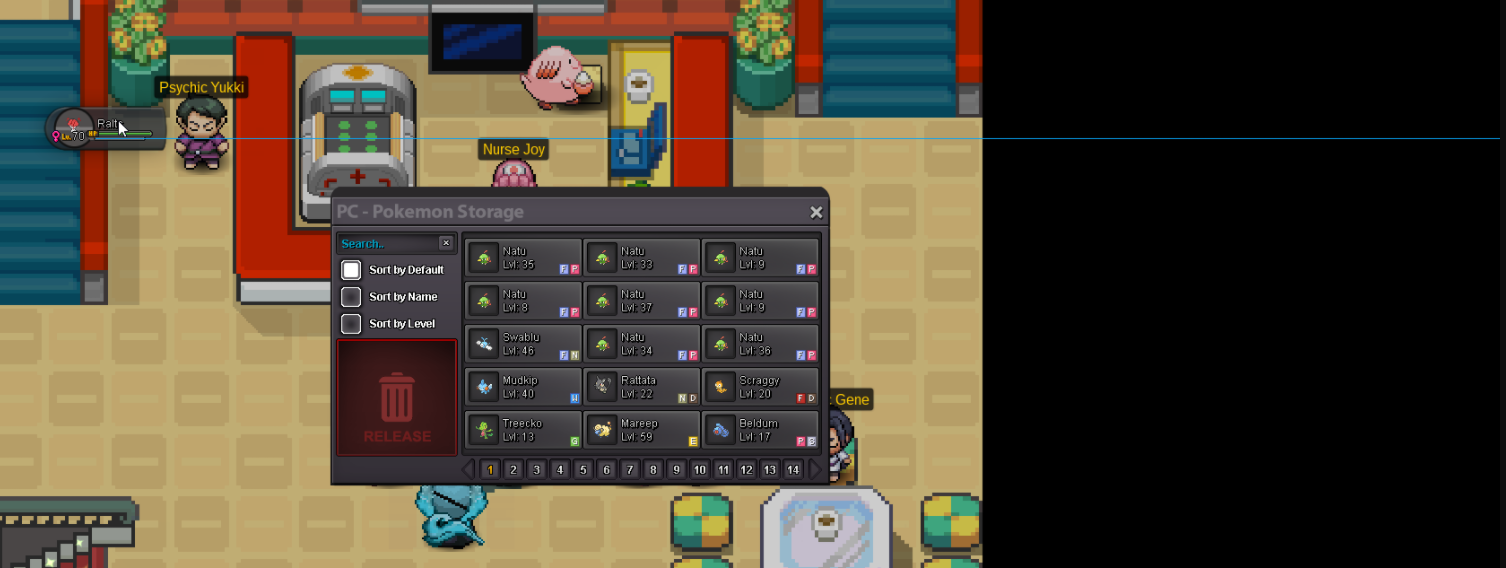
Hi yesterday My ralts was a Gardevoir lvl 70 i used 2 Rare candy to evolve , today i log in and it's a ralts and as you can see there is a blue line next to the pokemon . I already tried to log out but nothing change

-
2m2
-
Start
-
-
-
-
The Quest was super nice overall , The maze part was a bit hard(hints) but interesting Some trainers Battle were complicated too like the Guy with Charizard X Lead his pokemon was super bulky (Kinda Hard for New players) Rewards were nice .
-
Noragami https://www.youtube.com/watch?v=ytMYXCVIpf4&ab_channel=NoriakiKakyoin Aogiri Theme Tokyo Ghoul https://www.youtube.com/watch?v=B4ibOrDx_gg&ab_channel=VašekKiron Parasyte https://www.youtube.com/watch?v=DYnLbWqsv4M&ab_channel=NikhilKumar Akame Ga Kill ost https://www.youtube.com/watch?v=_ePJeC2JFiM&ab_channel=Key Fate Zero https://www.youtube.com/watch?v=2dmrr3DxUK4&ab_channel=SHARDLT
-
Auction Won by Salemzeroo
-
True it's annoying also People log out in Battle to tp back to Pokecenter a lot so we have the notifications each time they do that
-
1 Hour Left if no one bid in the last 15 mins
-
Bump
-
Started By SalemZEROO Auction End Sunday 18:15 (Eu timezome)
-
Start Auction 2 Days with First bid Start offer 2m5 Raise min 250k insta 5m
-
-
.
-
21M
-
19m
-
17M
-
15M
-
Hi im selling Cloyster For 650K
-
Hi im selling my charmander for 2m6
-
-
-
550k
