




New Trade Zone
Trade Zone is now live
Use the new Trade Zone for auctions and instant-price trades so Pokemon and item offers are easy to find.

Alexitof
Registered User
-
Joined
-
Last visited
Everything posted by Alexitof
-
For both pokemon (bids are for both poke and the winner gets both) Starting offer : 200k Minimum bid : 20k no insta Accepted payment Pokedollars Small MS = 180k CC = 350k Reroll ticket = 650k Auction ends 48h after first bid https://countingdownto.com/?c=4650427

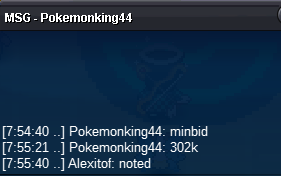
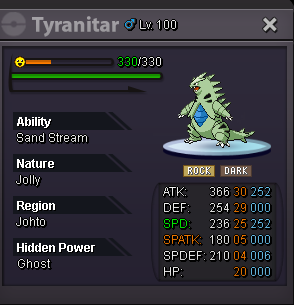 No, once an offer is placed you can't take it back. But there is a new offer now so it's all good.500k treecko300k treeckoFor each pokemon Starting offer : 50k Minimum bid : 1k no insta Accepted payment Pokedollars Small MS = 180k CC = 350k Reroll ticket = 650k Auction ends 48h after first bid Beldum SOLD Marowak sold Ferrothorn/Rotom/Hawlucha sold
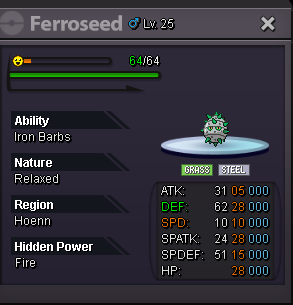
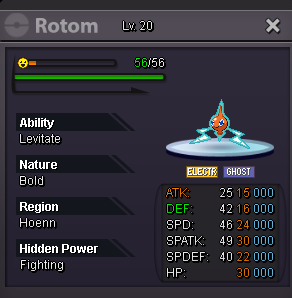
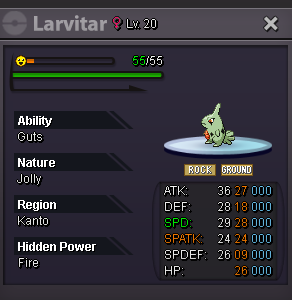
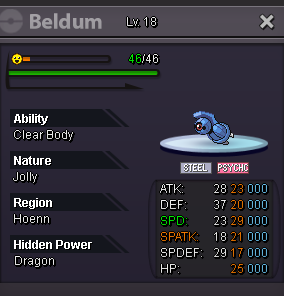
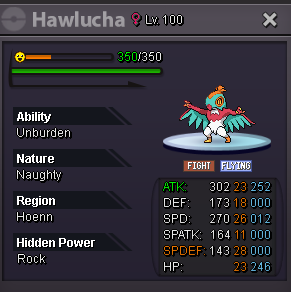 bumpAuction started. Ends at 17/2/23 03:15pm gmt+2.BumpStarting offer : 400k Minimum bid : 20k no insta Accepted payment CC = 350k Reroll ticket = 650k Auction ends 48h after first bid sold
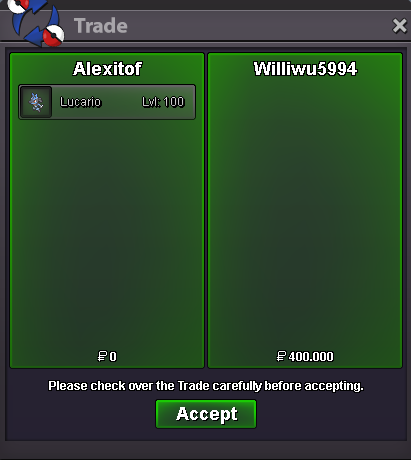
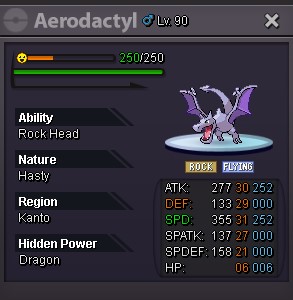 I have pmed you on discord.auction ended. @Williwu is the winnner. please contact me to complete the trade.BumpAuction started. Ends at 9/2/23 08:09pm gmt+2.bumpStarting offer : 400k Minimum bid : 20k 2.5m insta Accepted payment CC = 350k Reroll ticket = 650k Auction ends 48h after first bid sold https://www.timeanddate.com/countdown/generic?iso=20230209T2009&p0=1428&font=cursive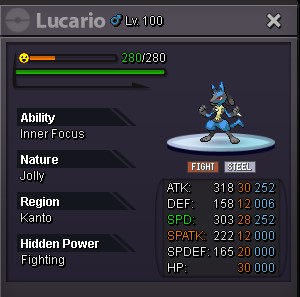



Account
Navigation
Search
Configure browser push notifications
Chrome (Android)
- Tap the lock icon next to the address bar.
- Tap Permissions → Notifications.
- Adjust your preference.
Chrome (Desktop)
- Click the padlock icon in the address bar.
- Select Site settings.
- Find Notifications and adjust your preference.
Safari (iOS 16.4+)
- Ensure the site is installed via Add to Home Screen.
- Open Settings App → Notifications.
- Find your app name and adjust your preference.
Safari (macOS)
- Go to Safari → Preferences.
- Click the Websites tab.
- Select Notifications in the sidebar.
- Find this website and adjust your preference.
Edge (Android)
- Tap the lock icon next to the address bar.
- Tap Permissions.
- Find Notifications and adjust your preference.
Edge (Desktop)
- Click the padlock icon in the address bar.
- Click Permissions for this site.
- Find Notifications and adjust your preference.
Firefox (Android)
- Go to Settings → Site permissions.
- Tap Notifications.
- Find this site in the list and adjust your preference.
Firefox (Desktop)
- Open Firefox Settings.
- Search for Notifications.
- Find this site in the list and adjust your preference.