




New Trade Zone
Trade Zone is now live
Use the new Trade Zone for auctions and instant-price trades so Pokemon and item offers are easy to find.

Asierp1504
Registered User
-
Joined
-
Last visited
-
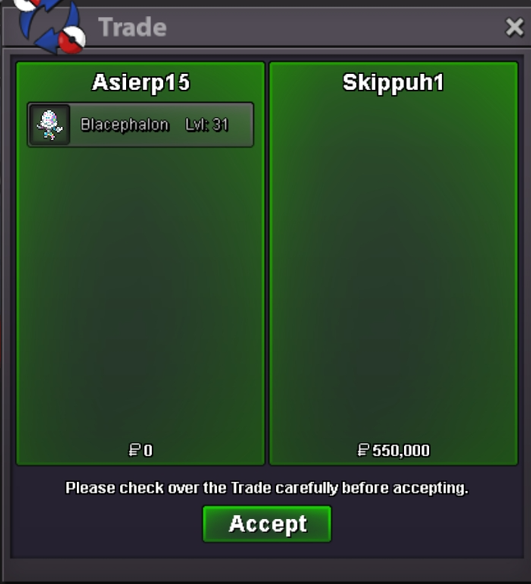
Trade done.
-
bumb
-
yea the auction was already finished, Skippuh is the winner with 550k.
-
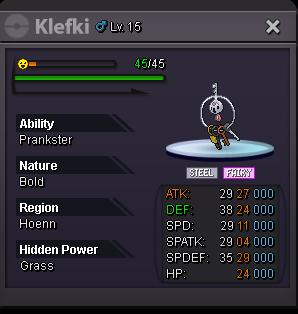
Acept PokeDolars or cc=400k S.O.=250k, min raise 25k, no insta, auction end 24h after first bid, if a bid is maid 15mins before the end, the auction time will became 15mins until no one bid for 15mins.
-
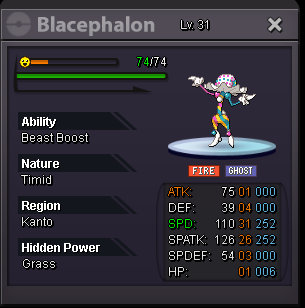
Acept PokeDolars or cc=400k S.O.=450k, min raise 25k, no insta, auction end 24h after first bid, if a bid is maid 15mins before the end, the auction time will became 15mins until no one bid for 15mins.
-
forget the medi, its been 5 days without response so i buy another
-
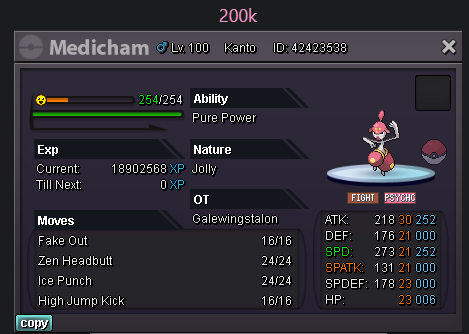
i want to buy the medicham
-
Asierp1504 changed their profile photo
-
-
-
-
130k torto
-
I repeat it and now it works. So dont worry any more and thx.
-
I fought against Cyntia ones, i lost but instead of going to the pc i stay in the same place with all the pokes fainted, i use a rope to go to the pc and now when i go back to fight with her the battle never starts (im going betwen 4-5am, wiht the archomp full happyness)
-
Can some moderator help me, because im triying to contact with the winner (Celebi12 by 1,1M), and whn im online he is always off.
-
Its finished

