




New Trade Zone
Trade Zone is now live
Use the new Trade Zone for auctions and instant-price trades so Pokemon and item offers are easy to find.

Bnoapo7
Suspended
-
Joined
-
Last visited
Everything posted by Bnoapo7
-
https://gyazo.com/e56603fe39b251555f827a0cc2889c96 done ty all for bidding
-
exactly 1h left. 5mil co 6m insta
-
2.6mil lead ends in about 1h 30min.
-
around 5h left. 2.2m co
-
13h left 2m co
-
around 20h left on the action co 2m
-
Start 2 mil min raise 100k insta 6 mil 24h from start bid
-
amazing hydreigon. if i had money i would offer money on this. nice catch buddy!
-
500k
-
bump
-
v
-
bump
-
Player name: Bnoapo7 Server: Silver Timezone: GMT+1 Rank on ladder: 2
-
y
-
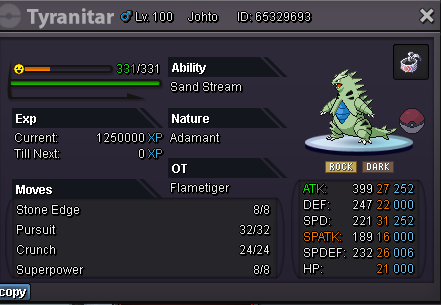
Buying these: Adamant Tyranitar 31 speed 20+ (or close to it) Ditto imposter hidden power ground any nature 15+ HP Swampert Adamant 31 speed 20+ (or close to it) Post plz if u got any of those
-
Buying these: Adamant Tyranitar 31 speed 20+ (or close to it) Ditto imposter hidden power ground any nature 15+ HP Swampert Adamant 31 speed 20+ (or close to it) Post plz if u got any of those
-
Buying these: Adamant Tyranitar 31 speed 20+ (or close to it) Ditto imposter hidden power ground any nature 15+ HP Swampert Adamant 31 speed 20+ (or close to it) Post plz if u got any of those
-
You dont see a problem with what you wrote? If everyone seems to be using same teams, why dont you just make a counter team to that? its that simple, you will beat everyone because everyone uses same teams.
-
bump
-
bump
-
bump
-
bump
-
bump
-
bump
-
any nature, must be hp ground h.a post if u have one plz
