




New Trade Zone
Trade Zone is now live
Use the new Trade Zone for auctions and instant-price trades so Pokemon and item offers are easy to find.

Lacomus
Registered User
-
Joined
-
Last visited
Everything posted by Lacomus
-
Lacomus (Gold Server).
-
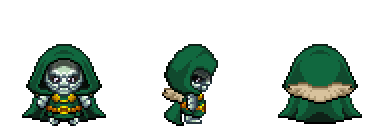
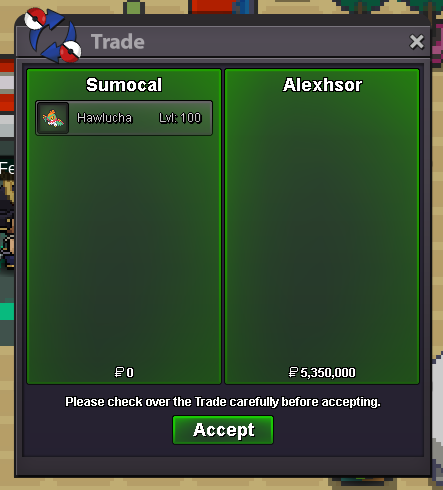
Lacomus (Gold Server).1mThe auction is now closed. @Alexhsor has won.Note: After opening, these items become non-tradable. The cosmetics included in this set are Dr. Doom Clothes, Dr. Doom Hood, Dr. Doom Mask, and Dr. Doom Cape. Every item in this set can be worn by both male and female characters. View PvP Chest Rewards Auction Details: Start Price: 10m End Point: 48 hours (after start price is met) Insta Price: N/A Minimum Raise: 100k Accepted Payments: Pokedollars, Coin Capsules (x1 Coin Capsule = 500k), IV Reroll Tickets (x1 IV Reroll Ticket = 750k) Important Reminders: This is a Gold Server auction. However, you may bid from any server, and I will transfer to your preferred server upon winning. If you intend to purchase with an alt account, specify the account alongside your bid. If a bid is received in the final 15 minutes of the auction, the end point will be delayed by 15 minutes from that bid, and will be delayed by 15 minutes for each new bid thereafter, until the current offer has been held for a full 15 minutes. Happy Bidding!
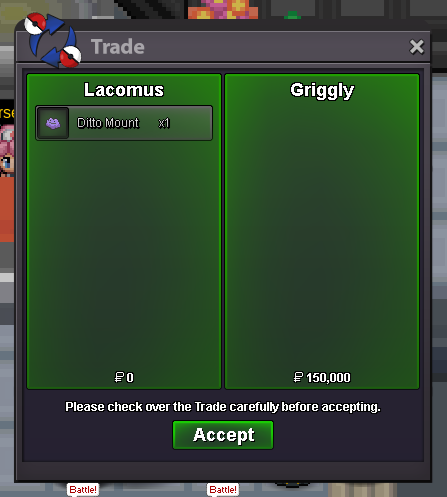
 Bid above by @Edgyseller is 4m750k.I’d like to suggest adding clearer information about the gender compatibility of cosmetic set pieces obtained from PvP chests. Right now, we can see which items are included in each cosmetic set and that they’re non-tradable, but we aren’t told which parts are unisex and which are gender-specific. Many sets do contain unisex pieces, but players have no way of knowing this beforehand. Since these cosmetics can be quite valuable, this information can influence a player’s decision to open, sell, buy, or bid on them during auctions. It’s disappointing for players who open a set only to realise later that certain pieces don’t fit the gender they expected. The suggestion is simple: If a cosmetic set has gender-specific pieces, list the gender compatibility for each item. If the entire set is unisex, state that clearly in the description. This small addition would help players make informed decisions and avoid unnecessary confusion or regret.BumpThe auction is now closed. @Griggly has won.Auction Details: Start Price: 1k End Point: 30 minutes (after start price is met) Insta Price: N/A Minimum Raise: 1k Accepted Payments: Pokedollars Important Reminders: This is a Gold Server auction. If bidding from an alternative server, state that you will transfer upon winning. If you intend to purchase with an alt account, specify the account alongside your bid. If a bid is received in the final 15 minutes of the auction, the end point will be delayed by 15 minutes from that bid, and will be delayed by 15 minutes for each new bid thereafter, until the current offer has been held for a full 15 minutes. Happy Bidding!
 BumpLacomus (Gold Server).BumpLacomus (Gold Server).BumpNote: Registration is still open for now (until the Christmas event goes live). I’ve started collecting buy-ins within the server, so if you’re already there, feel free to contact me to secure your spot. If you’re not in the server yet and would like an invite, just send me a message.BumpBump




Account
Navigation
Search
Configure browser push notifications
Chrome (Android)
- Tap the lock icon next to the address bar.
- Tap Permissions → Notifications.
- Adjust your preference.
Chrome (Desktop)
- Click the padlock icon in the address bar.
- Select Site settings.
- Find Notifications and adjust your preference.
Safari (iOS 16.4+)
- Ensure the site is installed via Add to Home Screen.
- Open Settings App → Notifications.
- Find your app name and adjust your preference.
Safari (macOS)
- Go to Safari → Preferences.
- Click the Websites tab.
- Select Notifications in the sidebar.
- Find this website and adjust your preference.
Edge (Android)
- Tap the lock icon next to the address bar.
- Tap Permissions.
- Find Notifications and adjust your preference.
Edge (Desktop)
- Click the padlock icon in the address bar.
- Click Permissions for this site.
- Find Notifications and adjust your preference.
Firefox (Android)
- Go to Settings → Site permissions.
- Tap Notifications.
- Find this site in the list and adjust your preference.
Firefox (Desktop)
- Open Firefox Settings.
- Search for Notifications.
- Find this site in the list and adjust your preference.