New Trade Zone
Trade Zone is now live
Use the new Trade Zone for auctions and instant-price trades so Pokemon and item offers are easy to find.

Boxus
Registered User
-
Joined
-
Last visited
-
-
1. What's your Player name (IGN)? Boxus 2. Number of hours played? 15 3. What's your favorite Pokemon? Dragonite 4. What do you enjoy doing the most in PRO? (Hunting, PvP, trading, etc) Hunting,Pvp,Learning! 5. How old are you? (Optional) 30
-
Hello there i would love to join the guild, i am a new player Boxus#2808 is my discord,
-
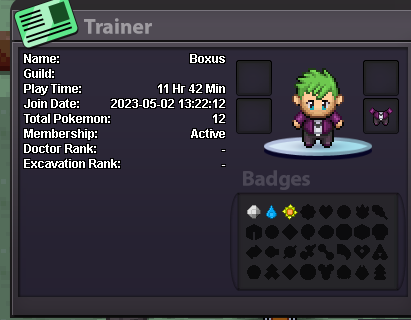
1. What's your Player name (IGN)? Boxus 2. Number of hours played? 12, i am new and am looking to learn and improve, have experience on PPO 3. What's your favorite Pokemon? Dragonite,Gengar 4. What do you enjoy doing the most in PRO? Will be looking to PvP 5. Why do you want to join Psynergy Find friends to play with and to help me improve 6. Highest PvP Rating ever? Not got there yet 7. Discord Tag? Boxus#2808 8. Post a screenshott of your Trainer Card