




New Trade Zone
Trade Zone is now live
Use the new Trade Zone for auctions and instant-price trades so Pokemon and item offers are easy to find.

Mrheimer
Registered User
-
Joined
-
Last visited
Everything posted by Mrheimer
-
Yep sorry i stoped to play, it was already sold in game for 2M, it stay only Nidoking
-
bump 2
-
bump
-
Togekiss: Insta 3M But i can start a bid for 2M raise up 100K mini end 48H after first bid Nidoking : Insta 2M But i can start a bid for 1.5M raise up 100K mini end 48H after first bid


-
-
-
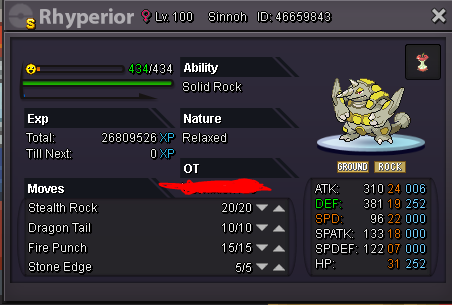
Shiny auction: Start: 1m Insta: 4M AUCTION END: 3 day after 1st bid MIN BID: 100k
-
-
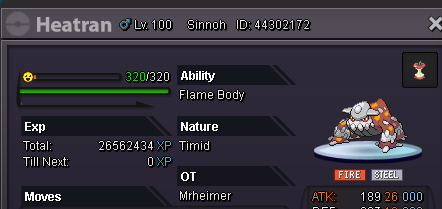
Hey ,i am MrHeimer on Silver, i was in pvp before, i switched on my heartran who was flash fire, and i i got fire damage... so i watch my ability and i see it was changed for the h.a flame body... Can you make back my heatran on flash fire? Sry i have a bad english
-
Username: MrHeimer Server: Silver Country/Timezone: France GTM +1 or +2
-
31 speed 31 atk other 20+ jolly ( or sneasel ) Pm me ig or post here thank's :)
-
U win Muk
-
Kommo-o gg dhrak4
-
Wts Muk Alola pvp ready : 48H after first bid bid start for 1M5. Raise 100K mini Insta 3M

-
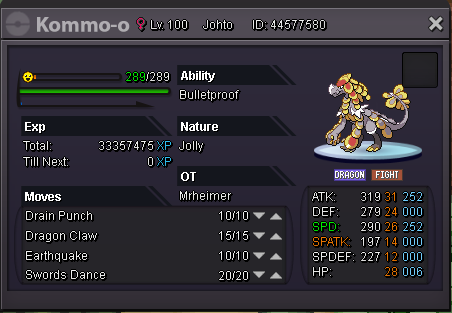
Kommo-o 1M4 by Drunkm

-
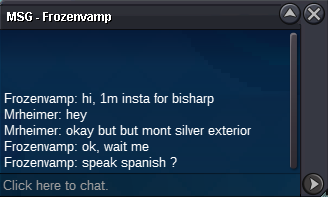
Bisharpbid end Insta by Frozenvamp
-
Bisharp bid start 600K by BahilHatem: 48h

-
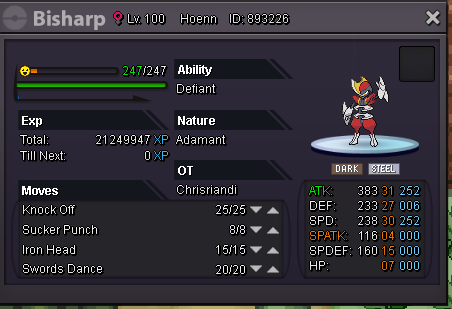
Bisharp : Start 600K Raise: 50k Insta; 1M Kommo-o: Start 1M raise: 100k Insta : 2M End 48H after first bid MrHeimer
-
Ok pm me in game
-
Make Offer 650k 650k 450k Post your offer here, or pm me in game as WorldBossHeimer or MrHeimer
-
No, i writed the price up
-
up !
-
They are all ready to pvp, post here or pm me in game:
-
:up: :Cool:
-
up!! :Light:
