




New Trade Zone
Trade Zone is now live
Use the new Trade Zone for auctions and instant-price trades so Pokemon and item offers are easy to find.

Vitronish
Registered User
-
Joined
-
Last visited
Everything posted by Vitronish
-
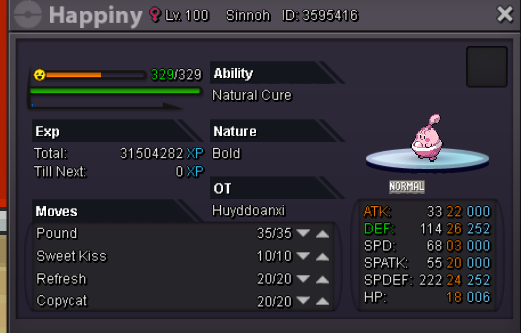
In-game name: vitronish Server: Silver Pokemon ID and/or screenshot:
-
1. Vitronish 2. 689 3. Grovyle
-
Hello add me in-game. I would like to buy 400 coins.
-
Alright, send me a friend request when you go online you're not on my friends list anymore.
-
Post your offers. If I like your offer its yours, else I'll put it as current offer. insta: 900k insta: 400k insta: 500k insta: 250k insta: 500k insta: 400k insta: 400k insta: 300k insta: 800k insta: 700k Sold Pokes
-
b.o 300k b.o 350k
-
-
200 coins for me :D IGN: vitronish
-
Found shuppet After 315 discoveries so it may be Available at 300.
-
Check you internet connection also Have you tried this: https://pokemonrevolution.net/forum/viewtopic.php?f=16&t=14738 and this: https://pokemonrevolution.net/forum/viewtopic.php?f=52&t=14688 It's stable now, btw sorry for not stating my OS, it's Win7. What I did was I restarted my Machine's LAN :thanks: for the help
-
PRO Username: vitronish Have you looked at the FAQ to solve your issue?: Yes On which server issue happened: BLUE What have you done before the problem was there? Logging in What have you already tried to solve the problem? Re-log Description and Message I always get disconnected in less than a minute everytime I am logged in. I though that it was just me having this problem as of the moment