




New Trade Zone
Trade Zone is now live
Use the new Trade Zone for auctions and instant-price trades so Pokemon and item offers are easy to find.

Rokanguro
Registered User
-
Joined
-
Last visited
Everything posted by Rokanguro
-
1.4
-
1.1
-
650k
-
900k
-
2.3
-
2m
-
1.4
-
@zoruami the mistake was that he didn't say anything about joining both bids and he didn't ask me what price I wanted to stay with, so it is unfair for me to have this warning, I couldn't even promote my auction I ask that my auction be reactivated for the remaining time after the warning received so I can make a fair promotion like the rest of the players.
-
this auction should not be valid because I had two auctions of the same pokemon active as the moderator made it clear so I requested the closure of both auctions just before you made your bid which can be verified by the auction manager by receiving the warning and requesting the closure of both auctions I could not promote the auction as it should be which is detrimental to not receive a prompt response from the moderator and not know if the auction is still on or not.
-
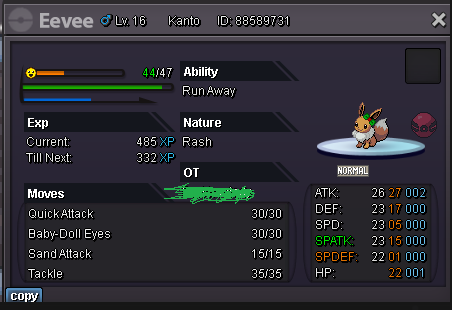
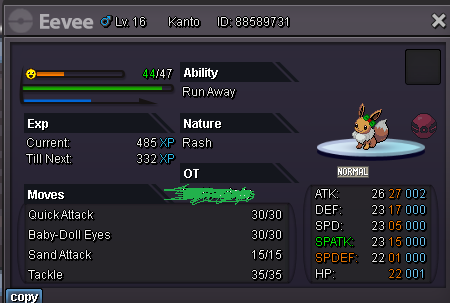
can you delete all post of eevee xmas from me? i don know delete my older post
-
Auctioning XMAS TIME STAR Price 1M Min bid 100k No insta 48 hours after first bid
-
Auctioning XMAS TIME STAR Price 15M Min bid 100k No insta 24 hours after first bid
 1.42.21.71.1500k1.1M1M600k950k300k

