




New Trade Zone
Trade Zone is now live
Use the new Trade Zone for auctions and instant-price trades so Pokemon and item offers are easy to find.


Ferocityy
Registered User
-
Joined
-
Last visited
Everything posted by Ferocityy
-
BUMP
-
Bump
-
Noted.
-
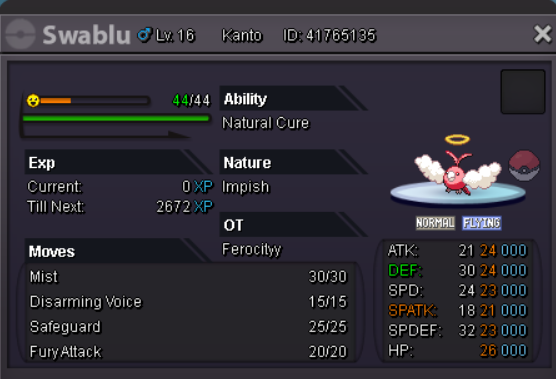
I decide to sell my Xmas Impish Swablu C.O :14M from @Benikisaki Min.Bid :1m Insta Price:35m Auction Time :3 Days, after 1st Bid Rules: Players from SILVER are welcome to bid but they have to transfer and pick up the Pokemon themselves or pay an extra 450k/cc for transfer. Accepted Currency: Pokedollars Coin Capsules: 450k Reroll Tickets:760k Nature Reroll Tickets: 380k Timer Cooldown: https://www.timeanddate.com/countdown/generic?p0=26&iso=20201221T1414&year=2020&month=12&day=21&hour=14&min=14&sec=0&msg=X-mas Swablu Countdown Auction Started at: 2:14 PM 18/12/2020 GMT +3 hours (Greece Time) Auction Ends at: 2:14 PM 21/12/2020 GMT +3 hours (Greece Time)
-
-
-
-
1.75m
-
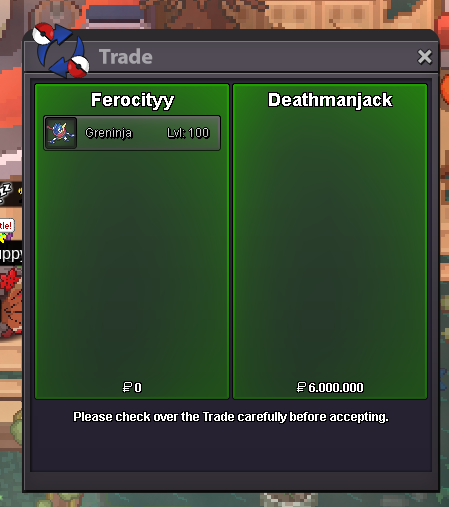
Trade completed
-
@HawluchaaSo we should wait until we get answer in our reports or to continue to the trade?
-
Also @Hawluchaahttps://pokemonrevolution.net/forum/topic/161944-trade-issue/
-
Time finish
-
15mins left from now on

-
Time gonna be extend 15min since last min offer from Inferno
-
29mins left
-
3h 16 mins left
-
Nice shop my friend. Good luck
-
Time Left: 25hours and 40 mins
-
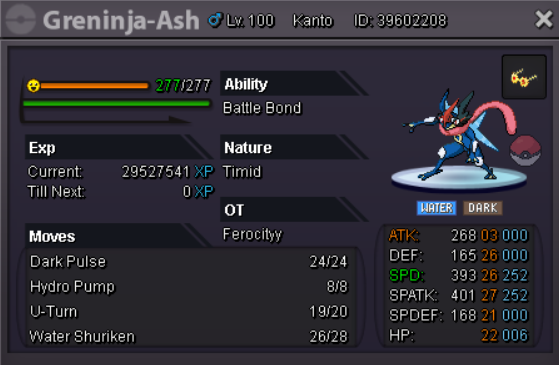
C.O: 5m from Deathmanjack Min Bid:500k Insta :10.5m Auction Time: 48h from starting bid
-
-
In case when u be online again pm me discord Toxicityy#3796
-
-
-
-
Bump
